Getting paid
Clients pay by card through your own Stripe account, and Stripe’s fee is the only one: Go Lancer takes nothing per invoice. Money that never had an invoice, a retainer, a deposit, an Upwork payout, gets logged so your income is the real figure.
Everything on this page is in the one plan at $14.99 a month, with no limit on invoices or payments.
Quick answer
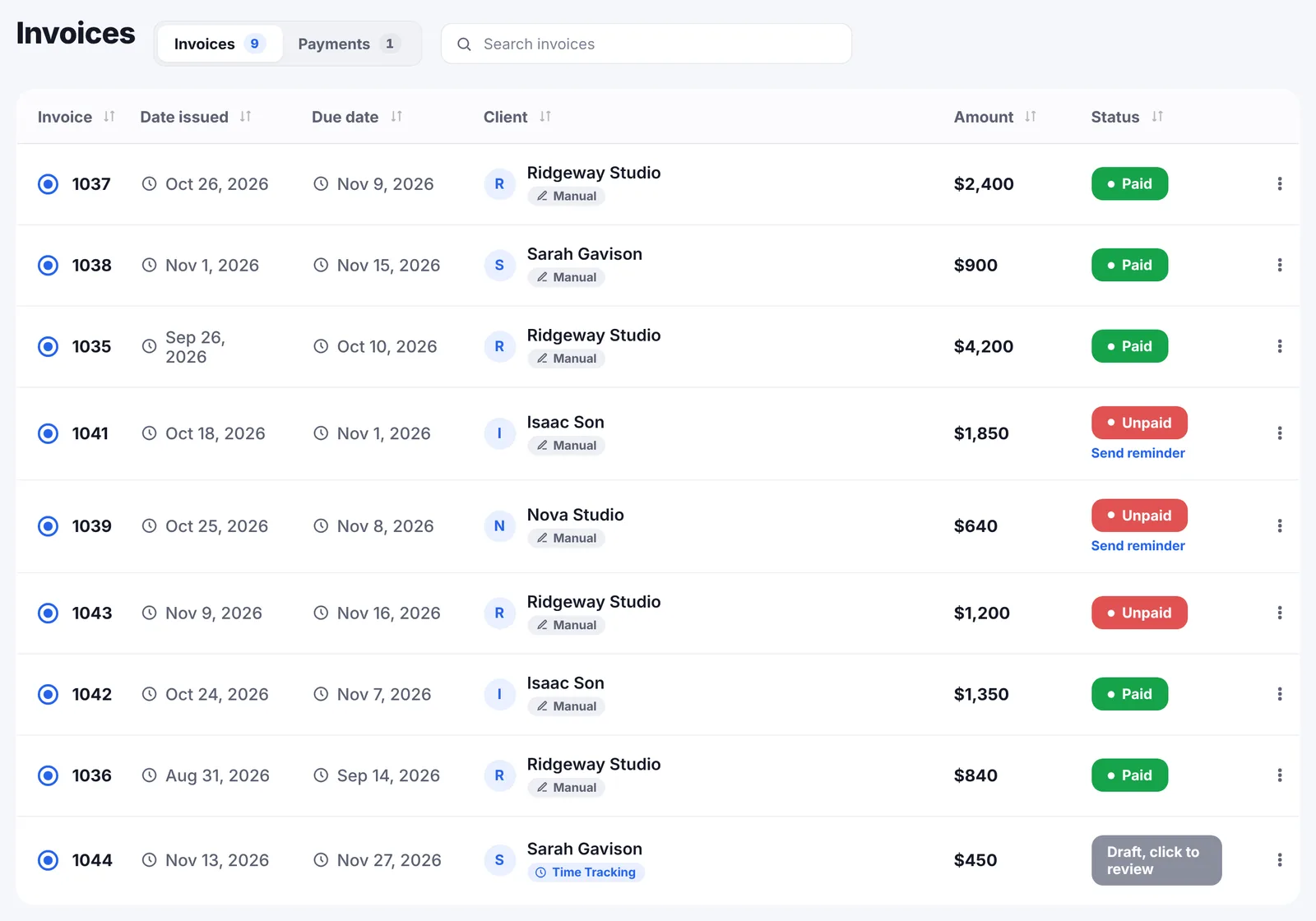
Each invoice is sent as Manual, Stripe or PayPal. With Stripe connected, the client pays by card from a link in the email and on the PDF and the invoice marks itself paid, with no fee from Go Lancer on top of Stripe’s. A part payment shows how much is still left rather than closing the invoice. Money with no invoice behind it is logged with its method and source, including Upwork, Fiverr and Contra payouts, retainers, deposits, tips and refunds, and anything marked as repeating is added for you each time it comes round.
Card payments, through your own Stripe
Connect your Stripe account once and every invoice can carry a pay link. The client gets it in the email and on the PDF, pays by card, and the invoice marks itself paid without you touching it.
Two things worth being plain about. The account is yours, so the money goes from your client to your Stripe balance to your bank on Stripe’s schedule; Go Lancer never holds it. And we take nothing on top. Stripe’s fee is Stripe’s fee, and our side is $14.99 a month whether you invoice for $200 or $20,000.
If you would rather not take cards at all, Manual is the default: you send the invoice, the client pays however you agreed, and you mark it paid. PayPal is the third option.
When only part of it arrives
Clients sometimes pay half, or pay the deposit and forget the rest. Log what came in and the invoice says Partial with the amount still outstanding, instead of flipping to paid and disappearing from view. The remainder keeps counting as owed and the reminders keep going.
Money that never had an invoice
Plenty of freelance income arrives without an invoice attached. A platform payout. A retainer paid up front. A deposit. A tip. If none of it is recorded, every figure in the app is wrong by that much.
Log payment takes the amount, the date and the currency, and optionally the client and project it belongs to. Then two fields that matter later:
- Method: bank transfer, Stripe, PayPal, Venmo, Revolut or Wise, cash, or other.
- Source: an Upwork, Fiverr or Contra payout, a retainer, a deposit, a tip or bonus, a refund, or something else.
A marketplace payout here means exactly that: money Upwork or Fiverr sent you for work you did through them, which you never invoiced in Go Lancer. There is no connection to those platforms and nothing is imported. You record the payout as what it was, and it stops being a hole in your income.
If the client you choose has open invoices, you can apply the payment to one of them instead of leaving it as income on its own, so the same money is never counted twice.
Go Lancer made my workflow so much easier for the first time in a long while. I loved how everything I need is in one place.

Retainers that log themselves
Mark a payment as repeating and pick the rhythm: every week, every two weeks, every month, every three months or every year. From then on Go Lancer adds that payment when its date comes round, so the retainer appears on the 15th without you logging it again.
Each added payment is tied to the one it came from and to its own date, so reopening the page never produces a duplicate. The occurrences still ahead show up in the forecast as their own layer, separate from invoices, because a standing arrangement is likely money rather than certain money.
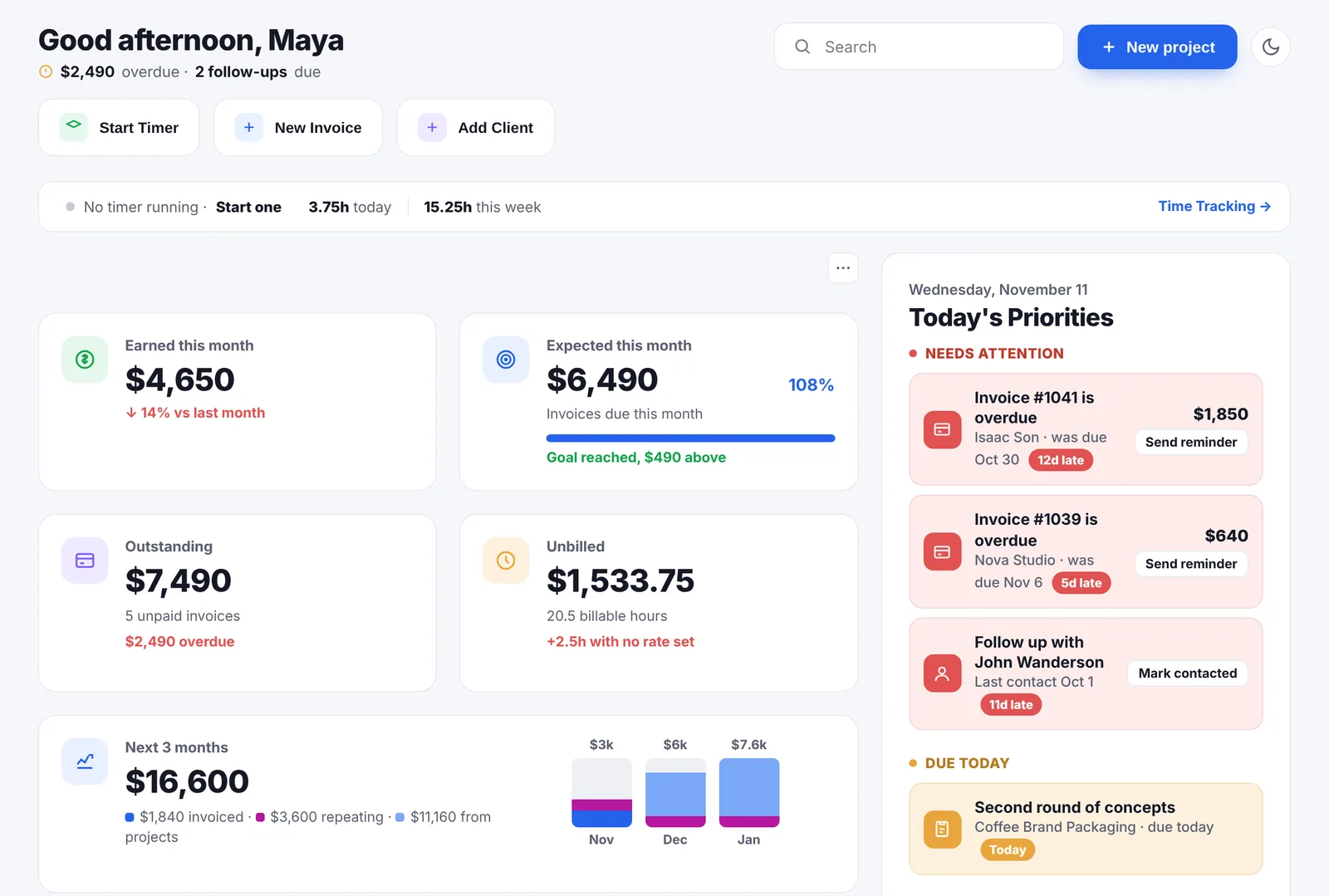
Where the money then shows up
- Earned this month on the dashboard counts paid invoices and logged payments together.
- The forecast puts them in the Paid layer, on the date they arrived.
- The client record works out the average days to pay from their paid invoices, which is how you learn who needs a deposit next time.
- Outstanding drops by whatever a part payment covered.
43 currencies
A payment keeps the currency it arrived in. Totals are converted into your account currency at ECB reference rates refreshed daily, with a marker showing which currencies went into a figure. Nothing is rewritten into dollars behind your back.
What Go Lancer does not do with your money
- It never holds it. No wallet, no balance, no payout schedule of ours. Stripe pays you.
- No fee per invoice or per payment. One subscription, nothing on top.
- No bank connection. Payments are logged, not imported from a bank feed.
- No bookkeeping. It records income, not expenses, ledgers or tax returns.
For what to put aside from each payment, our tax calculator covers five countries, and the payment fee calculator shows what each processor keeps.
Questions people ask
Does Go Lancer take a cut of what I invoice?
No. Card payments run through your own Stripe account and Stripe's fee is the only one. Go Lancer charges $14.99 a month and nothing per invoice, per client or per payment.
How do clients pay by card?
You connect your own Stripe account and pick Stripe as the payment method on the invoice. The client gets a link in the email and on the PDF, pays by card, and the invoice marks itself paid. PayPal is the other connected option; Manual means you send it and track the payment yourself.
Whose Stripe account is it?
Yours. The money goes from your client to your Stripe account and then to your bank on Stripe's schedule. Go Lancer never holds it.
What if a client pays only part of an invoice?
Log what arrived and the invoice shows Partial with the amount still left, rather than flipping to paid. The remainder keeps counting as outstanding and reminders keep going.
How do I record money that never had an invoice?
Log payment takes the amount, the date, the currency, and optionally a client and project. You pick the method, bank transfer, Stripe, PayPal, Venmo, Revolut or Wise, cash or other, and a source: an Upwork, Fiverr or Contra payout, a retainer, a deposit, a tip, a refund or something else.
What is a marketplace payout here?
Money a platform such as Upwork or Fiverr sends you for work you did through it. You never raised an invoice for it in Go Lancer, so it would be missing from your income unless you record it. There is no connection to those platforms; the payout is simply logged as what it was.
Can a logged payment count against an invoice?
Yes. If the client you pick has open invoices, you can apply the payment to one of them, or leave it as income only. Applying it updates the invoice rather than counting the money twice.
How do retainers work?
Log the payment once and mark it as repeating, at a weekly, fortnightly, monthly, quarterly or yearly rhythm. Every time a date comes round, Go Lancer adds that payment for you, and the ones still ahead appear in the forecast as their own layer.
Will a repeating payment be counted twice?
No. A spawned payment is tied to the one it came from and to its date, so reopening the page does not duplicate it, and the forecast projects only from the last occurrence that actually happened.
Can I take payments in several currencies?
Yes, 43 of them. Each payment keeps the currency it arrived in, and totals are converted to your account currency at ECB reference rates refreshed daily.
What is the fastest way for a freelancer to get paid?
A short payment term, a card link in the invoice, and reminders that go out without you. Most late payment is not refusal, it is an invoice that was easy to postpone and that nobody followed up on.
Should a freelancer ask for a deposit?
For new clients and for anything long enough that a cancellation would hurt, yes: a third up front is common, half for small jobs. It changes what you risk. Our contract template has the wording.
What is a deposit, and how is it different from a retainer?
A deposit is money paid up front against one specific job, usually a share of the total, and it comes off the final invoice. A retainer is a recurring payment for being available over a period, whether or not a particular piece of work happens in it.
What is a payment processor fee?
The cut a card or payment company takes for moving the money, usually a percentage plus a fixed amount per transaction. It comes out of what the client paid, so the figure that reaches your bank is lower than the invoice total.
Keep going
Invoicing Payment reminders Income forecast Payment fee calculator Fiverr fee calculator Payoneer fee calculator Compare with other apps About Go LancerKeep what you charge
Seven days, your own clients and invoices in it, and a founder who answers email. Then $14.99 a month, cancel any time.