Plutio alternative for freelancers: Go Lancer vs Plutio
Plutio Core is $19 a month and counts 9 active clients at a time; past that is Pro at $49. Go Lancer is $14.99 a month with no client limit.
If you work alone and are looking for a Plutio alternative, this is how Go Lancer compares. We make Go Lancer, so read this with that in mind. Everything about Plutio below comes from their own pricing and product pages, and we say plainly where they are the better choice.
Quick answer
Plutio is the better choice if you need proposals, scheduling, forms, a client portal or a team. Its Core plan is $19 a month and counts 9 active clients at a time; past that is Pro at $49. Go Lancer costs $14.99 a month with no client limit and is the better Plutio alternative for one freelancer who wants hours, invoices and reminders without the rest.
Pick Go Lancer if
- You work alone and want one tab, not a workspace to configure
- You have more than nine clients on the go, or expect to
- What you lose money on is unbilled hours and invoices you forgot to chase
- You want the app to tell you what to deal with this morning
Pick Plutio if
- You send proposals and contracts clients sign electronically
- You need clients to book time with you, or to fill in intake forms
- You want a client portal clients log into
- You work with subcontractors, or you are a small agency
Price and what the price limits
| Go Lancer | Plutio Core | Plutio Pro | Plutio Max | |
|---|---|---|---|---|
| Monthly | $14.99 | $19 | $49 | $199 |
| Yearly | $149 a year, two months free | Two months free on all plans | ||
| Active clients | Not counted | 9 at a time | Unlimited | Unlimited |
| Other people in the account | None, it is a solo app | None | 30 contributors | Unlimited |
| Lifetime | $299 once, limited number of accounts | Not offered | ||
| Free trial | 7 days, card at sign-up | 7 days, no card | ||
Plutio plans, prices and limits read from plutio.com/pricing and their product pages on 11 November 2026. Check it before you decide, pricing moves.
On the sticker price the two are close. The line that matters more is the one below it: Plutio Core counts active clients and stops at nine at a time, and the way past that is the $49 plan, which is built around team contributors you may never invite. Go Lancer does not count clients or seats, because there is only ever one of you.
Where Plutio is the better tool
Plutio is a wider product. If any of these is part of how you work, stop reading and go with Plutio.
- Proposals and contracts with e-signature. Build it, send it, the client signs in the browser. Go Lancer has no proposals module at all, so this is Plutio's by default.
- Scheduling. Clients pick a slot in your calendar. Go Lancer has no scheduler, you would keep using Calendly or similar.
- Forms. Intake forms and questionnaires you embed or send. Go Lancer has none.
- A client portal. Your clients log in and see projects, files and invoices. Go Lancer has no client login.
- Working with other people. Contributors, assigned tasks, an agency setup. Go Lancer is single-player on purpose.
- An API and integrations. Plutio has both on every plan. Go Lancer has no public API: it takes card payments through Stripe, syncs with Google Calendar and imports from Toggl, Clockify, Harvest, HubSpot and Notion.
Where Go Lancer is the better tool
Go Lancer does less, on purpose. It was built from 100+ interviews with freelancers who already had a tool and still missed invoices.
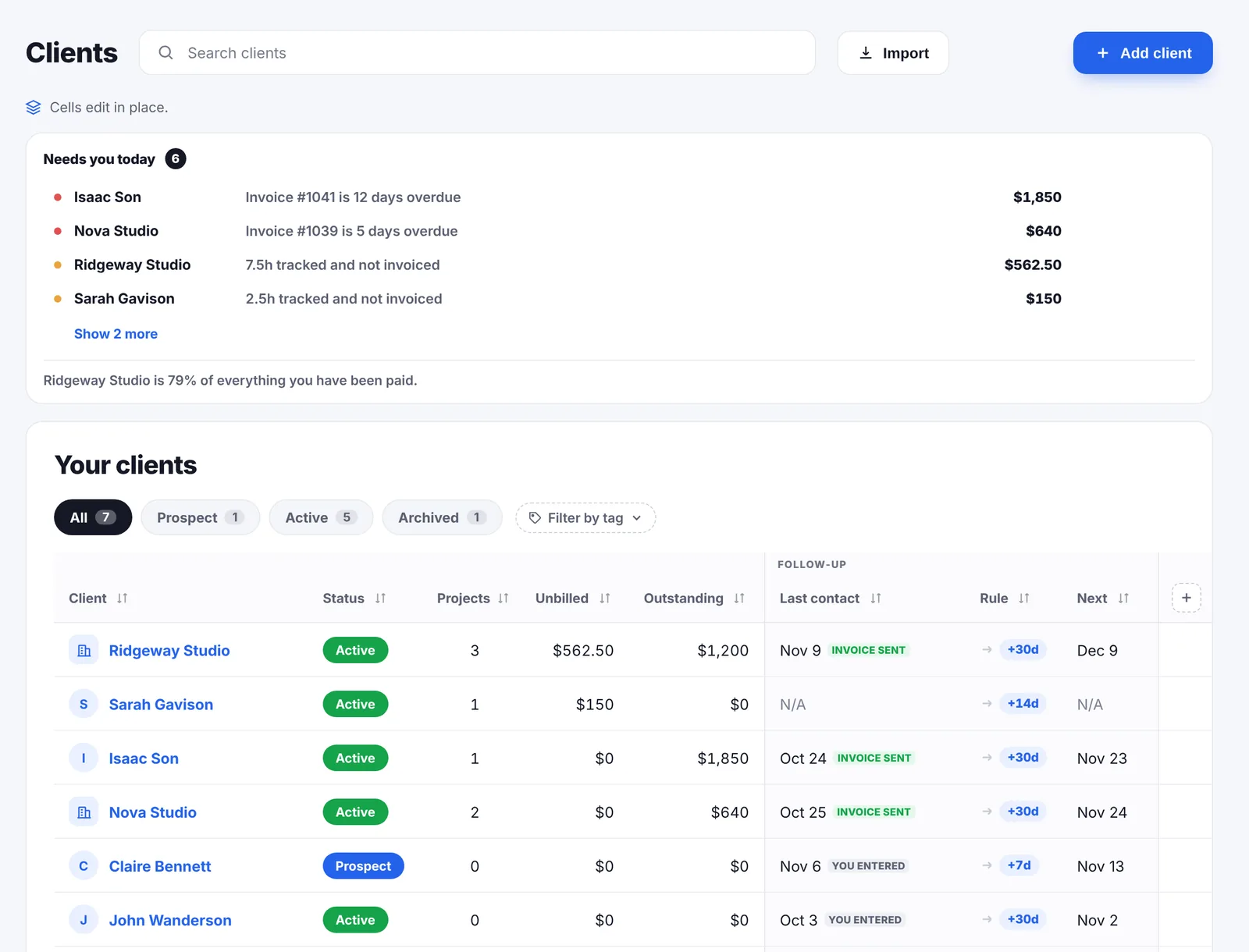
- It opens on what to do first. Overdue invoices, late projects and whatever is due today, most urgent first. You are not asked to go looking.
- Reminders you set up once. One switch covers every invoice, the email is your own text with the invoice PDF attached, it can go out from your own Gmail, and nothing leaves during your quiet hours or while you are away.
- Follow-ups for every client. Set how often a client should hear from you and the app tells you when it is time.
- Hours a client can read. Start the timer from the task, count up or set a countdown for a fixed block. Then send the client a PDF hours report, or put the hours straight on the invoice.
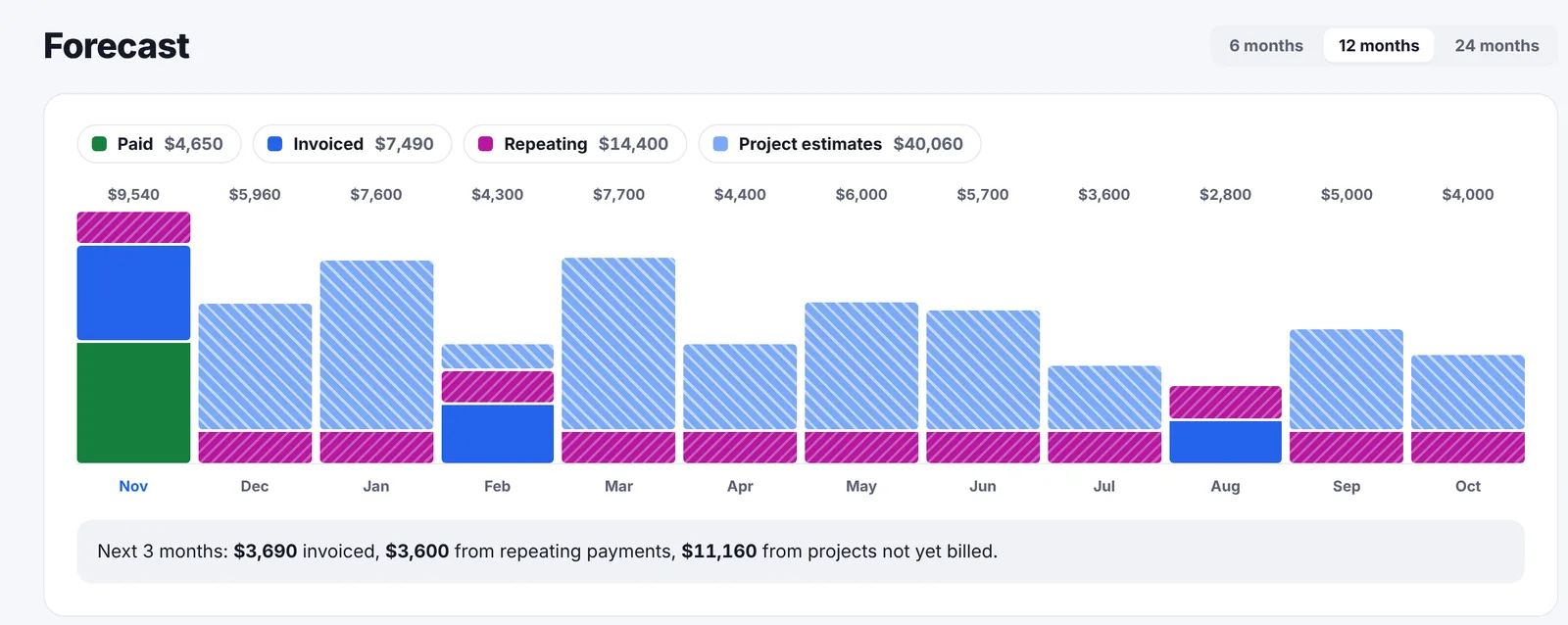
- It tells you what the coming months look like. A forecast up to 24 months ahead, built from unpaid invoices, repeating payments and what is left on open projects, so you know early if a thin month is coming.
- It knows which clients pay late. Each client gets a private label, from pays on time to ghost, worked out from how late they paid before.
- Slow Month. One month a year without paying, after your first three, no reason needed. Freelance income is not monthly, so the bill is not either.
- It looks after you too. Quiet hours so no reminder goes out at 2 a.m., an away mode for holidays, a nudge when you pass your weekly hours cap, and a mode that shows "3 invoices unpaid" instead of the total.
Feature by feature
Time tracking
Plutio's timer starts in one click from the browser, the desktop app or the phone app, on an existing task or a new one, and you can pick the project before, during or after. Time you forgot goes in by hand. Timesheets break down by person or task, and a project budget shows billable time against it as you go. Tracked time goes onto an invoice in one click, and timesheets export as CSV.
In Go Lancer you start the timer from the task itself, counting up or down, or log time afterwards as a start and end time or just the number of hours. Each entry gets a rate from the ones you saved, say Standard and Rush, or a custom one, and a switch for billable or not. The week is a chart of hours per day, and a click on a day lists what you worked on.
Every billable hour with a rate goes straight onto a draft invoice for that project, so there is nothing to generate at the end of the month. When a client wants to see the hours, you export a time summary with your own title and a note, grouped by project, with or without rates. Old entries import from Toggl, Clockify, Harvest, an Excel or CSV file, or a Google Sheet.
Invoicing
Plutio invoices take Stripe, PayPal and Square, with discounts, tax rates per location and payment instalments that split one invoice over several dates. Recurring subscriptions either charge the client automatically or send the invoice, and a signed proposal can create the project and the invoice by itself.
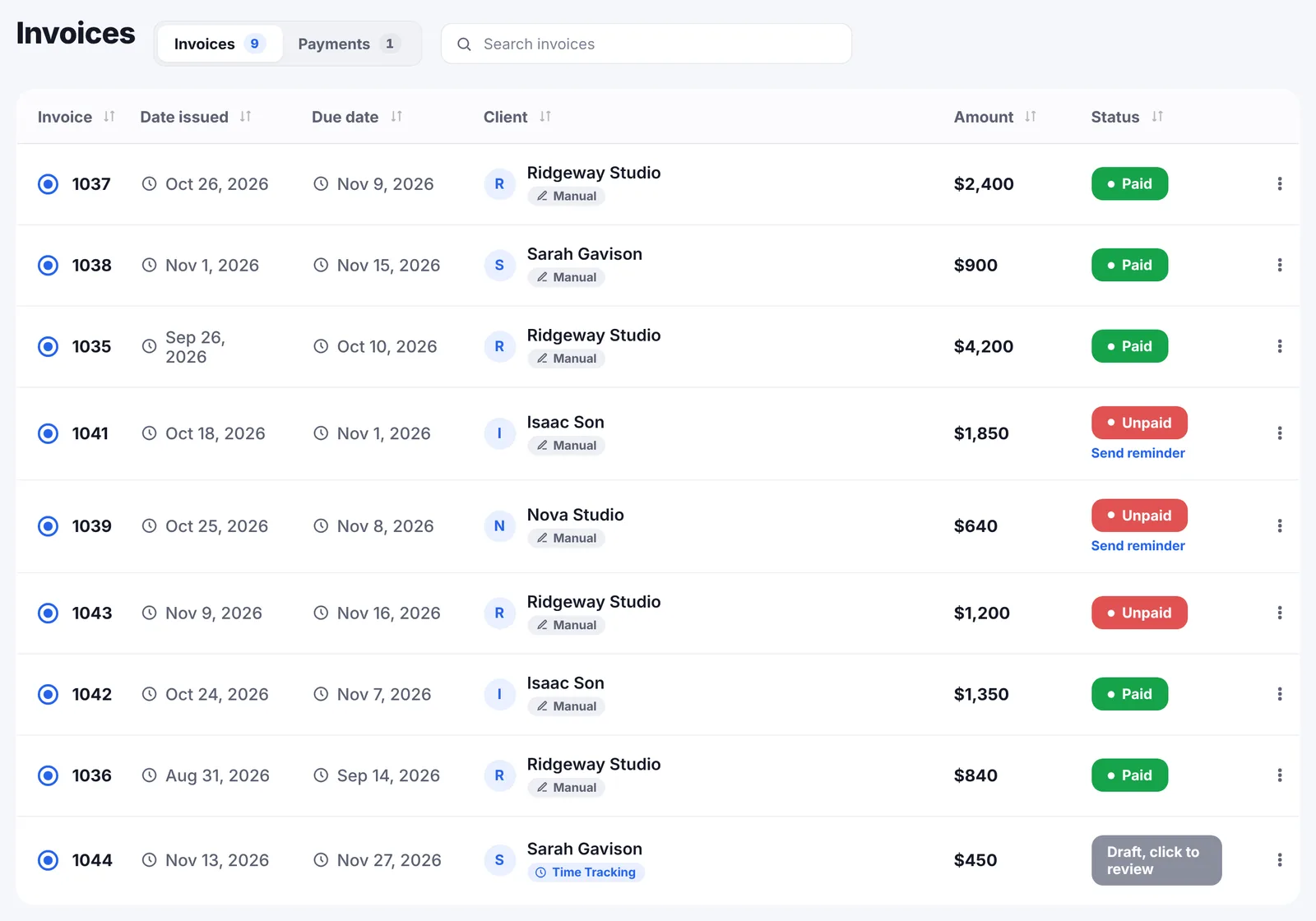
Go Lancer sends the invoice as a PDF from your name, or from your own Gmail if you connect it, with your own payment details and an optional card payment link through your own Stripe account. Lines go by the hour or as a flat rate, with your logo, a tax percentage and a preview before you send. It has five invoice designs, recurring invoices from weekly to yearly and its own numbering. There are no proposals and no instalment schedules: when a client pays part of an invoice, you log the payment and the invoice turns paid once it is covered. A retainer is a recurring invoice or a repeating payment, and both count in the forecast.
Payment reminders
Plutio has reminders on every plan. Its help center says the built-in ones go out on the due date and 3 and 7 days after it, for every overdue invoice in the workspace, with text Plutio writes for you. Plutio's marketing page describes schedules before the due date and messages you can edit; per its help center, a different schedule means turning the built-in reminders off and building your own in Plutio's automations.
Go Lancer turns reminders on once for the whole account, with an override per invoice. By default it writes a day before the due date, on the due date, then every 7 days up to 3 times. The email is your own text in any language with the invoice PDF attached, it never goes out during your quiet hours or while you are in away mode, and it stops the moment the invoice is paid. Go Lancer does not add late fees, and Plutio's invoicing page does not mention them.
Currencies
Both let you bill a client in their own currency. Plutio sets it per client or per invoice, and its interface comes in 25 languages. Go Lancer has 43 currencies and shows what you earned and what is owed in all of them on one dashboard, with daily exchange rates. Its interface is in English; the invoice and reminder text is whatever you write.
Dashboard
Plutio's dashboards are pages you design yourself: widgets for income over time from paid invoices, billable time, labour costs, tasks, proposals and your calendar, with a different version per role. It does not advertise a forecast of money you have not received yet.
Go Lancer's dashboard opens on today's priorities. Below them you pick the tiles yourself and drag them into order: what you earned this month, outstanding, unbilled, progress towards your income goal, the overdue amount, average invoice, top project by revenue, follow-ups due, hours without a rate and more. There is also a Quick notes box for the thought you do not want to lose mid-task: type it, tag a client with @, and turn it into a task with one click. The Invoicing page has its own row of numbers you pick, with average days to get paid and your top client by revenue.
On the Invoicing page, below those numbers, is a forecast for the next 6, 12 or 24 months, month by month: what is already paid, what is invoiced and not paid yet, repeating payments such as retainers, and the value of open projects you have not billed yet. A line under the chart sums up the next three months.
A month with both
Say you write and design for ten clients at once: four on small monthly retainers and six on projects, two of them paying in euros. You track about 70 hours a month.
In Plutio, ten active clients is one over the Core limit. Either you archive a client every time a project ends and bring them back when they return, or you move to Pro at $49 a month, which mostly adds contributors you will not invite. You send proposals that clients sign, then build invoices from the timesheets with a reminder schedule on each one. Clients log into the portal to see where things stand.
In Go Lancer, it is $14.99 a month whatever the number of clients. The four retainers are recurring invoices that create themselves each month, and the hours on the six projects land on draft invoices as you track them. You check the drafts and send them; reminders are already on. The forecast shows the retainers and what is left on open projects for the months ahead. Proposals and contracts stay in another tool or in an email, because Go Lancer does not do them.
If signed proposals and a portal are what your clients expect, that is your answer. If not, most of what the Pro plan adds is something you will never open.
The two side by side
| Go Lancer | Plutio | |
|---|---|---|
| Time and the work | ||
| Time tracking | ✓ count up or countdown, saved rates, time summary for the client | ✓ browser, desktop and phone apps, CSV export |
| Invoices | ✓ draft builds itself from tracked hours | ✓ from tracked time in one click |
| Clients and documents | ||
| Ways clients pay | Card through your own Stripe, or bank transfer | ✓ Stripe, PayPal, Square, bank transfer |
| Recurring invoices | ✓ weekly to yearly | ✓ charged automatically or invoiced |
| Payment instalments | ✕ partial payments are logged | ✓ |
| Automatic payment reminders | ✓ in your wording, quiet hours and away mode respected | ✓ built in: due date, +3 and +7 days; other schedules through automations |
| Client follow-up rhythm | ✓ | Not advertised |
| Planning, wellbeing and limits | ||
| "What do I do first" screen | ✓ | Not advertised |
| Dashboard | ✓ priorities first, tiles you choose and reorder | ✓ pages you design, with widgets |
| Income forecast, 6 to 24 months | ✓ | Not advertised |
| Wellbeing settings | ✓ quiet hours, away mode, overwork nudge | Not advertised |
| Import from other tools | ✓ Toggl, Clockify, Harvest, HubSpot, Notion, Excel, CSV, Google Sheets | CSV for contacts, invoices, proposals and contracts |
| Proposals and contracts | ✕ | ✓ with e-signature |
| Scheduling | ✕ | ✓ |
| Forms | ✕ | ✓ |
| Inbox and live chat | ✕ | ✓ client chat, website widget, team channels |
| Client portal | ✕ on the roadmap, voted for | ✓ |
| Team members | ✕ | ✓ from the Pro plan |
| API and integrations | Stripe, Google Calendar, no public API | ✓ unlimited, every plan |
| Mobile | Installs from the browser | ✓ iOS, Android, Mac and Windows apps |
| AI assistant | ✕ | ✓ credits on every plan |
| White-label | ✕ | Add-on on Core and Pro, included on Max |
| Currencies | 43, one dashboard with daily FX | ✓ per client or per invoice |
| Client limit | None | 9 at a time on Core |
| Lifetime plan | $299 once | Not offered |
So which one
If your week is client calls, signed proposals and a portal clients live in, Plutio does more for the money and this is not a close call.
If your week is doing the work and then losing an evening to admin you keep putting off, the wider tool is not the answer, it is more rooms to tidy. That is the gap Go Lancer was built for: fewer features, aimed at the two things that cost freelancers real money, hours that never make it onto an invoice and invoices nobody chases.
Before you decide, open your invoicing tool. If you cannot tell quickly which invoice is the most overdue, start with that.
Looking at other all-in-one freelance apps too? We also compare Go Lancer with Indy, which is free for 3 invoices a month and keeps Gmail and white labelling for its Pro plan, and with Incomee, which writes proposals with AI and gets them signed in the app, for €19 a month.
Switching from Plutio
- Export your contacts. In Plutio, the People section exports to a CSV file.
- Import them into Go Lancer. Upload the CSV in Clients. Columns Go Lancer does not know become custom fields, so nothing is dropped.
- Bring your hours and invoices. Export your timesheets from Plutio as a CSV and import them in Time Tracking. Download the invoices you still need as PDFs and upload them to Go Lancer, so they sit in the same list.
- Turn reminders on. One switch in Go Lancer covers every new invoice. Invoices that are still open in Plutio keep being chased there until they are paid, because Go Lancer only reminds about invoices it sent.
Proposals, contracts, forms and files have no place in Go Lancer, so keep them in Plutio until you no longer need them, or move them to a tool built for that.
Other Plutio alternatives
Go Lancer is one Plutio alternative; it fits a freelancer who wants the hours, invoices and reminders in one place. If you need something else from the list above, these are the other tools we have compared side by side, each from the vendor's own pages:
- Bonsai. Bonsai grows into an agency suite with proposals, contracts, bookkeeping and team seats; invoices start on its $25 plan.
- HoneyBook. HoneyBook does proposals, contracts, automations and a client portal, for businesses in the US, Canada, the UK and Australia, from $36 a month.
- Dubsado. Dubsado wins and onboards clients with proposals, contracts, workflows, a scheduler and a portal; time tracking is on Premier.
- Indy. Indy is free for 3 invoices a month and keeps Gmail, white labelling and payment reminders for its Pro plan.
- Zoho. Zoho is a suite: Zoho Invoice is free for 3 projects and 500 invoices a year, next to Zoho CRM, Bookings and Solo.
- FreshBooks. FreshBooks is accounting software that also invoices, with expenses, bank reconciliation and proposals.
- 17hats. 17hats runs the path from lead form to quote, contract, booking and invoice in one plan from $60 a month, with documents capped below its top level.
- Notion. A workspace you build yourself: free for one person, endlessly flexible, and it will not send or chase an invoice.
All of them are on the comparisons page.
Questions people ask
Is Go Lancer cheaper than Plutio?
Go Lancer is $14.99 a month. Plutio Core is $19 a month, Pro is $49 and Max is $199, with two months free on yearly billing. The bigger difference is the client limit: Plutio Core allows 9 active clients at a time, Go Lancer does not count clients.
What does Plutio do that Go Lancer does not?
Proposals and contracts with e-signatures, a scheduler clients book into, intake forms, a client portal, team contributors, an API and integrations. Go Lancer has no proposals module at all. If you need any of those, Plutio is the better fit today.
What does Go Lancer do that Plutio does not?
It opens on a list of what to deal with first: overdue invoices, late projects and anything due today. It keeps a follow-up rhythm per client and its reminders stay quiet during your quiet hours and away mode. It shows a forecast of the next 6, 12 or 24 months. And after three paid months, a monthly or yearly subscriber can skip paying for one month a year, because freelance income is not monthly.
Can I use Plutio or Go Lancer with a team?
Plutio yes: Pro includes 30 contributors and Max has no limit. Go Lancer is built for one person and has no contributors, so a team should pick Plutio.
Do Go Lancer and Plutio both have a free trial?
Both offer 7 days. Plutio starts without a card. Go Lancer asks for a card at sign-up and charges after the trial unless you cancel.
Does Plutio have automatic payment reminders?
Yes, on every plan. The built-in reminders go out on the due date and 3 and 7 days after it, with text Plutio writes; a different schedule can be built in Plutio's automations. Go Lancer has them too: one switch for the whole account with an override per invoice, your own text with the invoice PDF attached, and nothing goes out during your quiet hours or away mode.
Does the 9 client limit on Plutio Core count archived clients?
No. Plutio counts only clients that are not archived, so archiving one frees a slot. Go Lancer does not count clients at all.
Does Plutio have an income forecast?
Plutio's dashboards can show income over time from paid invoices, but Plutio does not advertise a forecast of money still to come. Go Lancer forecasts the next 6, 12 or 24 months from unpaid invoices, repeating payments such as retainers and what is left on open projects.
Can I move my data from Plutio to Go Lancer?
Yes. Export your contacts and your timesheets from Plutio as CSV files and import them into Go Lancer's Clients and Time Tracking. Invoices you still need can be downloaded as PDFs and uploaded to Go Lancer.
Does Go Lancer have a mobile app like Plutio?
Plutio has native apps for iPhone, iPad, Android, Mac and Windows. Go Lancer installs from the browser on a phone or a computer and works like an app, with the timer, marking invoices paid and sending reminders, but it has no App Store listing.
Sources
Everything about Plutio on this page was read from Plutio's own pages on 11 November 2026:
- Plutio pricing: plans, prices, client and contributor limits, trial
- Features: modules, dashboards, apps, integrations and white-label
- Timesheets and projects: time tracking, budgets and billing from tracked time
- Invoicing and payment reminders: payment methods, currencies and instalments; setting up automatic reminders and custom reminder schedules: the built-in schedule
- CSV import and export and contact import and export: switching
Prices move, and the figures above are what Plutio’s own pages said on the date given, so check theirs before you pay for anything. We wrote this page, Plutio did not: there is no partnership between us, nobody asked us to write it, and the name Plutio belongs to them.
Keep going
Go Lancer vs Dubsado Go Lancer vs FreshBooks Go Lancer vs HoneyBook Go Lancer vs Trello Go Lancer vs Bonsai Go Lancer vs Scoro Go Lancer vs Harvest Go Lancer vs Basecamp Go Lancer vs Indy Go Lancer vs Zoho What Go Lancer does Pricing Free tools for freelancers Billable hours calculator Payment fee calculator Best apps for freelancers How to invoice as a freelancerSee it before you decide
Seven days, your own clients and invoices in it, and a founder who answers email. Then $14.99 a month, cancel any time.