The dashboard
Five tiles to start with and seventeen to choose from, a list of what actually needs you today, and a tile that shows the next three months split into invoiced, repeating and not yet billed.
Everything on this page is in the one plan at $14.99 a month.
Quick answer
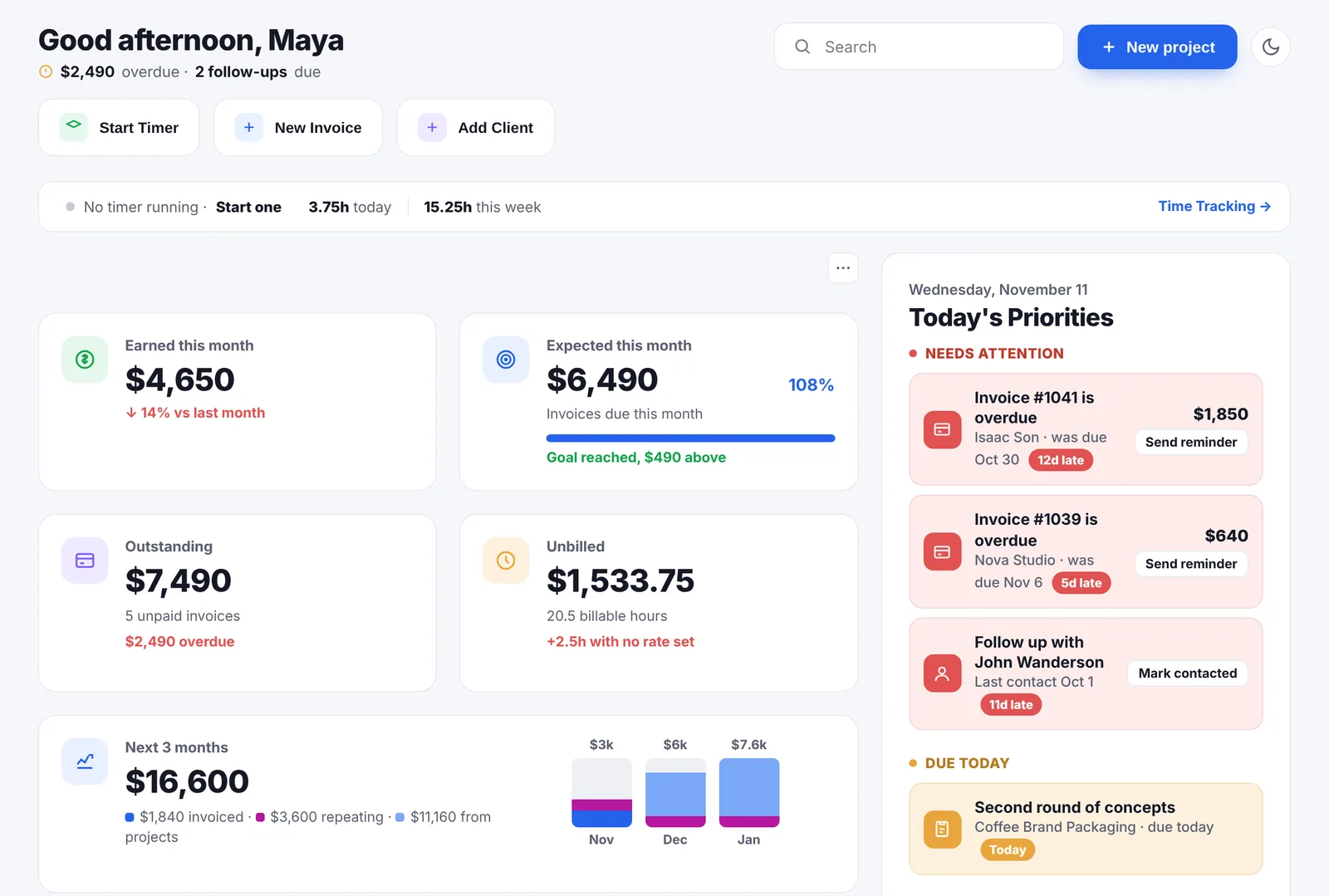
Go Lancer opens on earned this month, expected this month, outstanding, unbilled and the next three months. You can add any of twelve more metrics, drag them into the order you want, pin the important ones and remove the rest. Beside the tiles, Today’s Priorities ranks overdue invoices, due follow-ups, late tasks and unbilled work into one list, with send reminder and mark contacted on the rows themselves. Every tile opens the records behind its number.
The five you start with
- Earned this month. Invoices actually paid, with the change against last month.
- Expected this month. Paid so far plus invoices still due, against your goal, with the days left and how far short you are. A percentage on its own does not tell you whether you are going to make it; 60% on the 10th and 60% on the 28th are opposite situations.
- Outstanding. What is invoiced and still waiting, with the overdue part called out.
- Unbilled. Billable time tracked and not yet on an invoice. Hours with no rate are shown as hours and never turned into money.
- Next 3 months. What is coming, in three layers, from the forecast.
I loved the dashboard and being able to have a quick overview of the day in one place. I found the platform very user-friendly and easy to navigate.

The next three months, not blended
One tile answers the question a freelancer planning ahead is actually asking. It keeps three layers visible rather than adding them into one figure: invoices already issued, repeating work, and the value of projects agreed but not billed. There is a small bar for each of the three months, most certain at the bottom.
A single number that mixes an invoice with an estimate is a number nobody can act on, which is why the split stays on the tile.
Twelve more metrics, in the order you want
Add metric opens a list of everything not currently on the page:
- Tasks due today, with the first one by name
- Active projects, with the next deadline
- Hours logged this week, and billable this week
- A weekly time goal, and goal progress against your monthly earnings target
- Average invoice, overdue amount, new clients this month
- Top project by revenue
- Follow-ups due, and hours logged with no rate set
Drag a tile to move it, pin one to hold it at the top, remove one you do not want. The layout is saved and there is a reset. Past six tiles the grid collapses and offers to show the rest, so the page does not grow a tall empty column.
Today’s Priorities
Next to the numbers is the list that tells you what to do. It ranks everything it can see and sorts it into three groups: needs attention, due today, coming up.
- Overdue invoices, with how late, how much, and when the next automatic reminder goes.
- Follow-ups due, from the rhythm set on the client, with the date you last spoke.
- Tasks and project deadlines that are late or due today.
- Unbilled work per client, once there is enough of it to be worth an invoice.
- Coming up: tasks due within three days and invoices due within a week.
One line per subject, so a client with three overdue invoices does not take over the panel, and only one row per group is guaranteed a slot, so a bad week does not show five red lines and hide everything else.
Two rows carry the action itself: an overdue invoice has a send reminder button, and a follow-up has mark contacted, which restarts that client’s rhythm without opening anything.
Click a number, see where it came from
Every tile opens the records behind it and the rule that turned them into the figure. Unbilled opens grouped by client, with a create invoice button on each row and a set rate button where the hours have no rate, since an invoice for those would come out at zero.
Where several currencies went into a tile, the amount is converted to your account currency at today’s rate and a small marker on the tile says which currencies it came from and what each one was.
The day, not just the money
- A one-line summary under the greeting: at most two facts, urgent first, or a line saying nothing is urgent.
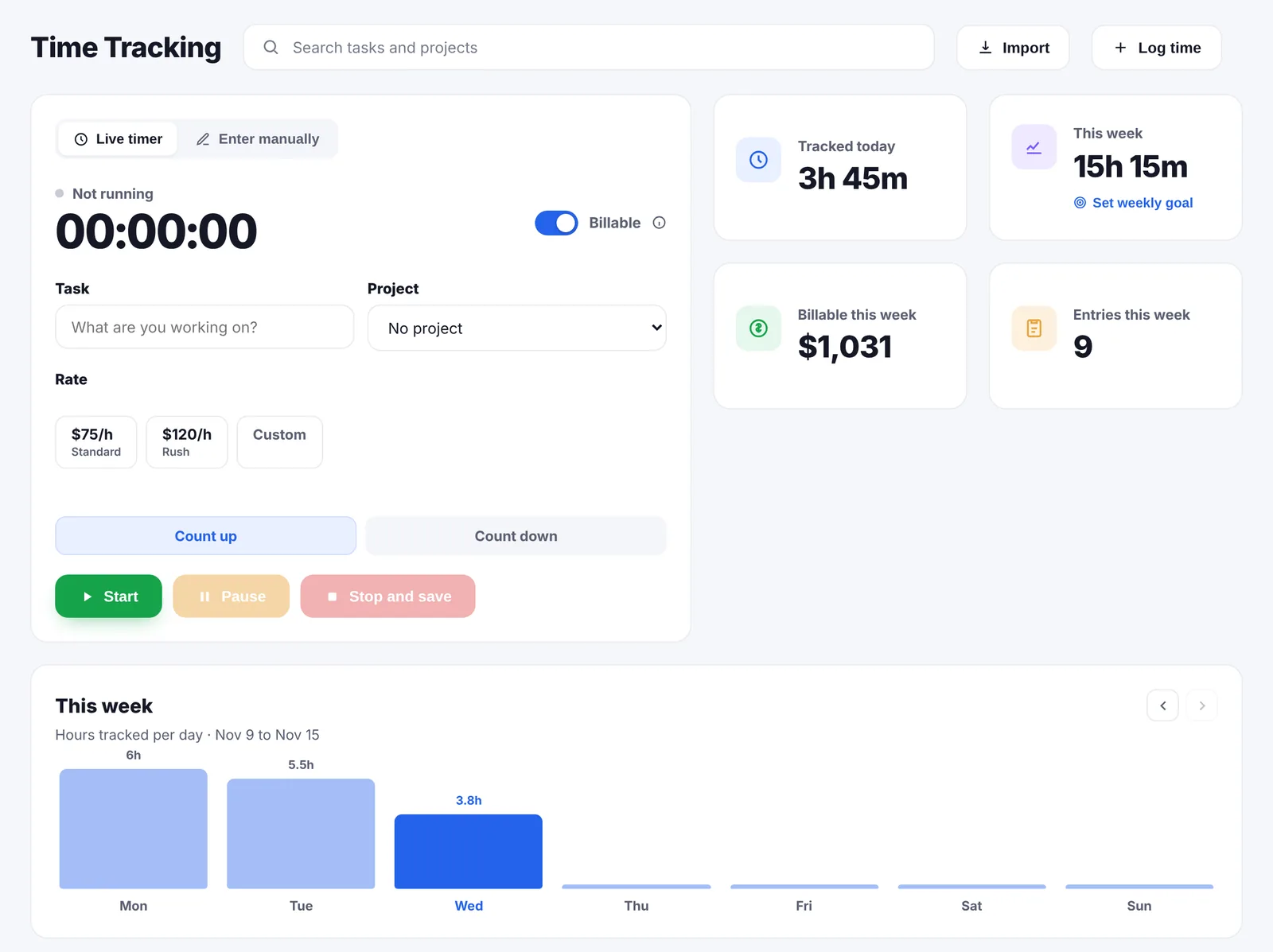
- A timer strip with whether a timer is running, what it is on, and hours today and this week.
- Quick notes. A one-line note you type into the page, ticked off when done. Type @ to tag it to a client.
- Search across clients, projects, tasks and invoices, each result opening the record where it lives.
- Start timer, new invoice and add client as three buttons at the top.
Three banners you will usually not see
They appear only when they apply. Away mode shows while your reminders and follow-ups are paused. An overwork notice shows when the week’s hours go past the cap you set. A third says your rates have not changed in over a year. Alongside them sit two small facts: how much runway you have, and how long since your last day off.
There is also a quieter mode for money, which mutes the big figures on the money tiles and leaves counts and hours as they are.
What the dashboard does not do
- It does not store anything. Every figure comes from invoices, time entries, projects and clients. Edit the record, the tile follows.
- No custom report builder. The seventeen metrics are the metrics; there is no query tool.
- No team view. One login, one freelancer, so there is nothing to compare across people.
- No accounting ledger. It shows money in and money owed, not a chart of accounts.
Questions people ask
What is on the dashboard by default?
Five tiles: earned this month, expected this month, outstanding, unbilled, and the next three months. Next to them sits Today’s Priorities, a running timer strip and quick notes.
Can I change which numbers I see?
Yes. Seventeen metrics are available, you add the ones you want, drag tiles into the order you like, pin the ones that matter to the top and remove the rest. The arrangement is saved, and there is a reset if you want the five defaults back.
What else can I put on it?
Tasks due today, active projects, hours logged this week, billable this week, a weekly time goal, goal progress, average invoice, overdue amount, new clients this month, top project by revenue, follow-ups due, and hours logged with no rate set.
What does the three-month tile show?
What is coming in over the next three months, split into invoices already issued, repeating work and the value of projects not yet billed. The three layers stay separate and there is a small bar per month, because a single blended figure mixing an invoice with an estimate is not a number you can act on.
How does Today’s Priorities decide what to show?
It ranks overdue invoices, follow-ups due, overdue tasks and project deadlines, unbilled work, and anything due in the next few days. It shows five at a time in three groups: needs attention, due today, coming up. One line per subject, so three overdue invoices from one client do not fill the panel.
Can I act on a priority without leaving the page?
Yes for the two commonest ones: an overdue invoice has a send reminder button on the row, and a follow-up has mark contacted, which restarts that client’s rhythm.
Can I click a number to see where it came from?
Yes. Every tile opens a breakdown of the records behind it and the rule that produced the figure. Unbilled opens grouped by client with a create invoice button on each row.
What if my invoices are in several currencies?
Amounts are converted to your account currency at today’s rate, and a small marker on the tile shows which currencies went into it and what each one was.
What is the one-line summary under the greeting?
At most two facts, the urgent ones first: money overdue, follow-ups due, tasks overdue, money ready to invoice. If nothing is urgent, it says so.
What are quick notes?
A one-line note you type straight into the page, up to 160 characters, with a tick when it is done. Type @ to tag it to a client, and the note links to that client’s record.
Does the dashboard track my hours?
It shows them. A strip at the top says whether a timer is running, what it is on, and how many hours you have logged today and this week. The timer itself lives in time tracking.
What are the wellbeing banners?
Three, and only when they apply: away mode, when you have paused reminders and follow-ups; an overwork notice when the hours for the week go past the cap you set; and a note when your rates have not changed in over a year. There are also two small facts, how much runway you have and how long since your last day off.
What numbers should a freelancer actually watch?
What came in this month, what is still owed, what is late, and what is tracked but not yet invoiced. The last one is usually the biggest, because it is money already earned that nobody has asked for.
How far ahead can a freelancer forecast income?
Usually one to three months with any confidence, and only in layers: invoices already issued are near certain, repeating work is likely, and the value of agreed projects is an estimate. Added into one number they stop being useful.
What is a healthy client concentration for a freelancer?
No single client much past a third of your income, as a rule of thumb. Past half, the month that client leaves is a crisis rather than a dip, and most freelancers only find out the share when it happens.
What is unbilled work?
Work that is done, and often tracked to the minute, but has not been put on an invoice yet. It is the most commonly lost money in freelancing, because nothing chases you for it.
What are accounts receivable?
The accounting term for money that has been invoiced and not yet paid. On a freelance dashboard it is the outstanding figure, and the part of it past its due date is what needs you today.
Keep going
Invoicing Time tracking Projects and tasks Clients and follow-ups Pricing Compare with other apps Hourly rate calculator About Go LancerSee your own numbers on it
Seven days, your own clients and invoices in it, and a founder who answers email. Then $14.99 a month, cancel any time.