Go Lancer vs Moxie
Moxie is the wider product and its cheapest plan is cheaper. The parts people quote it for, the white-labelled client portal and the automations, are on the $25 plan.
Quick answer
Moxie is built for freelancers and does more than Go Lancer: proposals, contracts with e-signatures, expenses with a bank connection, a sales pipeline and a client portal. Starter is $12 a month, or $10 billed yearly, and carries most of it. The portal, the custom domain, the automations and the QuickBooks link are Pro at $25. Go Lancer is $14.99 a month with nothing held back, and it does not do proposals, contracts or expenses at all. Pick Moxie if winning the work is the hard part; pick Go Lancer if the work is won and the admin is what slips.
Pick Go Lancer if
- You want one price with everything in it, not a feature on a higher plan
- The problem is invoices going out late and nobody chasing them
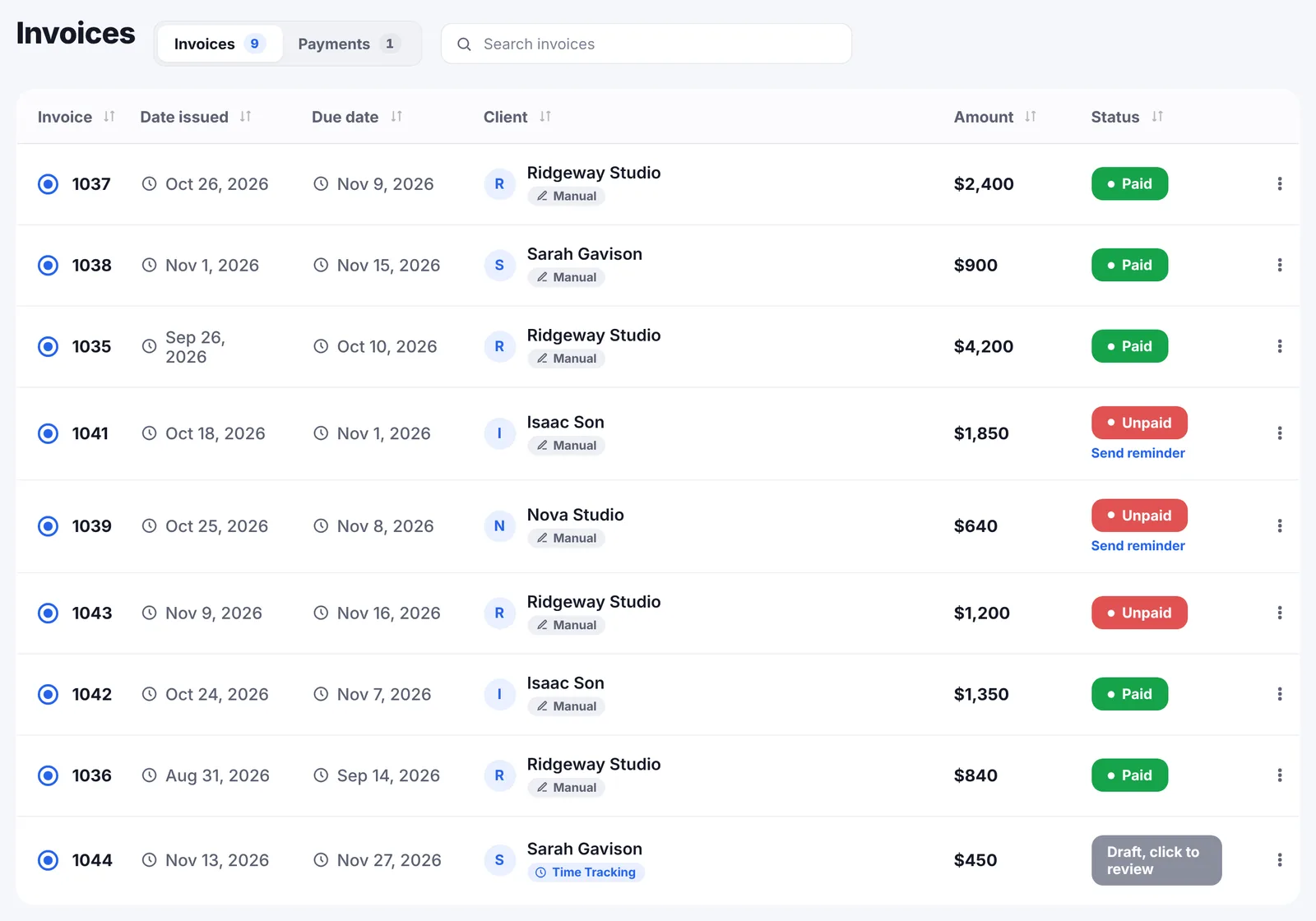
- You want a follow-up rhythm per client and a forecast of the months ahead
- You do not need proposals, contracts or expenses
Pick Moxie if
- You send proposals and need contracts signed
- You want a client portal with your branding on it
- You track expenses and want them pulled from a bank or card
- You want the cheapest all-in-one, and $10 a month billed yearly is it
Price and what each plan holds back
| Go Lancer | Moxie | |
|---|---|---|
| Price | $14.99 a month, or $149 a year | Starter $12, Pro $25, Teams $40 a month |
| Billed yearly | $149 a year | $10, $20 or $32 a month, charged annually |
| Plans | ✓ one, everything in it | Three |
| Client portal | ✕ none | Pro, $25 |
| Custom domain, automations, QuickBooks | ✕ | Pro, $25 |
| Team members | ✕ one freelancer | Up to 5 on Teams, $40 |
| Free trial | 7 days | 14 days |
Moxie's own pricing page puts client and project management, invoicing, proposals, quotes and contracts, time tracking, a sales pipeline, basic accounting, forms, schedulers and their AI assistant on Starter. That is a lot for $12 a month, and we are not going to pretend otherwise.
What moves to Pro at $25 is the part most people picture when they picture Moxie: the white-labelled client portal, a custom domain, workflow automations, the API and Zapier connections, the QuickBooks integration and the phone line. Compare the real plan you would be on, not the headline price.
Where Moxie is the better tool
- Proposals and contracts. Templates written with input from legal professionals, and e-signatures. Go Lancer has none of this.
- A client portal. Clients log in to pay invoices, sign contracts, approve deliverables and comment, with your logo and colours, and you choose what each one sees.
- Expenses and accounting. Receipts, categories, costs assigned to a client, a Plaid bank connection that fills expenses in, and a QuickBooks integration.
- A sales pipeline, for work you are still trying to win.
- More currencies. Their invoicing page says 81 or more through Stripe and PayPal, against our 43.
- A team, if you grow. Up to five members on Teams.
If any two of those matter, stop reading and take Moxie. This page is not going to argue you out of a feature we do not have.
Where Go Lancer is the better tool
- One plan. Everything described on our site is in the $14.99, including the parts a tiered product would keep for the tier above.
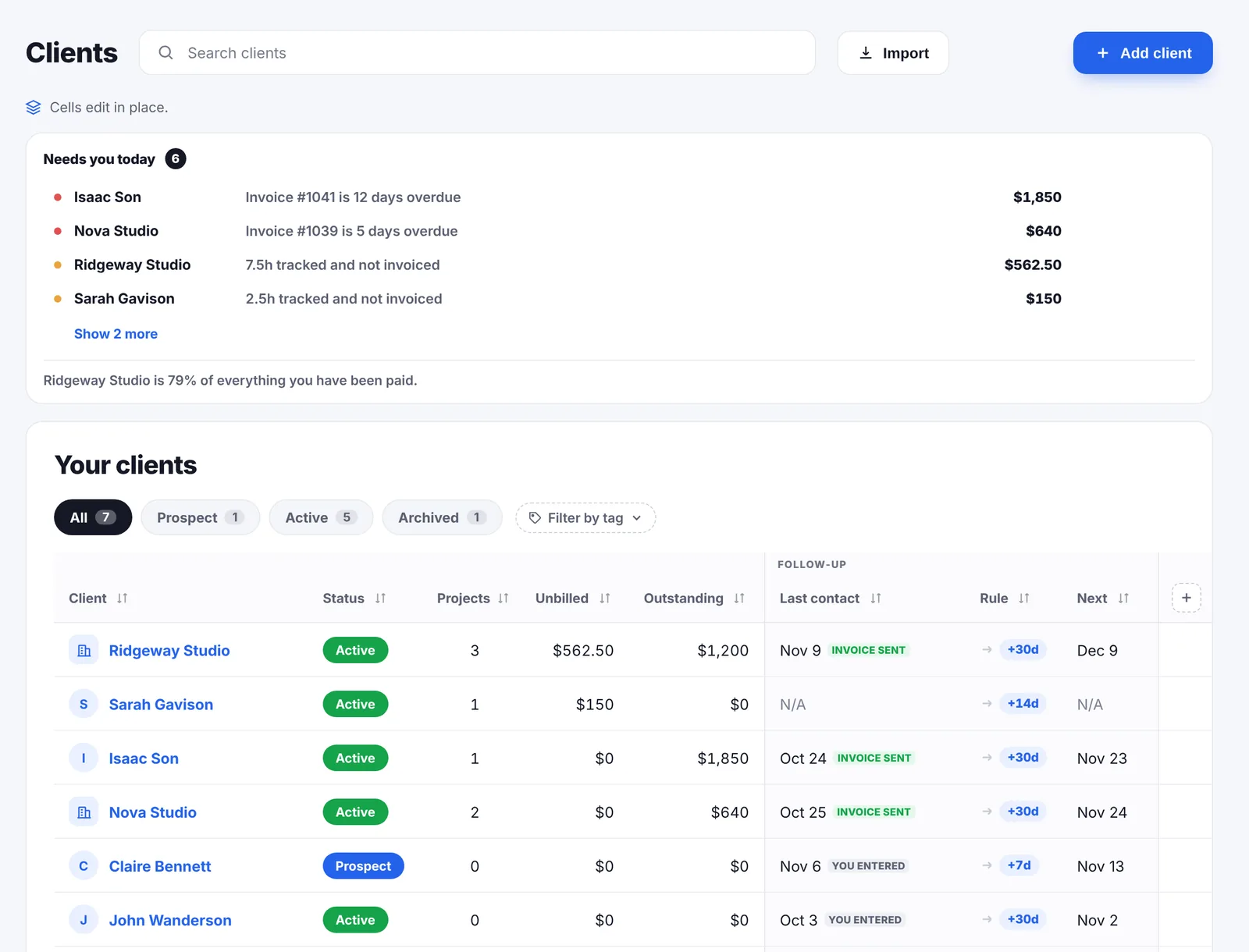
- A follow-up rhythm per client. Every 7, 14, 30 or 90 days, with a Needs you today list that puts overdue invoices, unbilled hours and quiet clients in one ranked queue.
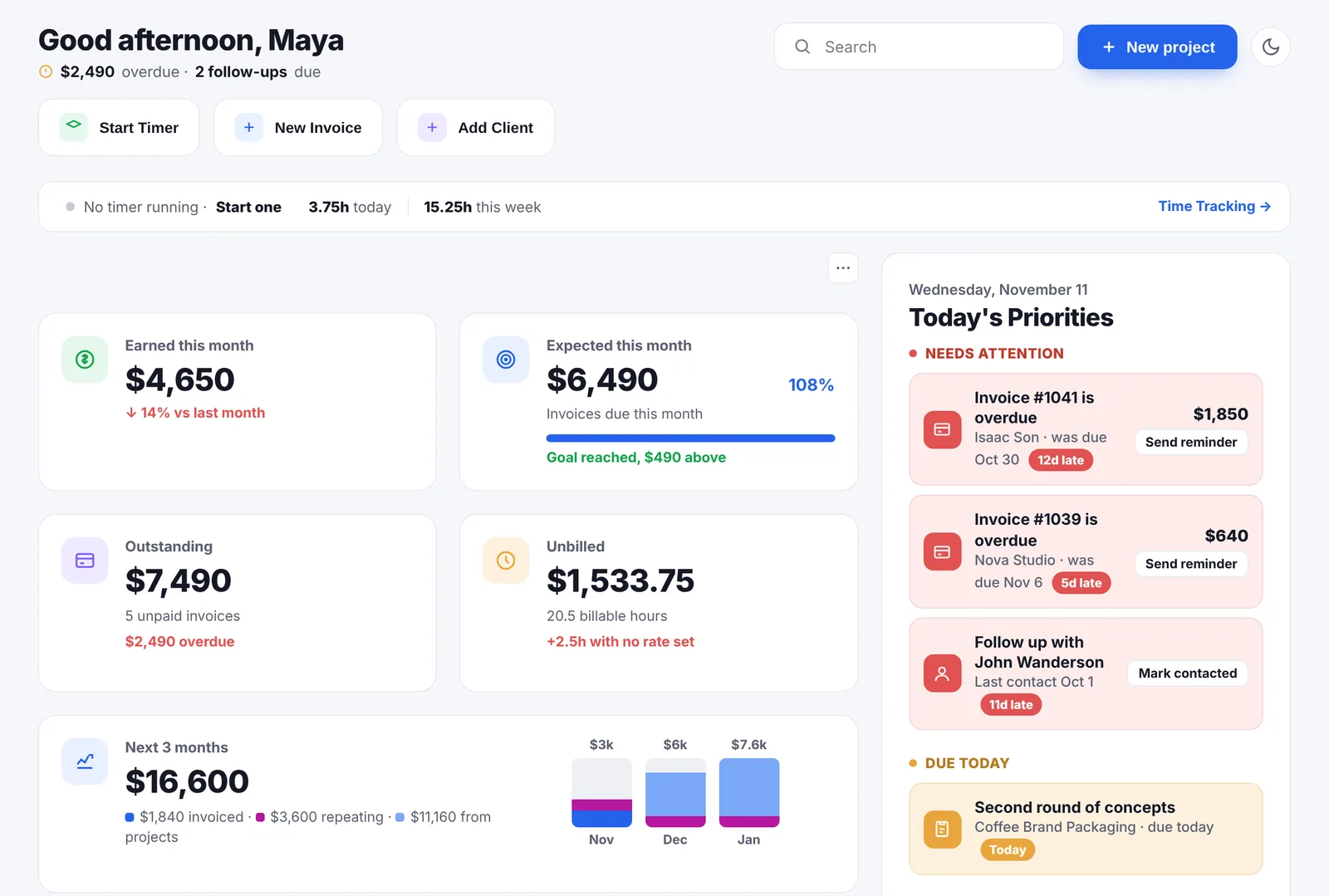
- An income forecast over 6, 12 or 24 months, in four layers that stay apart: paid, invoiced, repeating and not yet billed.
- Hours that become an invoice by themselves, as you track them, not when you remember to select them.
- Wellbeing settings that hold reminders back during quiet hours and stop them entirely in away mode, plus a weekly hour cap and a runway figure.
- No seats, ever. The price does not change because the year went well.
A month with both
Say you are a freelance consultant with six clients. Two are retainers, four are project work. You send ten invoices a month, you do not send proposals because the work comes through referrals, and you have an accountant who handles the expenses.
In Moxie, Starter at $10 a month billed yearly covers it. You track time, pick the entries, let the invoice populate and send it. Reminders chase late payers. The portal you read about is on Pro, so your clients get emails like everyone else's. At the end of the quarter you export for your accountant, or move to Pro for the QuickBooks link.
In Go Lancer, it is $149 a year. Billable hours land on each project's draft as you work, so the ten invoices are mostly written before the month ends. The two retainers are logged as repeating and show up in the forecast. The quiet client surfaces on the client page before you notice they went quiet. The expenses are still your accountant's problem, because we do not touch them.
On that profile Moxie is cheaper and Go Lancer does more of the chasing. Change one detail, add proposals to win the work, and Moxie wins outright.
The two side by side
| Go Lancer | Moxie | |
|---|---|---|
| What it is | ||
| Built for | One freelancer, from hours to paid | Freelancers, from the pitch to the books |
| Price of the plan you would be on | $14.99 a month | $12 Starter, $25 Pro |
| Invoicing and payments | ||
| Invoicing | ✓ five designs, your numbering | ✓ templates, built from tracked time |
| Recurring invoices | ✓ | ✓ |
| Automatic reminders | ✓ schedule you set, stops at paid | ✓ reminders and follow-ups |
| Late fees on an invoice | ✕ calculator only | ✓ |
| Card payment | ✓ your own Stripe | ✓ card, PayPal, ACH |
| Currencies | 43 | 81 or more |
| Time and work | ||
| Time tracking | ✓ timer on the task, count up or down | ✓ desktop and mobile |
| Hours onto the invoice | ✓ automatically, as you track | Select the entries, invoice populates |
| Winning and serving clients | ||
| Proposals and contracts | ✕ | ✓ templates and e-signatures |
| Client portal | ✕ | Pro, white-labelled |
| Expenses, receipts, bank feed | ✕ | ✓ Plaid, QuickBooks |
| Sales pipeline | ✕ | ✓ |
| Follow-up rhythm per client | ✓ | Not described |
| Planning, wellbeing and limits | ||
| Income forecast | ✓ 6, 12 or 24 months, four layers | Not described |
| Wellbeing settings | ✓ away mode, quiet hours, hour cap | Not described |
| Team members | ✕ | Up to 5 on Teams |
The thing to check before you buy
Tiered pricing is not a trick, but it does make comparison harder. The $12 headline is real, and so is the fact that the portal, the custom domain and the automations are not in it.
So work out which plan you would actually be on. If Starter covers you, Moxie is cheaper than us by about $29 a year. If you need Pro, it is $240 a year against our $149, and the difference buys a portal and automations we do not have at any price.
So which one
Moxie is the better product for a freelancer whose business runs from pitch to payment: proposals out, contracts signed, work done, expenses tracked, books tidy.
Go Lancer is narrower on purpose. It assumes the work is already won and that what goes wrong is the middle: hours not billed, invoices sent late, clients nobody followed up with, and no idea what next quarter looks like. If that is your problem, a wider tool will not fix it, and a cheaper plan that hides the useful half behind an upgrade will not either.
Moving from Moxie
- Bring the clients. Export to CSV or Excel and import; unknown columns become custom fields instead of being dropped.
- Bring the hours from a spreadsheet export, or start fresh and keep the old ones in Moxie as a record.
- Upload the open invoices as PDFs so everything sits in one list.
- Set your numbering and turn reminders on.
- Keep Moxie for proposals if that is why you had it. Nothing stops you running both while you decide.
And the honest warning: proposals, contracts, the portal and the expenses have nowhere to land here. If you use them, this is a downgrade, not a switch.
Other Moxie alternatives
Go Lancer is one Moxie alternative, and a deliberately narrow one. These are the other tools we have compared side by side, each from the vendor's own pages:
- Bonsai. The closest thing to Moxie in scope: proposals, contracts and bookkeeping, with invoices starting on its $25 plan.
- Dubsado. Workflows, forms and contracts, with time tracking kept for its Premier plan.
- HoneyBook. Built around booking clients, with proposals, contracts and payments.
- Plutio. The widest of them: proposals, scheduling, forms, a client portal and a team, with a 9-client limit on its cheapest plan.
- 17hats. One all-inclusive plan, with add-ons on top.
- Indy. Free for 3 invoices a month, with Gmail sending and reminders on its Pro plan.
All of them are on the comparisons page.
Questions people ask
How much does Moxie cost?
Moxie's pricing page lists three plans: Starter at $12 a month or $10 billed yearly, Pro at $25 a month or $20 yearly, and Teams at $40 a month or $32 yearly. There is a 14-day free trial. Go Lancer is one plan at $14.99 a month, or $149 a year.
What do you get on Moxie's cheapest plan?
Their pricing page lists client and project management, invoicing and payments, proposals, quotes and contracts, time tracking, a sales pipeline, basic accounting, a form builder, meeting schedulers, a universal calendar and inbox, and their AI assistant. It is a lot for $12.
What is kept for Moxie's Pro plan?
Their pricing page puts a custom domain, the white-labelled client portal, ticketing, workflow automations, a Communicator phone line, API integrations including Zapier and Make, the QuickBooks integration and unlimited project collaborators on Pro at $25 a month.
Does Moxie have a client portal?
Yes, on Pro. Their page says clients log in to schedule meetings, pay invoices, sign contracts, review deliverables and comment on projects, that you control what each client sees, and that the portal carries your logo, colours and branded URL. Go Lancer has no client portal at all.
Does Moxie do proposals and contracts?
Yes. Their page describes pre-built templates written with input from legal professionals, and e-signatures they call industry standard. They stop short of calling the contracts legally binding, saying they are legally vetted and suggesting you check local law. Go Lancer does not do proposals or contracts.
Which handles more currencies?
Moxie, by their numbers: their invoicing page says payment in 81 or more currencies through Stripe and PayPal. Go Lancer invoices in 43.
Does Moxie track expenses?
Yes. Their accounting page describes categorising charges, attaching receipts, assigning costs to a client, attaching expenses to an invoice for reimbursement, a Plaid connection so a card or bank account fills expenses in automatically, and a QuickBooks integration. Go Lancer does none of that.
So what is Go Lancer better at?
Being finished rather than wide. One price with everything in it, a follow-up rhythm per client, an income forecast over 6, 12 or 24 months, and wellbeing settings that hold reminders back when you are away. Nothing is kept for a higher plan, because there is no higher plan.
Which is cheaper?
Moxie's Starter at $10 a month billed yearly is cheaper than Go Lancer at $149 a year. Moxie's Pro, which is where the portal and the automations live, is $240 a year. Go Lancer sits between the two and does not move.
Is Moxie the same as Hectic?
Moxie was previously called Hectic, and their own site still carries Hectic in a page address for the mobile app.
Which should a freelancer with no clients yet pick?
Moxie, probably. Proposals, contracts and a sales pipeline matter most when you are still winning the work. Go Lancer starts being the better tool once the work is won and the admin is what slips.
Can I move from Moxie to Go Lancer?
Clients come in from a CSV or Excel export, hours from a spreadsheet, and old invoices can be uploaded as PDFs so they sit in the same list. Proposals and contracts have nowhere to go, because Go Lancer does not do them.
Sources
Everything about Moxie on this page was read from Moxie's own pages on 16 November 2026:
- Moxie pricing: the three plans, monthly and yearly prices, what each includes and the 14-day trial
- Invoicing: recurring invoices, reminders, late fees, card, PayPal and ACH, and 81 or more currencies
- Time tracking: timer, manual entry, selecting entries to populate an invoice, reports and the mobile app
- Client portal: what clients do in it, the branding, and the Pro plan it sits on
- Accounting: expenses, receipts, the Plaid connection and QuickBooks
- Proposals and contracts: templates, e-signatures and what they say about legal vetting
Prices move, and the figures above are what Moxie’s own pages said on the date given, so check theirs before you pay for anything. We wrote this page, Moxie did not: there is no partnership between us, nobody asked us to write it, and the name Moxie belongs to them.
Keep going
All comparisons Invoicing Clients and follow-ups Income forecast Free contract template Project quote calculator PricingOne plan, nothing held back
Seven days, your own clients and invoices in it, and a founder who answers email. Then $14.99 a month, cancel any time.