Indy alternative for freelancers: Go Lancer vs Indy
Indy is free for 3 invoices a month, and keeps Gmail, white labelling, payment reminders and recurring invoices for Indy Pro, from $18.75 a month billed yearly. Go Lancer is $14.99 a month with all of that in its one plan, and no Go Lancer logo on your invoices.
If you use Indy, the freelance app at weareindy.com, or are looking for an Indy alternative, this is how Go Lancer compares. We make Go Lancer, so read this with that in mind. Everything about Indy below comes from Indy's own pricing and product pages, and we say plainly where it is the better choice.
Quick answer
Indy is the better choice if you send 3 invoices a month or fewer, because its free plan covers that, or if you need proposals and contracts. Gmail, white labelling, payment reminders and recurring invoices need Indy Pro, from $18.75 a month billed yearly. Go Lancer costs $14.99 a month and is the better Indy alternative once you are past the free plan: all of that is in its one plan.
Pick Go Lancer if
- You want invoices from your own Gmail and without anyone else's logo, at the base price
- You bill by the hour and want the hours on the invoice without moving them by hand
- Chasing late payers and keeping in touch with clients is where you lose money
- You want to see what the next months will bring in
Pick Indy if
- You send 3 invoices a month or fewer and want to pay nothing
- You win clients with proposals and contracts
- Your clients want a portal with chat and feedback on files
- You need forms, PayPal or Zelle, or an AI assistant
Price and what the price limits
| Go Lancer | Indy | |
|---|---|---|
| Price | $14.99 a month, or $149 a year | Free; Pro $25 a month, $18.75 billed yearly, $12.50 on a two-year plan |
| Free plan | ✕ | ✓ 3 clients and 3 invoices a month |
| Send from your Gmail | ✓ on the one plan | Pro only |
| No app logo on documents | ✓ always | Pro only (white labelling) |
| Payment reminders | ✓ | Pro only |
| Recurring invoices | ✓ | Pro only |
| Tracked time on invoices | ✓ draft builds itself | Pro only |
| Lifetime | $299 once, limited number of accounts | Not offered |
| Free trial | 7 days, card at sign-up | 7 days of Pro |
Indy prices and limits read from weareindy.com/pricing and Indy's tool pages on 14 November 2026. Indy shows its Pro price in different ways on different pages: $25 a month, $18.75 a month billed yearly, and $12.50 a month billed as $300 for two years. Check it before you decide, pricing moves.
Indy's free plan is generous for a side project. Once you send more than 3 invoices a month, or want reminders, recurring invoices or your hours on the invoice, you are on Pro. At that point the two cost about the same: Go Lancer's yearly plan works out at $12.42 a month, Indy's two-year plan at $12.50. The difference is what is in it.
Where Indy is the better tool
Indy covers the whole job with a client, from the first proposal to the last file. If any of these matters to you, Indy is the better fit.
- A free plan. 3 clients, proposals, contracts and invoices a month, plus the time tracker, at no cost. Go Lancer has a 7-day trial.
- Proposals and contracts. A drag-and-drop proposal builder with templates, an estimate that can turn into an invoice when approved, and contract templates such as a consulting agreement, an NDA and a subcontractor agreement. Clients sign online without an Indy account. Go Lancer has neither.
- A client portal and file approvals. Clients see your tasks and progress, chat with you, and comment on files by version, and a client can be set as the approver. Go Lancer has no client login.
- Forms and a calendar. Unlimited forms on the free plan, from templates such as client intake and project brief, embeddable on your site on Pro. A day, week and month calendar with two-way Google Calendar sync on Pro.
- More ways to get paid. Stripe, PayPal, Zelle, wire, direct deposit and check, and Indy says it adds no fee of its own on card payments. Go Lancer takes cards through your own Stripe account, or a bank transfer.
- Extras on Pro. An AI assistant, Zapier, late fees and deposit requests on invoices, and over 50 fonts.
Where Go Lancer is the better tool
Go Lancer was built from 100+ interviews with freelancers who already had a tool and still missed invoices. It does less than Indy, and puts all of it in one price.
- Your Gmail, no extra plan. Invoices and reminders can go out from your own Gmail address on the one plan. In Indy, the Gmail integration is Pro only.
- Your brand only. Go Lancer never puts its logo on your invoices or emails. In Indy, removing its branding from documents is a Pro feature.
- Hours land on a draft by themselves. Every billable hour with a rate goes onto a draft invoice for that project as you track it.
- Reminders you set up once. One switch for the whole account, a day before the due date, on it, then every 7 days up to 3 times, with an override per invoice, never during your quiet hours or while you are away.
- Clients you keep in touch with. A follow-up rule per client, a list of what needs you today, and a private label from pays on time to ghost.
- An income forecast. What the next 6, 12 or 24 months look like, from unpaid invoices, repeating payments and open projects.
- More task views. List, board, calendar and Gantt, with subtasks and estimated hours. Indy's task page describes list and board views.
Feature by feature
Invoicing and payment reminders
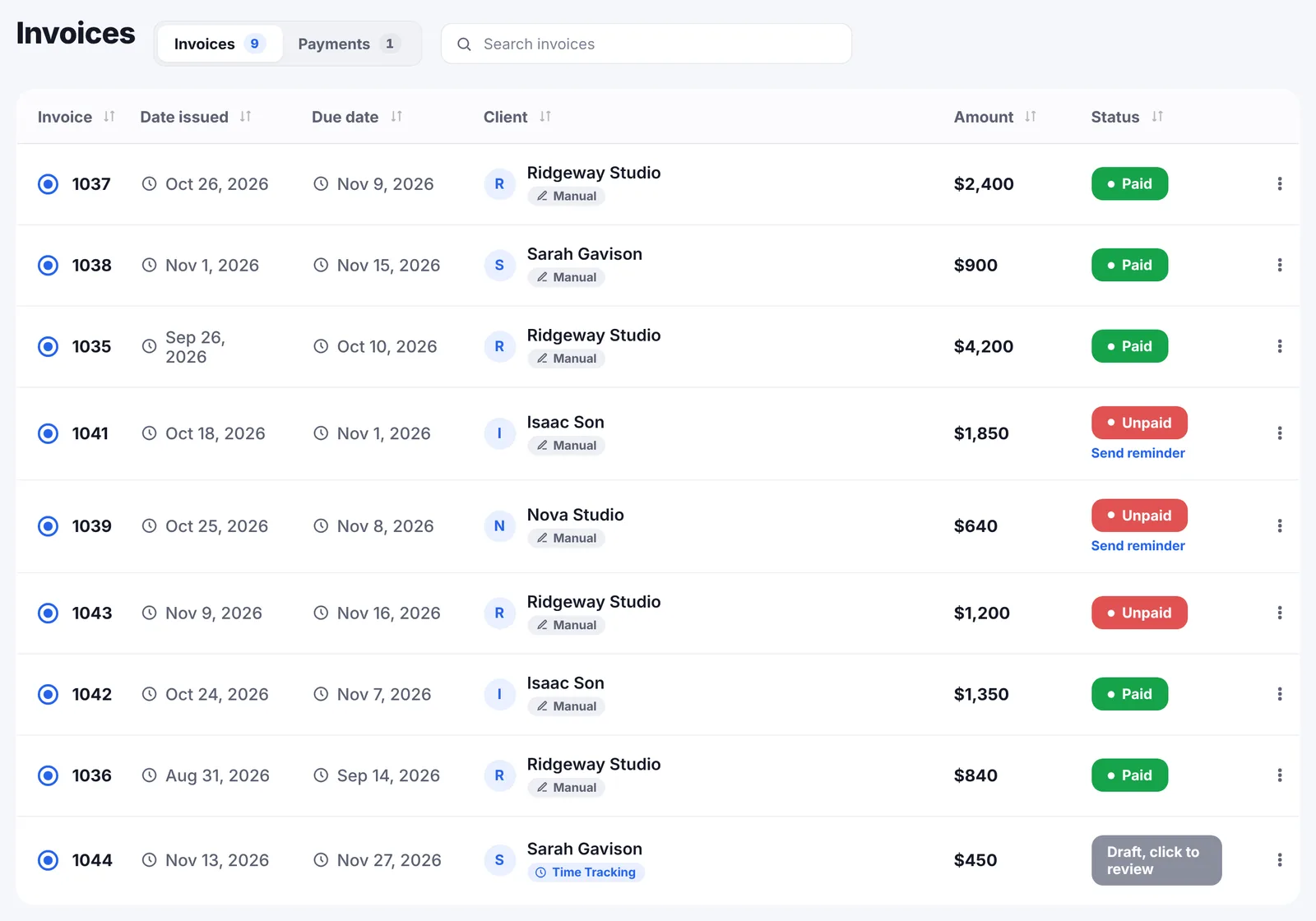
Indy builds invoices from templates with line items, taxes, discounts, late fees and deposit requests, in the currency you choose, with your logo, colour and font. Recurring invoices and automated payment reminders are part of Indy Pro; its page does not give the reminder schedule.
Go Lancer sends the invoice as a PDF from your name, or from your own Gmail, with your payment details and an optional card link through your own Stripe account. It has five designs, recurring invoices from weekly to yearly, 43 currencies and its own numbering. Reminders go out by default a day before the due date, on it, then every 7 days up to 3 times, in your own words with the invoice attached, and stop the moment it is paid.
Time tracking
Indy's timer runs in its desktop app and keeps recording if you close the app by accident. You can add time by hand, set a rate per project and filter timesheets by project, date and invoice status. The time tracker is free, and adding time tracks to an invoice needs Pro. The mobile version is in beta and read-only.
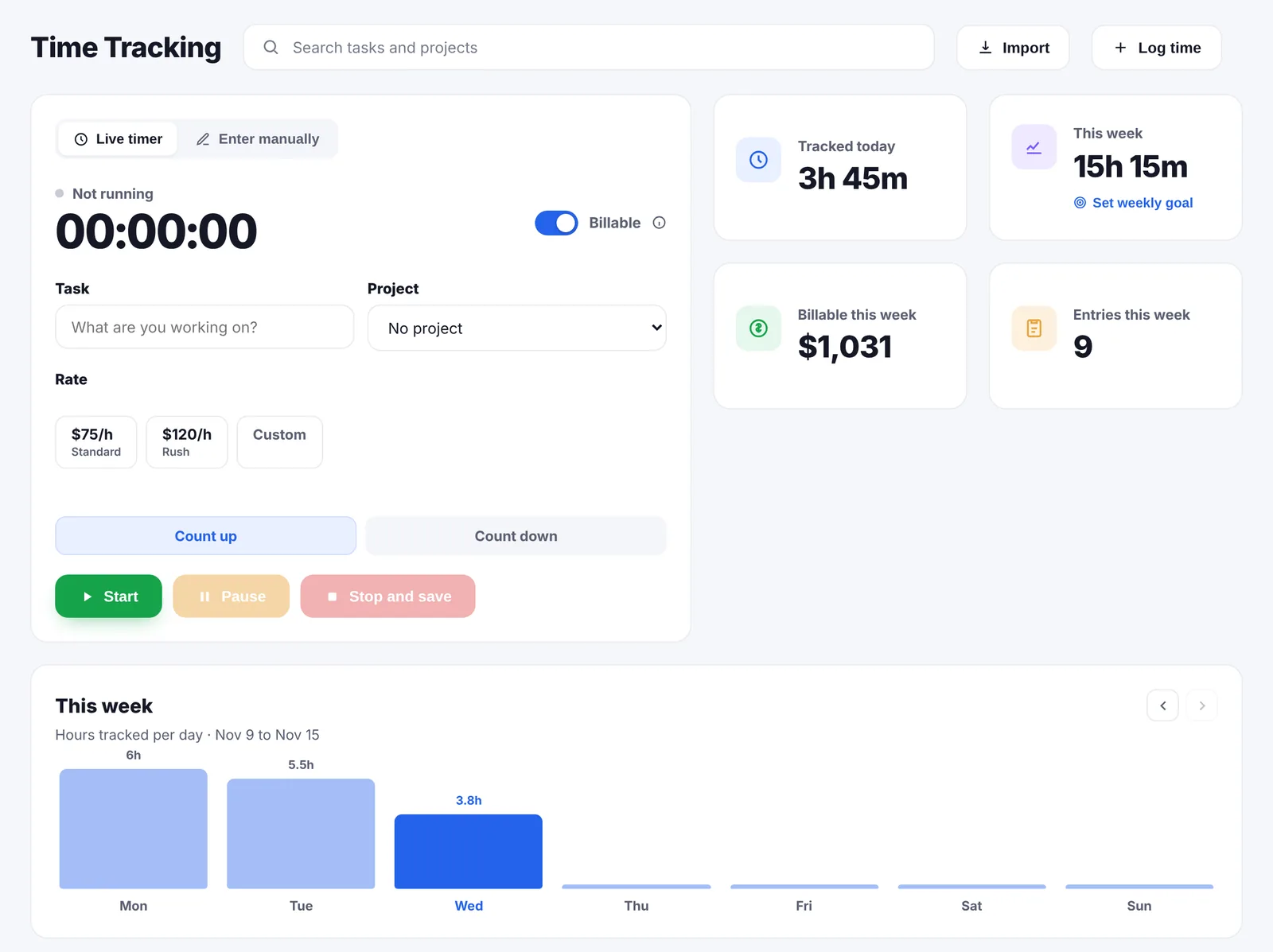
In Go Lancer you start the timer from the task, counting up or down, or log time afterwards. Each entry gets one of your saved rates, such as Standard and Rush, and a switch for billable or not. Billable hours land on the draft invoice without a separate step, and a time summary for the client exports with your own title and note.
Clients and follow-ups
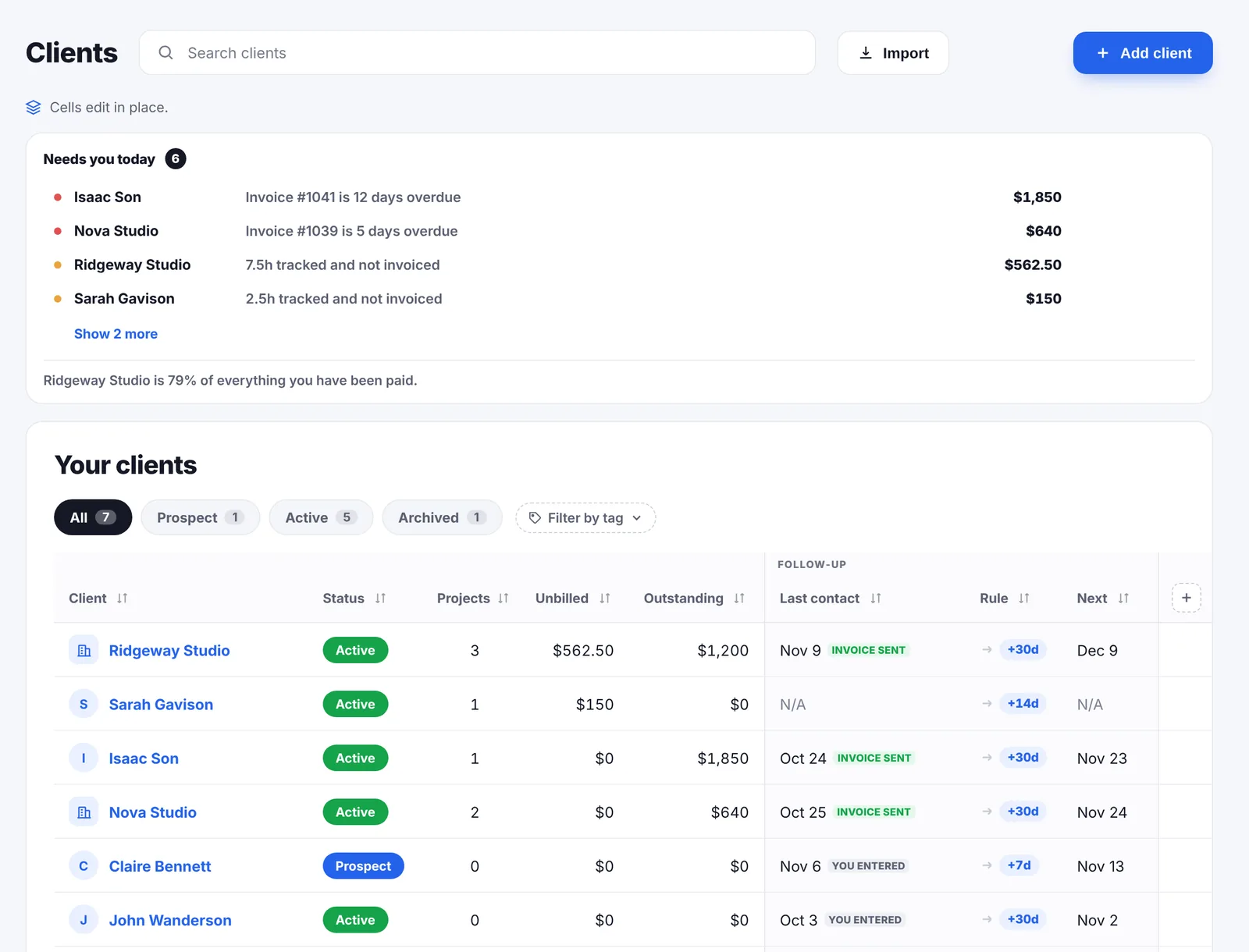
Indy's client side is the portal: tasks and progress, chat and file feedback in one place for the client. Go Lancer's client side is about you staying on top of them. The Clients page opens on what needs you today, such as an overdue invoice or hours not billed yet. Each client gets a follow-up rule, every 7, 14, 30 or 90 days, and a private label based on how late they paid before.
Proposals, contracts, forms and files
This is where Indy does the most that Go Lancer does not. Proposals are built from blocks such as text, a timeline, an estimate and a signature, and an approved estimate can become an invoice. Contracts start from templates for consultants, designers, developers, photographers, copywriters and others; you and the client sign online, and Indy can send follow-up emails until it is signed. Forms cover client intake, project briefs, onboarding and feedback. Files can be shared with a link, commented on by version and approved by the client.
Go Lancer has none of these. It starts once the work is agreed: projects, hours, invoices and getting paid. Freelancers who use it keep proposals and contracts in Google Docs, a signing tool or Indy's free plan.
Projects and tasks
Indy has tasks in list and board views, with due dates that show on its calendar. Go Lancer has list, board, calendar and Gantt views, tasks with subtasks, priorities and estimated hours, and project templates that bring their tasks, rate and invoice setup with them.
A month with both
Say you are a freelance copywriter with six clients, billed by the hour, two of them abroad. You send about eight invoices a month.
In Indy, eight invoices is past the free plan, so you are on Pro. Proposals and contracts help you sign the new clients, and the portal keeps feedback in one place. At the end of the month you add each project's time tracks to its invoice and send it, and Pro's reminders follow up.
In Go Lancer, it is $14.99 a month. The hours are already on each project's draft when the month ends, the invoices go out from your own Gmail with only your name on them, and reminders, quiet hours and follow-ups are on. Proposals and contracts stay in Google Docs or a tool built for them.
If you sell with proposals and run clients through a portal, Indy is the better fit. If the work is already agreed and the job is getting paid on time, Go Lancer is the better fit.
The two side by side
| Go Lancer | Indy | |
|---|---|---|
| Price and plans | ||
| Built for | One freelancer, after the client says yes | One freelancer, from proposal to payment |
| Paid plan | $14.99 a month, $149 a year | Pro $25 a month, $18.75 billed yearly |
| Free plan | ✕ | ✓ 3 invoices a month |
| Lifetime plan | $299 once | Not offered |
| Invoicing and payments | ||
| Gmail sending | ✓ included | Pro |
| No app branding on invoices | ✓ included | Pro |
| Automatic payment reminders | ✓ quiet hours, away mode, per-invoice override | Pro |
| Recurring invoices | ✓ included | Pro |
| Hours onto the invoice | ✓ automatically | Pro, added by you |
| Ways to get paid | Bank transfer, card via your Stripe | Stripe, PayPal, Zelle, wire, check |
| Time and the work | ||
| Time tracking | ✓ timer on the task, saved rates | ✓ desktop app; phone in beta |
| Task views | ✓ list, board, calendar, Gantt | List and board |
| Clients and documents | ||
| Client follow-up rhythm | ✓ | Not advertised |
| Proposals and contracts | ✕ | ✓ |
| Client portal | ✕ | ✓ tasks, chat, file feedback |
| Forms | ✕ | ✓ |
| Planning, wellbeing and limits | ||
| Income forecast | ✓ 6, 12 or 24 months | Not advertised |
| AI assistant | ✕ | Pro |
So which one
If you send a handful of invoices a month, Indy's free plan covers it. If proposals, contracts and a client portal are how you work, Indy does that and Go Lancer does not.
If you are past the free plan anyway, compare what the money buys. In Indy, Gmail, an unbranded invoice, reminders and hours on the invoice are the reasons to pay for Pro. In Go Lancer they are the starting point, along with follow-ups and a forecast.
Before you decide, open your last five invoices. If any went out late, or still has not been paid, reminders and follow-ups will help you more than proposals.
Switching from Indy
- Bring your clients. Import them from a CSV or Excel file, a Google Sheet, HubSpot or Notion. Columns Go Lancer does not know become custom fields.
- Bring your hours. Import old time entries from an Excel or CSV file, a Google Sheet, or from Toggl, Clockify or Harvest.
- Bring your invoices. Upload the invoices you still need as PDFs, so they sit in the same list.
- Connect Gmail and turn reminders on. Both are on the one plan.
Proposals, contracts and forms have no place in Go Lancer, so keep them in Indy's free plan or a tool built for them.
Questions people ask
Is Indy free?
Indy has a free plan with 3 clients, 3 proposals, 3 contracts and 3 invoices a month, and the time tracker. Recurring invoices, payment reminders, Gmail, white labelling and adding tracked time to invoices need Indy Pro. Go Lancer has no free plan: 7 days free, then $14.99 a month with everything in it.
How much is Indy Pro?
Indy's pages show $25 a month, $18.75 a month billed yearly, and $12.50 a month when you pay $300 for two years. Go Lancer is $14.99 a month or $149 a year, or $299 once for lifetime access.
Does Indy connect to Gmail?
Yes, on Indy Pro only. In Go Lancer, connecting Gmail is part of the one plan: invoices and reminders go out from your own Gmail address.
Do invoices show the Indy logo?
Indy's pricing FAQ says white labelling, which removes Indy's branding from documents, is a Pro feature. Go Lancer invoices never show a Go Lancer logo on any plan: your logo, your details, your payment information.
Does Indy send automatic payment reminders?
Yes, Indy says automated payment reminders are included in Indy Pro. Go Lancer has one switch for the whole account, writes before and after the due date, uses your own wording with the invoice PDF attached, and sends nothing during your quiet hours.
Can I turn tracked time into an invoice in Indy?
Yes, on Indy Pro you can add time tracks to an invoice as line items. In Go Lancer every billable hour with a rate lands on a draft invoice for that project as you track it, on the one plan.
What does Indy do that Go Lancer does not?
Proposals, contract templates with online signing, unlimited forms, a client portal with chat, file versions and client approval, a calendar with two-way Google Calendar sync, an AI assistant, Zapier, a free plan and more ways to get paid, such as PayPal and Zelle.
What does Go Lancer do that Indy does not?
Gmail and an unbranded invoice without paying for a higher plan, reminders with quiet hours and an away mode, a follow-up rhythm per client, a label for clients who pay late, an income forecast up to 24 months ahead, calendar and Gantt views for tasks, subtasks, and a lifetime plan.
Does Indy have a phone app for time tracking?
Indy's time tracker runs in its desktop app. Its page says the mobile version is in beta and shows recorded time read-only. Go Lancer installs on a phone from the browser, with the timer included.
Can I move from Indy to Go Lancer?
Yes. Bring clients in from a CSV or Excel file, a Google Sheet, HubSpot or Notion, upload the invoices you still need as PDFs, and import old hours from a CSV or Excel file. Proposals and contracts have no place in Go Lancer.
Sources
Everything about Indy on this page was read from Indy's own pages on 14 November 2026:
- Indy pricing: Free and Pro, monthly limits, Gmail, white labelling, recurring invoices and the trial
- Invoices: invoice options, payment methods, reminders and time on invoices
- Time tracker: timer, desktop and mobile apps, rates and timesheets
- Tasks and project portal: task views and what clients see
- Proposals and contracts: builder, templates, signatures, estimates and follow-ups
- Forms, calendar and files: templates and embedding, Google Calendar sync, sharing, versions and approvals
Prices move, and the figures above are what Indy’s own pages said on the date given, so check theirs before you pay for anything. We wrote this page, Indy did not: there is no partnership between us, nobody asked us to write it, and the name Indy belongs to them.
Keep going
Go Lancer vs Bonsai Go Lancer vs HoneyBook Go Lancer vs Dubsado Go Lancer vs Plutio Go Lancer vs FreshBooks Go Lancer vs Harvest Go Lancer vs Zoho What Go Lancer does Pricing Payment reminder emails Free invoice generatorSee it before you decide
Seven days, your own clients and invoices in it, and a founder who answers email. Then $14.99 a month, cancel any time.