Zoho alternative for freelancers: Go Lancer vs Zoho
Zoho is a family of business apps: Zoho One bundles 50+ of them from $30 per user a month. A freelancer usually puts together a few: Zoho CRM for clients, Zoho Invoice for invoices and time, Zoho Bookings for scheduling, or tries Zoho Solo. Go Lancer is one app for one freelancer, $14.99 a month.
If you are piecing together Zoho apps for your freelance work, or looking for a Zoho alternative, this is how Go Lancer compares, app by app. We make Go Lancer, so read this with that in mind. Everything about Zoho below comes from Zoho's own pages, and we say plainly where it is the better choice.
Quick answer
Zoho is the better choice if you want free invoicing or a wider suite: Zoho Invoice is free for up to 3 projects and 500 invoices a year, next to Zoho CRM, Bookings and Solo. Go Lancer costs $14.99 a month and is the better Zoho alternative if you want one app for clients, projects, hours and invoices, with no caps and no app branding on your invoices.
Pick Go Lancer if
- You want clients, projects, hours and invoices in one app, not four
- You run more than three projects and send more than a handful of invoices
- You want only your brand on invoices, sent from your own Gmail
- Late payers and quiet clients are where you lose money
Pick Zoho if
- You want to start for free and stay within the free plans' limits
- You sell with quotes, a pipeline and a CRM, or work with a small team
- Clients book and pay deposits themselves, or need a portal
- You want accounting, expenses and other business apps from one vendor
What a freelancer's Zoho setup costs
| The job | Go Lancer | Zoho |
|---|---|---|
| Clients and follow-ups | Included | Zoho CRM: free for up to 3 users; Standard and up priced per user |
| Invoices, time and projects | Included, no caps | Zoho Invoice: free for 2 users, 3 projects, 500 invoices a year |
| Bigger project work | Included: list, board, calendar, Gantt | Zoho Projects or Zoho Tables, separate apps |
| Client scheduling | ✕ | Zoho Bookings, separate app |
| Card payments | Your own Stripe account | Many gateways; Zoho Payments in the US |
| All in one | $14.99 a month, or $149 a year | Zoho One from $30 per user a month, or Zoho Solo (Free and Pro) |
| App branding on invoices | None, ever | "Powered by Zoho Invoice" on free accounts |
| Free trial | 7 days, card at sign-up | Free plans; trials on paid CRM editions; 15 days of Solo Pro |
Read from Zoho's pricing and product pages on 14 November 2026. Zoho CRM's pricing page does not show its per-user prices in text, and Zoho Solo's pages do not show the Pro price, so neither is quoted here. Check them before you decide.
Zoho is generous with free plans, and a freelancer can get a long way for nothing: Zoho Invoice alone covers invoices, time, reminders and a client portal. The cost shows up in other ways. Each job lives in a different app with its own screens, the free plans have limits a busy freelancer passes (three projects in Zoho Invoice, three users in Zoho CRM), and free invoices carry Zoho's name. Go Lancer has one price and one place for all of it.
Where Zoho is the better tool
Zoho has an app for almost everything a business does. If any of these matters to you, Zoho is the better fit.
- Free plans. Zoho Invoice is free forever within its limits, Zoho CRM has a free edition for three users, and Zoho Solo lists a free plan. Go Lancer has a 7-day trial and then costs $14.99 a month.
- A real sales CRM. Pipelines, web forms for leads, forecasting, workflow automation and Zia AI in Zoho CRM, or Bigin for small businesses. Go Lancer starts after the client has said yes.
- Quotes and a client portal. Zoho Invoice creates quotes and gives clients a self-service portal. Go Lancer has neither.
- Expenses and taxes. Zoho Invoice records expenses and bills them to clients; Zoho Solo separates taxable expenses and prepares tax reports. Go Lancer does not track expenses.
- Booking and payments. Zoho Bookings lets clients book from your site and pay a deposit. Zoho Invoice connects Stripe, PayPal, Razorpay, Square, Braintree and more, with cards, ACH, e-wallets and UPI, and adds no fee of its own.
- Native apps and teams. iOS, Android, Windows and Mac apps for Zoho Invoice, two users on its free plan, and team editions across the suite. Go Lancer is one person, installed from the browser.
Where Go Lancer is the better tool
Go Lancer was built from 100+ interviews with freelancers. Many had tried assembling a suite. What they wanted was one place to open in the morning.
- One app, one price. Clients, projects, the timer, invoices, reminders and the forecast in the same app for $14.99 a month. No choosing which apps to connect.
- No caps. Unlimited projects, clients and invoices.
- Your brand only. No "Powered by" line on your invoices or emails, and they can go out from your own Gmail.
- Hours land on a draft by themselves. Every billable hour with a rate goes onto a draft invoice for that project as you track it.
- Reminders with manners. A day before the due date, on it, then every 7 days up to 3 times, in your own words, never during your quiet hours or while you are away.
- Clients you keep in touch with. A follow-up rule per client, a list of what needs you today, and a private label from pays on time to ghost.
- An income forecast. The next 6, 12 or 24 months from unpaid invoices, repeating payments and open projects.
App by app
Clients: Zoho CRM vs Go Lancer
Zoho CRM is a sales platform used by more than 350,000 businesses. Its free edition, for up to three users, covers contact management, follow-up reminders, workflow automation, tasks, meetings and calls, standard reports and mobile apps. Standard adds Gmail and Outlook integration, multiple pipelines, web forms and forecasting; Professional adds AI agents, quotes and customer portals. For small businesses and freelancers, Zoho also offers Bigin, a simpler CRM with pipelines, scheduling and Stripe and PayPal payments.
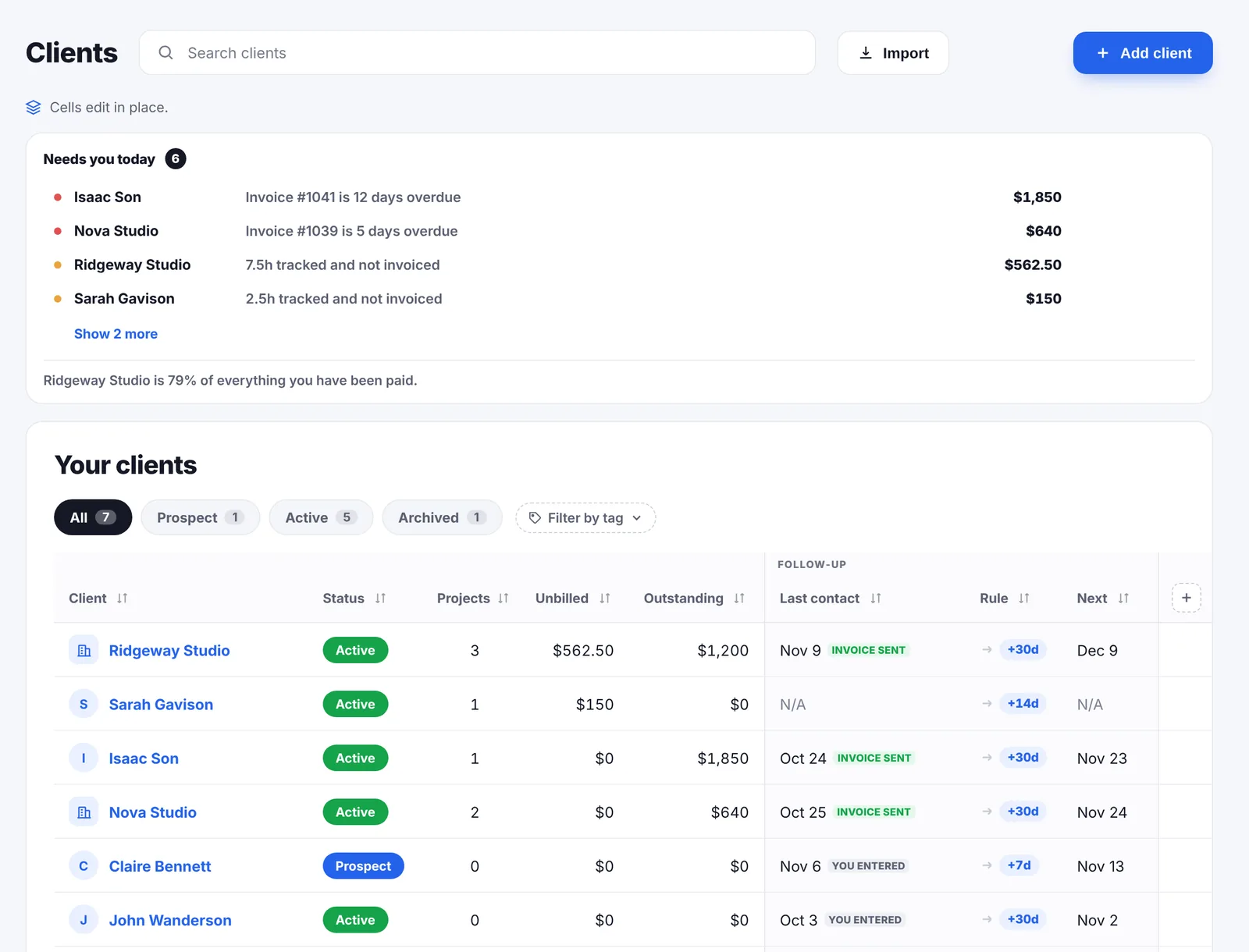
Go Lancer's clients page is about the clients you already have. It opens on what needs you today: invoices that are overdue and by how many days, and hours you have not invoiced. Each client gets a follow-up rule, every 7, 14, 30 or 90 days, and sending an invoice or a reminder counts as contact. A private label shows who pays on time and who does not. There are no deals, pipelines or lead forms.
Invoices: Zoho Invoice vs Go Lancer
Zoho Invoice creates tax-compliant invoices and quotes from templates with your logo and signature, sends recurring invoices on each client's cycle, can charge a saved card automatically, automates reminders for upcoming and overdue payments, and gives clients a self-service portal. It is free for up to two users, three projects and 500 invoices a year, in editions for 18 countries, with "Powered by Zoho Invoice" on free accounts. Zoho says it shows no ads and does not sell user information.
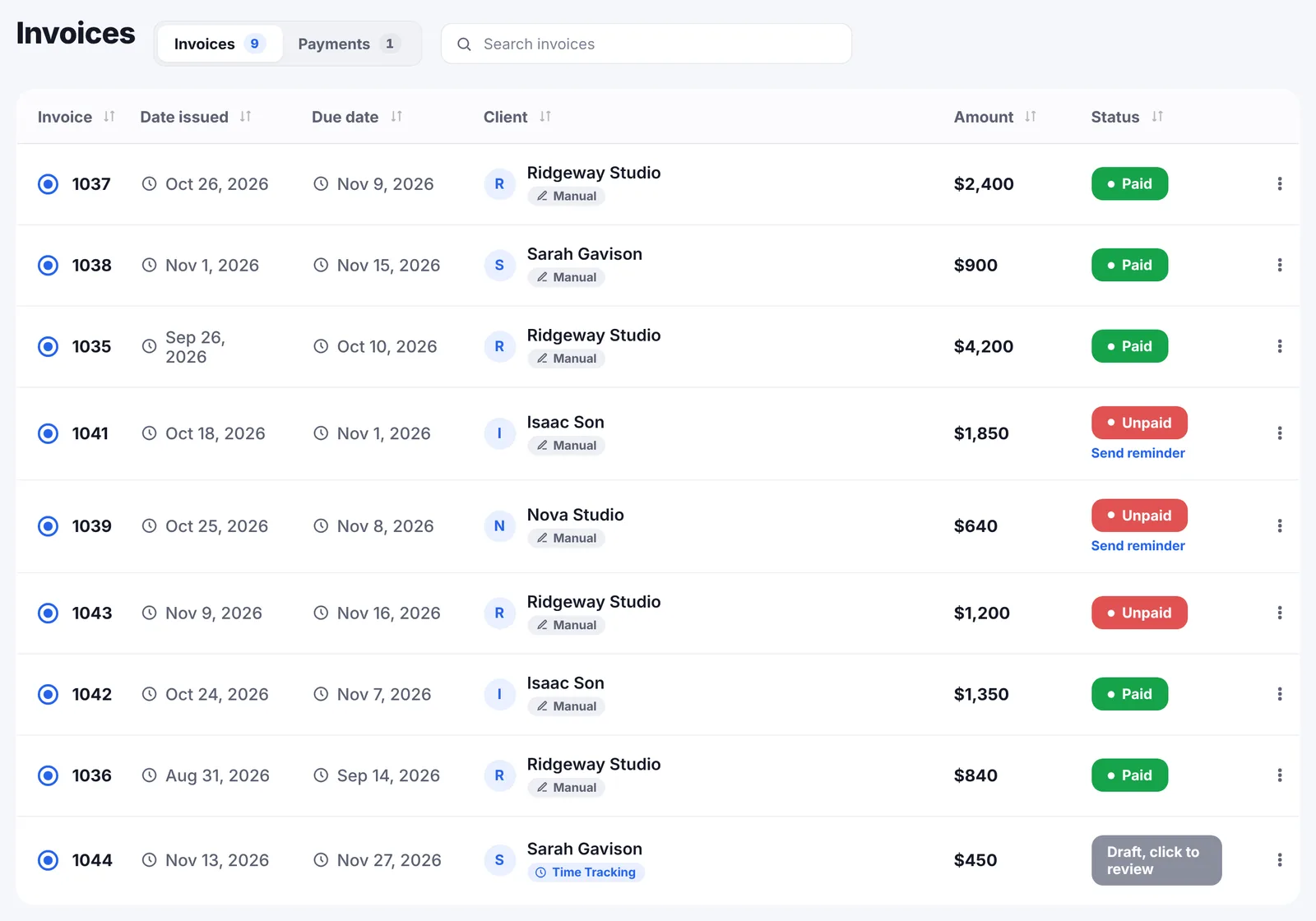
Go Lancer sends the invoice as a PDF from your name, or from your own Gmail, with your payment details and an optional card link through your own Stripe account. It has five designs, recurring invoices from weekly to yearly and 43 currencies set per client. Reminders go out by default a day before the due date, on it, then every 7 days up to 3 times, and stop the moment the invoice is paid.
Projects and time: Zoho Invoice, Projects and Tables vs Go Lancer
Zoho Invoice tracks billable time and bills by project hours, task hours or fixed cost, turning timesheets into invoices, for up to three projects on the free plan. For more project work Zoho points to separate apps: Zoho Projects, which it describes as strong for team workflows, and Zoho Tables, a spreadsheet-database with a freelance project tracker template. Zoho Solo has its own task list and timers with automatic tracking.
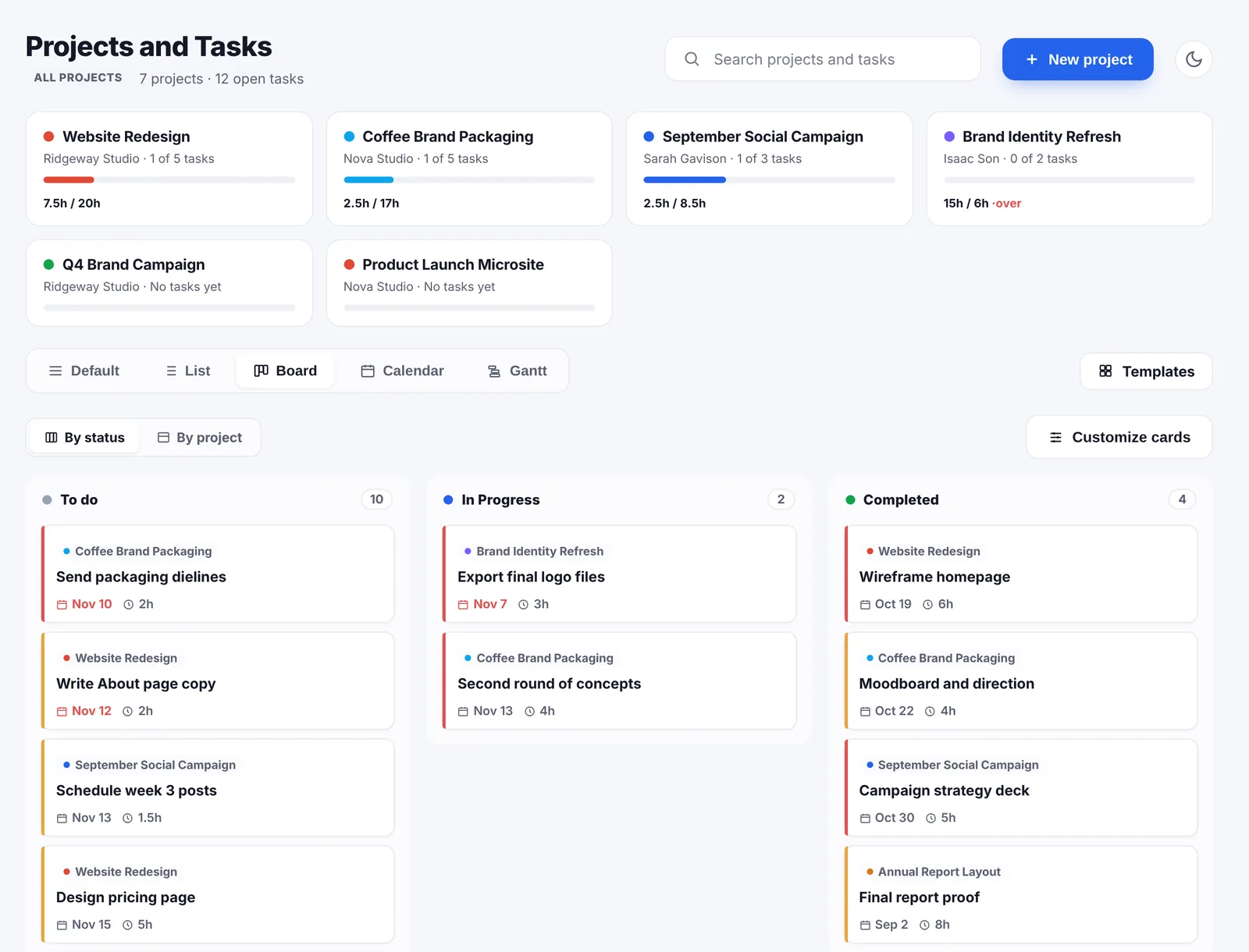
Go Lancer has projects with list, board, calendar and Gantt views, tasks with subtasks, priorities and estimated hours, a timer on the task, and project templates that bring their tasks, rate and invoice setup with them. The hours you track are the hours on the invoice, in the same app. It has no recurring tasks or task dependencies.
Scheduling and payments: Zoho Bookings and Zoho Payments
Zoho Bookings gives clients a booking page you can embed on your site, can take a deposit or full payment at booking, syncs with Google and Zoho calendars, and keeps client profiles with past invoices. Zoho Payments, in the US, takes cards and ACH Direct Debit, sends payment links and automated reminders, and connects to Zoho Invoice and Books. Go Lancer has no scheduler; you would keep Calendly, Zoho Bookings or similar. Card payments go through your own Stripe account, and Go Lancer adds nothing on top.
Reports and forecast
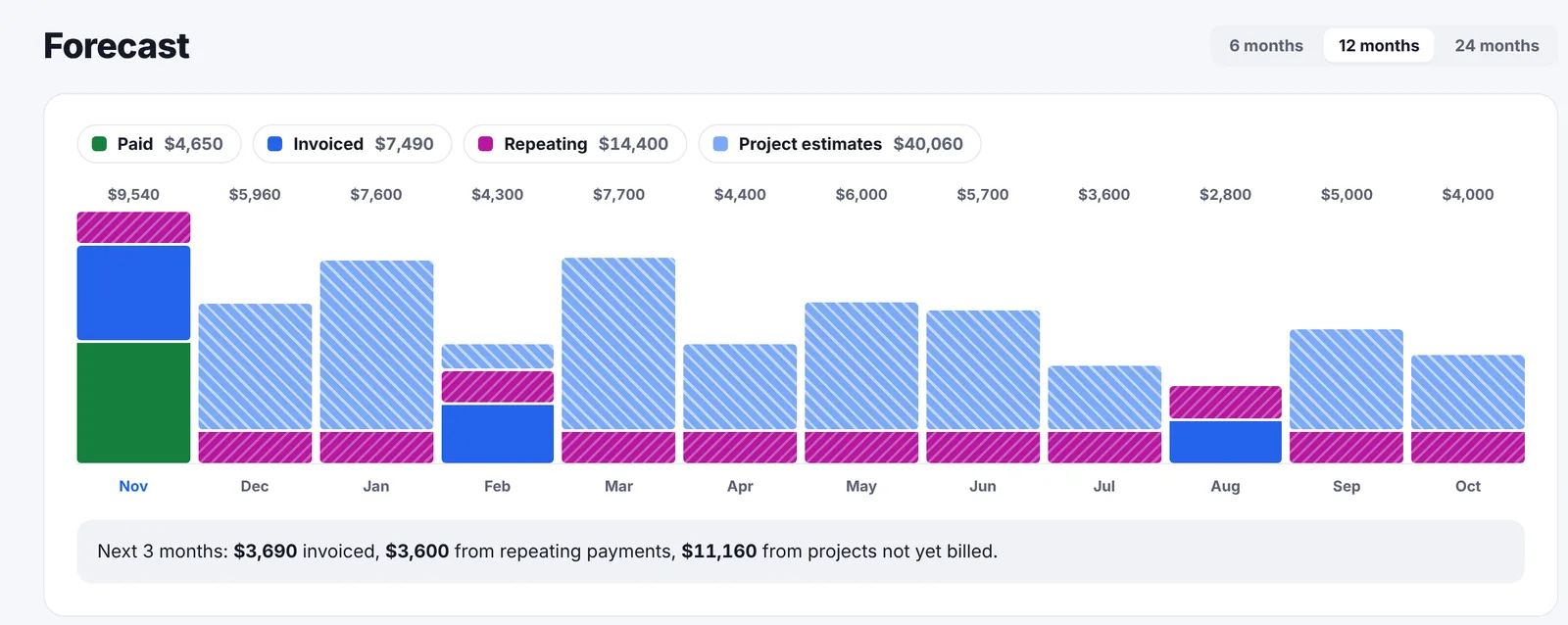
Zoho Invoice has a dashboard and automated reports on sales, receivables, expenses and slow-paying customers, and Zoho CRM forecasts sales from its pipeline. Go Lancer's dashboard opens on today's priorities with tiles you choose, and the Invoicing page forecasts your income for the next 6, 12 or 24 months, month by month: paid, invoiced, repeating payments and open projects.
And Zoho Solo?
Zoho Solo is Zoho's answer to one app for one person: tasks, time tracking with timers and automatic tracking, contacts, meetings, invoices with payment gateways, expenses split into taxable and non-taxable, and tax reports. It is built around its iOS and Android app. Its pages list Free and Pro plans without prices, a 15-day Pro trial with no card, and tell visitors in some countries that it is not available there yet. If it is available where you live, it is the closest Zoho product to Go Lancer, and worth trying side by side.
A month with both
Say you are a freelance designer with seven clients, billed by the hour, two of them paying monthly retainers.
With Zoho, you keep clients in Zoho CRM's free edition and invoice from Zoho Invoice, both at no cost. Seven clients is more than Zoho Invoice's three free projects, so you group work into fewer projects or look at a paid Zoho product. You track time in Zoho Invoice, send the invoices with "Powered by Zoho Invoice" on them, and reminders go out automatically. Two apps, two logins, and the follow-up reminders live in the CRM while the money lives in Invoice.
In Go Lancer, it is $14.99 a month. Each client has a project, the hours are on each draft at the end of the month, the retainers repeat on their own, invoices go from your own Gmail with only your name on them, and the clients page shows who is due a follow-up and who pays late.
If free and flexible matters most, Zoho gets you started. If you want to open one app and see the whole business, Go Lancer is the better fit.
The two side by side
| Go Lancer | Zoho | |
|---|---|---|
| Price and plans | ||
| What it is | One app for one freelancer | A suite of separate apps |
| Price | $14.99 a month | Free plans; Zoho One from $30 per user a month |
| Invoicing and payments | ||
| Projects and invoices | Unlimited | Free Invoice: 3 projects, 500 invoices a year |
| App branding on invoices | None | On free Zoho Invoice accounts |
| Clients and documents | ||
| Client follow-ups | ✓ rule per client, payment label | ✓ follow-up reminders in Zoho CRM |
| Sales pipeline and lead forms | ✕ | ✓ Zoho CRM, Bigin |
| Quotes | ✕ | ✓ |
| Time tracking | ✓ timer on the task | ✓ Invoice, Solo, Projects |
| Hours onto the invoice | ✓ draft builds itself | ✓ timesheets to invoices in Zoho Invoice |
| Automatic payment reminders | ✓ quiet hours, away mode, per-invoice override | ✓ |
| Planning, wellbeing and limits | ||
| Send from your Gmail | ✓ | Gmail integration in Zoho CRM Standard |
| Task views | ✓ list, board, calendar, Gantt | In Zoho Projects or Tables, separate apps |
| Income forecast | ✓ 6, 12 or 24 months | Sales forecasting in Zoho CRM |
| Client portal | ✕ | ✓ Zoho Invoice |
| Client self-scheduling | ✕ | ✓ Zoho Bookings |
| Expenses and tax reports | ✕ | ✓ Zoho Invoice, Solo |
| Payment options | Bank transfer, card via your Stripe | Many gateways; cards, ACH, e-wallets, UPI |
| Native apps | Installs from the browser | ✓ iOS, Android; Windows and Mac for Invoice |
| Team users | ✕ | ✓ |
| Wellbeing settings | ✓ quiet hours, away mode, overwork nudge | Not advertised |
| Lifetime plan | $299 once | Not offered |
So which one
If you want to pay nothing for now, sell with quotes and a pipeline, or already run other parts of your business on Zoho, the suite does that and Go Lancer does not. Zoho Invoice on its own is one of the most capable free invoicing apps there is.
If you are one person with more than a few clients, and what costs you money is hours never billed, invoices nobody chases and clients you forgot to call, Go Lancer puts that in one app instead of several.
Before you decide, count the Zoho apps you would open in a normal week. If it is more than one, compare the time spent moving between them with Go Lancer's $14.99.
Switching from Zoho
- Bring your clients. Export contacts from Zoho CRM or customers from Zoho Invoice as a CSV file and import them. Columns Go Lancer does not know become custom fields.
- Bring your hours. Import old time entries from an Excel or CSV file, a Google Sheet, or from Toggl, Clockify or Harvest.
- Bring your invoices. Upload the invoices you still need as PDFs, so they sit in the same list.
- Connect Gmail and turn reminders on. Both are on the one plan.
Quotes, expenses, the client portal and booking have no place in Go Lancer. Keep Zoho Bookings or your accounting software for those if you need them.
Questions people ask
Can Zoho replace Go Lancer for a freelancer?
Several Zoho apps together can: Zoho CRM for clients, Zoho Invoice for invoices, time and up to three projects, Zoho Bookings for scheduling, and a payment gateway. They are separate apps that integrate with each other. Go Lancer puts clients, projects, hours, invoices and reminders in one app for one person.
Is Zoho free for freelancers?
Parts of it. Zoho Invoice is free forever for up to two users, three projects and 500 invoices a year, with "Powered by Zoho Invoice" on free accounts. Zoho CRM has a free edition for up to three users. Zoho Solo lists a free plan. Larger needs move to paid Zoho products, and Zoho One, the bundle of 50+ apps, starts at $30 per user a month.
What is the difference between Zoho Invoice and Zoho Solo?
Zoho Invoice is Zoho's free invoicing app, on the web, iOS, Android, Windows and Mac, with time tracking, recurring invoices, reminders, expenses and a client portal. Zoho Solo is a newer app for solo businesses: tasks, time, contacts, meetings, invoices, expenses and taxes, built around its iOS and Android app. Its page lists Free and Pro plans without prices and says it is not yet available in every country.
Does Zoho put its logo on my invoices?
Per Zoho's pricing page, free Zoho Invoice accounts carry "Powered by Zoho Invoice" branding. Go Lancer never puts its logo on your invoices or emails, on any plan.
Does Zoho send payment reminders?
Yes. Zoho Invoice automates reminders for upcoming and overdue payments, and Zoho Payments in the US sends automated payment reminders too. Neither page gives a default schedule. Go Lancer writes a day before the due date, on it, then every 7 days up to 3 times, in your own words, never during your quiet hours.
Does Zoho CRM do invoicing?
Not on its own. The free and Standard editions do not mention invoicing; Professional adds inventory management for invoices and Enterprise a QuickBooks integration. Freelancers pair Zoho CRM with Zoho Invoice or Zoho Books, which integrate with it.
Is Zoho good for freelancers?
If you want to start for free and like choosing a separate app for each job, yes. Zoho Invoice alone covers a lot. The trade-offs are the limits on the free plans, Zoho branding on free invoices, and learning several apps. If you want one app that runs your freelance work, Go Lancer is the better fit.
What does Zoho do that Go Lancer does not?
Free plans, a client portal, expense tracking, quotes, a sales CRM with pipelines and AI, client self-scheduling with deposits in Zoho Bookings, many payment gateways and methods including UPI and e-wallets, native apps for iOS, Android, Windows and Mac, team users, and 50+ apps for the rest of a business.
What does Go Lancer do that Zoho does not?
One app and one price for one person, with no cap on projects or invoices, no app branding, invoices from your own Gmail, hours that land on a draft invoice by themselves, a follow-up rhythm and a payment label per client, an income forecast up to 24 months ahead, quiet hours and away mode, Slow Month and a lifetime plan.
What happens to my data if I stop using Zoho Invoice?
Per Zoho's pricing FAQ, if a user is inactive for more than 180 days, their data is deleted within the following 20 days, after a notice. Log back in or keep a backup if you invoice only occasionally.
Can I move from Zoho to Go Lancer?
Yes. Export your contacts from Zoho CRM or customers from Zoho Invoice as a CSV file and import them, upload the invoices you still need as PDFs, and import old hours from a CSV or Excel file. Expenses, quotes and the client portal have no place in Go Lancer.
Can I use Zoho and Go Lancer together?
Yes. Some freelancers keep Zoho CRM or Bookings for winning and booking clients, and use Go Lancer for the projects, hours, invoices and reminders once the work starts.
Sources
Everything about Zoho on this page was read from Zoho's own pages on 14 November 2026:
- Zoho Invoice pricing: the free plan, its limits, branding, data retention and privacy
- Zoho Invoice for freelancers and online payments: time, projects, reminders, recurring invoices, expenses, apps, gateways and fees
- Zoho CRM and CRM pricing: editions, the free edition, Bigin and Zoho One
- Zoho Solo and Zoho Solo for freelancers: features, plans, trial and availability
- Zoho Bookings for freelancers, Zoho Tables for freelance projects and Zoho Payments for freelancers
Prices move, and the figures above are what Zoho’s own pages said on the date given, so check theirs before you pay for anything. We wrote this page, Zoho did not: there is no partnership between us, nobody asked us to write it, and the name Zoho belongs to them.
Keep going
Go Lancer vs FreshBooks Go Lancer vs Indy Go Lancer vs Bonsai Go Lancer vs Harvest Go Lancer vs Plutio Go Lancer vs HoneyBook What Go Lancer does Pricing Free invoice generator Payment reminder emailsSee it before you decide
Seven days, your own clients and invoices in it, and a founder who answers email. Then $14.99 a month, cancel any time.