Trello alternative for freelancers: Go Lancer vs Trello
Trello is free for up to 10 boards, but it has no time tracking or invoices of its own. Go Lancer is $14.99 a month and keeps your projects, hours and invoices in one place.
If you run your freelance work on a Trello board and are looking for a Trello alternative, this is how Go Lancer compares. We make Go Lancer, so read this with that in mind. Everything about Trello below comes from Trello's own pricing, product and support pages, and we say plainly where it is the better choice.
Quick answer
Trello is the better choice if a board is all you need, or you share boards with clients or a team: it is free for up to 10 boards. It has no time tracking or invoices of its own. Go Lancer costs $14.99 a month and is the better Trello alternative if you also track hours and send invoices, because the board, the timer and the invoice are in one place.
Pick Go Lancer if
- You keep a Trello board for the work and another tool for hours and invoices
- You bill by the hour and want the time to end up on the invoice by itself
- You want a calendar or timeline of your projects without paying for a premium plan
- What you lose money on is unbilled hours and invoices you forgot to chase
Pick Trello if
- You only need a board, and you are happy with the free plan
- You share boards with clients, subcontractors or a team
- You want automations and add-ons for the board
- You already have a time tracker and an invoicing tool you like
Price and what the price limits
| Go Lancer | Trello Free | Trello Standard | Trello Premium | |
|---|---|---|---|---|
| Monthly | $14.99 | $0 | $6 per user | $12.50 per user |
| Billed yearly | $149 a year | $0 | $5 per user a month | $10 per user a month |
| Boards or projects | Unlimited projects | Up to 10 boards per workspace | Unlimited | Unlimited |
| Calendar and timeline views | ✓ | ✕ | ✕ | ✓ |
| Automation runs a month | No automations | 250 | 1,000 | Unlimited |
| Time tracking and invoices | ✓ included | Not built in | ||
| Other people | None, it is a solo app | Up to 10 collaborators | Per user | |
| Free trial | 7 days, card at sign-up | Free plan, plus a free Premium trial | ||
Trello plans, prices and limits read from trello.com/pricing, Trello's product pages and support.atlassian.com on 12 November 2026. Check it before you decide, pricing moves.
On price alone Trello wins: the free plan is enough for a lot of freelancers. The real cost is what you add around it. A board does not track time or send invoices, so most freelancers on Trello also pay for a time tracker and an invoicing tool, and copy hours from one to the other at the end of the month. Go Lancer is one bill for the board, the hours and the invoices.
Where Trello is the better tool
Trello is a flexible board that a lot of people already know. If any of these is how you work, stay with Trello.
- It is free. Up to 10 boards in a workspace and up to 10 collaborators, at no cost. Go Lancer has no free plan.
- Working with other people. Invite clients, subcontractors or a team to a board and work on the same cards. Go Lancer is single-player on purpose.
- Automations. Butler rules, card buttons and board buttons move cards, set due dates, tick checklists and post to Slack or send emails. Go Lancer has no rule builder.
- Add-ons. Power-Ups connect a board to other tools, and Trello has an official MCP server so AI assistants can work with your boards on Premium. Go Lancer connects to Stripe, Gmail and Google Calendar, and has no public API.
- Capturing work. Inbox collects to-dos from email, Slack and Microsoft Teams, and Planner puts cards next to your Google or Outlook calendar.
- More views on Premium. Table, dashboard and map views on top of calendar and timeline. Go Lancer has no table or map view.
Where Go Lancer is the better tool
Go Lancer is not a better board. It adds what Trello leaves out: tracking the hours, invoicing them and chasing the payment.
- Hours from the task to the invoice. Start the timer on a task, and every billable hour with a rate lands on a draft invoice for that project. No add-on, no second app, no copying at the end of the month.
- Invoices and reminders. Send the invoice as a PDF from your name or your own Gmail, with a card payment link through your own Stripe account, and reminders go out in your wording until the client pays.
- Clients as well as cards. Every project belongs to a client with their currency, rate and contact details, and the app tells you when a client is due a follow-up.
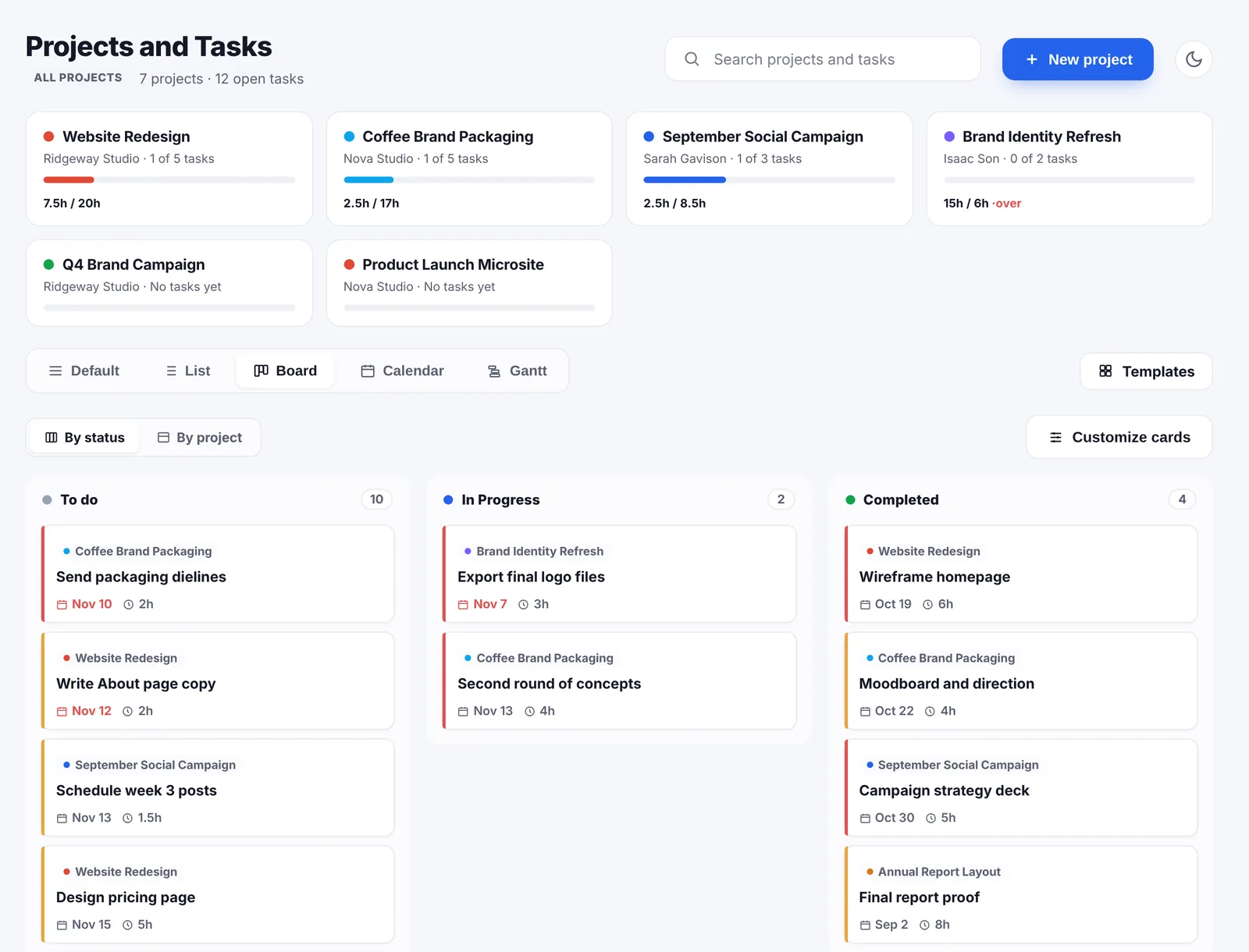
- All views in the one plan. List, board, calendar and Gantt views of your projects and tasks, without a premium tier.
- It tells you what the coming months look like. A forecast up to 24 months ahead from unpaid invoices, repeating payments and what is left on open projects.
- It opens on what to do first. Overdue invoices, late projects and whatever is due today, most urgent first.
- It looks after you too. Quiet hours, an away mode, a nudge when you pass your weekly hours cap, and Slow Month, one month a year without paying, after your first three.
Feature by feature
Projects and tasks
In Trello a board holds lists, and lists hold cards with due dates, checklists, labels, members and attachments up to 10MB on Free or 250MB on Standard. Card templates and Butler rules cover repeating work. A card does not know which client it is for or what it is worth, unless you add that yourself with labels or custom fields.
In Go Lancer a project belongs to a client, or stands alone, with start and due dates, status, priority, a project value and an hourly rate. Tasks inside it have subtasks, estimated hours, dates, priority and status, and projects and tasks take attachments up to 20MB each. Project templates bring their tasks and an invoice setup with them, so a repeat job starts in one click.
Views
Trello's board view is on every plan. Calendar, timeline, table, dashboard and map views are on Premium, at $12.50 a user a month, or $10 billed yearly. Go Lancer has a default view, a list, a board, a calendar and a Gantt chart for every user, in the one plan.
Clients and follow-ups
On a Trello board a client is whatever you make it: a list, a label or a card with a custom field. Trello does not know what a client owes you, how many hours you have not billed them yet, or when you last spoke.
In Go Lancer every client has a status (prospect, active, past or archived), their currency, rate, billing details and your own custom fields. The clients page opens on what needs you today: invoices that are overdue and by how many days, and hours you tracked but have not invoiced, with the amounts. Each client also has a follow-up rule, for example every 30 days, and sending an invoice or a reminder counts as contact, so the next date updates on its own.
Time tracking
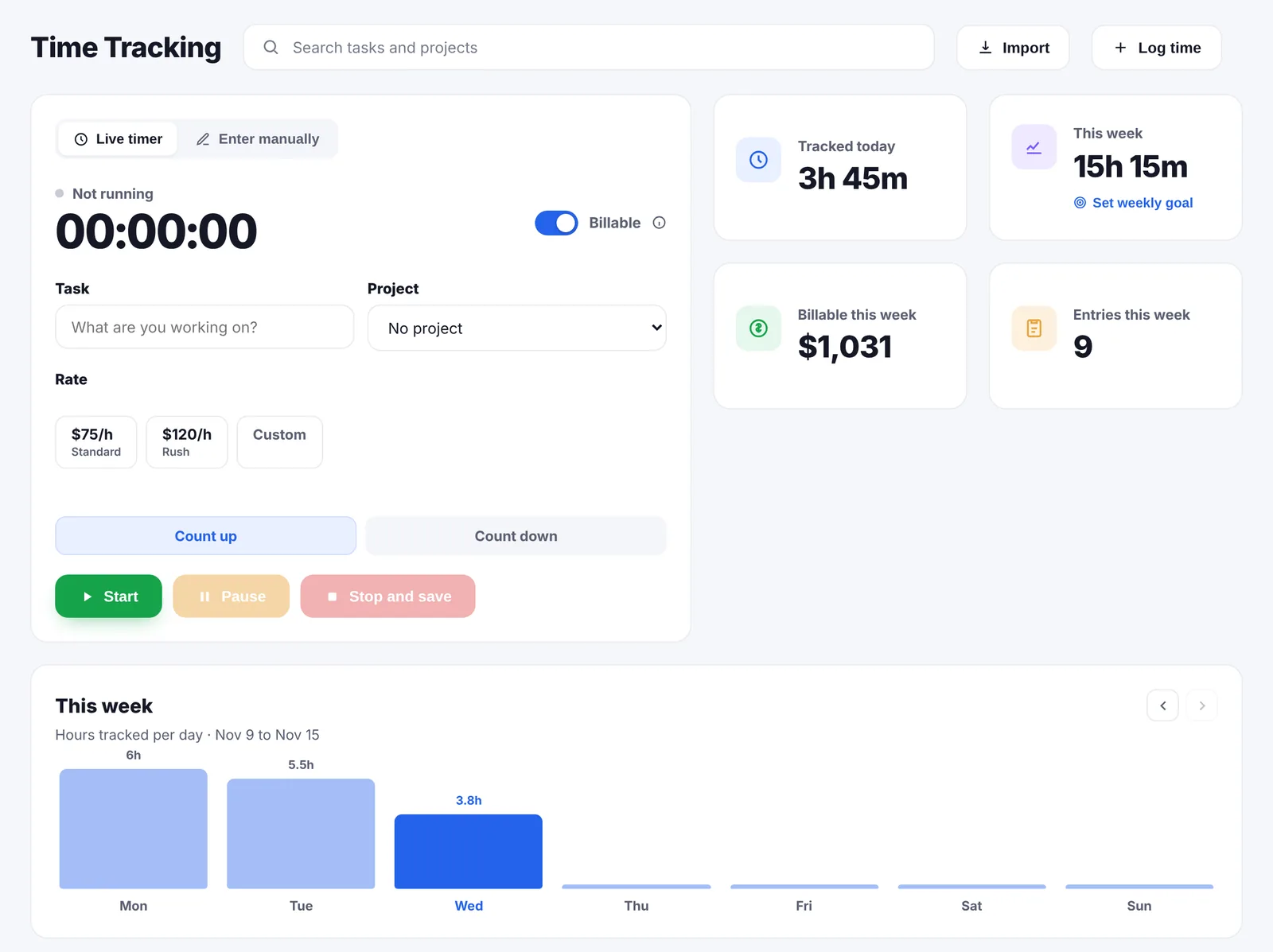
Trello has no time tracker of its own; freelancers add one through a Power-Up or keep a separate app open, such as Clockify or Harvest, and the hours live there, not on the card. In Go Lancer you start the timer from the task itself, counting up or down, or log time afterwards. Each entry gets one of your saved rates and a switch for billable or not, and the week is a chart of hours per day. If your old hours are in Toggl, Clockify or Harvest, they import with an API token, or from an Excel or CSV file or a Google Sheet.
Invoices and payment reminders
Trello does not send invoices. Go Lancer sends them as a PDF from your name, or from your own Gmail if you connect it, with your logo, a tax percentage, five designs, recurring invoices from weekly to yearly and an optional card payment link through your own Stripe account. Reminders are one switch for the whole account: by default a day before the due date, on the due date, then every 7 days up to 3 times, in your own text with the invoice attached, never during your quiet hours, and they stop the moment the invoice is paid. Invoices go out in any of 43 currencies.
Automations
Trello's Butler runs rules when something happens on a board, plus card and board buttons, with 250 runs a month on Free, 1,000 on Standard and no limit on Premium. It can also post to Slack and send emails from a board. Go Lancer has no rule builder. What it automates is fixed and about money: drafts from tracked hours, recurring invoices, payment reminders and client follow-up reminders.
Dashboard
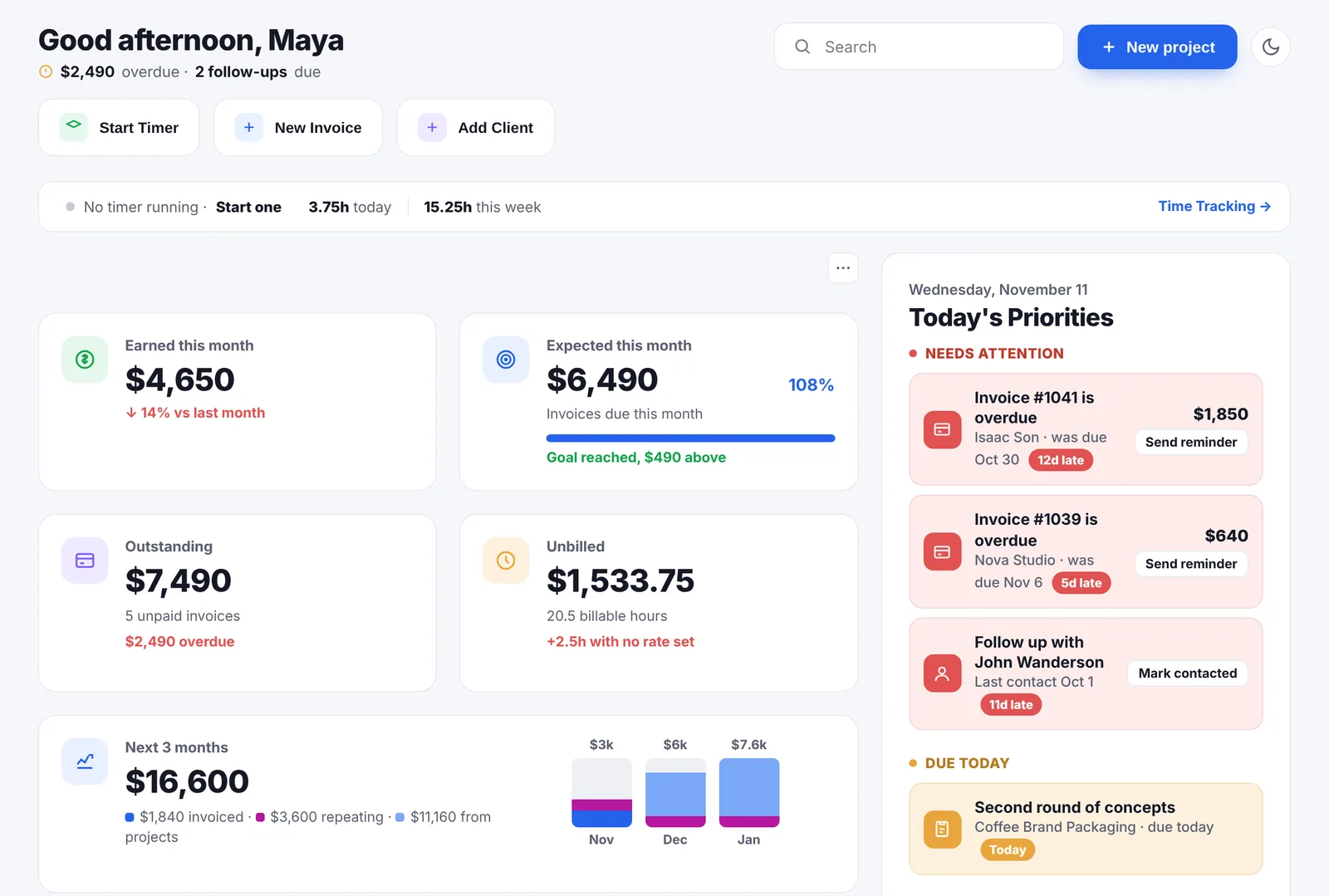
Trello's dashboard view, on Premium, charts the cards on a board. Go Lancer's dashboard opens on today's priorities, and below them you pick the tiles yourself and drag them into order: what you earned this month, outstanding, unbilled, progress towards your income goal, the overdue amount and more. A Quick notes box catches a thought mid-task and turns it into a task with one click. On the Invoicing page is a forecast for the next 6, 12 or 24 months.
A month with both
Say you are a designer with six clients and a board for each, and you bill most of them by the hour.
With Trello, the boards are free. The hours go into a separate time tracker. At the end of the month you open the tracker, total the hours per client, open your invoicing tool or a document template, type the invoices, send them, and put a note in your calendar to chase the ones that are not paid. The board knows the work is done; it does not know whether you were paid for it.
With Go Lancer, it is $14.99 a month for all of it. You start the timer on the task you are working on, and by the end of the month each project has a draft invoice with the hours on it. You check the drafts and send them, and the reminders are already on. The dashboard shows what came in and what is still owed.
If the board is all you need, Trello's free plan is enough. If you also pay for a time tracker and an invoicing tool and spend an evening a month moving hours between them, Go Lancer does that part for you.
The two side by side
| Go Lancer | Trello | |
|---|---|---|
| Price and plans | ||
| Price | $14.99 a month, one plan | Free plan; $6 or $12.50 per user a month |
| Time and the work | ||
| Board view | ✓ | ✓ |
| List, calendar and timeline | ✓ list, calendar, Gantt | Calendar and timeline on Premium |
| Table, dashboard and map views | Dashboard of your business, no table or map | ✓ Premium |
| Subtasks and estimates | ✓ subtasks, estimated hours, priority | Checklists |
| Projects linked to clients | ✓ with the client's currency and rate, and a project value | Labels or custom fields |
| Project templates | ✓ with tasks and an invoice setup | ✓ board and card templates |
| Attachments | Up to 20MB a file, 10 per project or task | 10MB on Free, 250MB on Standard |
| Time tracking | ✓ timer on the task, saved rates | Through a Power-Up |
| Invoices | ✓ draft from tracked hours, 43 currencies | ✕ |
| Automatic payment reminders | ✓ | ✕ |
| Card payments | ✓ through your own Stripe | ✕ |
| Clients and documents | ||
| Client follow-up rhythm | ✓ | ✕ |
| Planning, wellbeing and limits | ||
| Income forecast | ✓ 6, 12 or 24 months | ✕ |
| Wellbeing settings | ✓ quiet hours, away mode, overwork nudge | Not advertised |
| Automations | Fixed: drafts, recurring invoices, reminders | ✓ Butler rules and buttons |
| Collaborators | ✕ | ✓ |
| Inbox and planner | Quick notes on the dashboard | ✓ capture from email, Slack, Teams; calendar planner |
| Integrations | Stripe, Gmail, Google Calendar | ✓ Power-Ups, Slack, Jira, an MCP server on Premium |
| Import | ✓ clients from CSV, Excel, Sheets, HubSpot, Notion; hours from Toggl, Clockify, Harvest | Boards cannot be re-created from an export |
| Lifetime plan | $299 once | Not offered |
So which one
If you share boards with other people, rely on automations, or only need somewhere to move cards across, Trello does that and the free plan may be all you ever pay. This is not a close call.
If you work alone and the board is one of three tools, next to a time tracker and an invoicing app, Go Lancer puts the three in one place. The hours you track on a task are the hours on the invoice, and the invoice chases itself.
Before you decide, look at last month. If any hours you worked never made it onto an invoice, Go Lancer fixes that part.
Weighing a bigger project tool instead? We also compare Go Lancer with Basecamp, which adds message boards, chat and client access but no invoicing.
Switching from Trello
- Export your boards. In Trello, any board member can export a board as JSON, and boards in Premium workspaces export as CSV too. Keep the file as your archive; Trello itself cannot re-create a board from it either.
- Bring your clients. Import them into Go Lancer from a CSV or Excel file, a Google Sheet, HubSpot or Notion. Columns Go Lancer does not know become custom fields.
- Bring your hours. If you tracked time in Toggl, Clockify or Harvest, import it with an API token, or from a CSV file.
- Set up the open projects. Create a project for each active client job and add the tasks still to do. For repeat work, save a project as a template once.
You can also keep Trello for boards you share with others and use Go Lancer for your own projects, hours and invoices.
Questions people ask
Is Trello free for freelancers?
Yes, Trello's free plan covers up to 10 boards per workspace, up to 10 collaborators and 250 automation runs a month. Standard is $6 a user a month and Premium $12.50. Go Lancer has no free plan: it is $14.99 a month, with time tracking and invoices included.
Does Trello have time tracking?
Not built in. Freelancers add a time tracking Power-Up or use a separate app, and the hours stay there. Go Lancer has a timer on every task, and billable hours land on a draft invoice by themselves.
Can Trello send invoices?
No. Trello organises the work but does not invoice, take payments or send payment reminders, so freelancers use a separate invoicing tool. Go Lancer does all three.
Does Go Lancer have a Kanban board like Trello?
Yes. Projects and tasks have a board view, plus a list, a calendar and a Gantt chart, all in the one plan. Trello's calendar and timeline views are on Premium.
What does Trello do that Go Lancer does not?
A free plan, shared boards with clients, subcontractors or a team, Butler automations, Power-Ups, an Inbox that captures to-dos from email, Slack and Teams, and table, dashboard and map views on Premium.
What does Go Lancer do that Trello does not?
Time tracking on the task, invoices drafted from tracked hours, automatic payment reminders, card payments through your own Stripe, client records with currency and rates, a follow-up rhythm per client and a forecast up to 24 months ahead.
Can I import my Trello boards into Go Lancer?
Not directly. Trello exports boards as JSON, and as CSV on Premium, but Go Lancer does not import boards. You bring clients from a CSV, Excel, Google Sheets, HubSpot or Notion, hours from Toggl, Clockify or Harvest, and set up open projects by hand or from a template.
Can I use Trello and Go Lancer together?
Yes. Some freelancers keep Trello for boards they share with clients or a team, and use Go Lancer for their own projects, hours, invoices and reminders.
Can I use Go Lancer with a team, the way Trello allows?
No. Go Lancer is built for one person and has no collaborators. If you work on the same board as other people, Trello fits that better.
Do Go Lancer and Trello both have a free trial?
Trello has a free plan and a free Premium trial. Go Lancer offers 7 days, asks for a card at sign-up and charges after the trial unless you cancel.
Sources
Everything about Trello on this page was read from Trello's own pages on 12 November 2026:
- Trello pricing: plans, prices, board limits, automation runs, file size and views
- Butler automation: rules, card and board buttons
- Inbox and Planner: capturing to-dos and planning around your calendar
- Power-Ups and the Trello MCP server: add-ons and AI access
- Export data from Trello: JSON and CSV exports
Prices move, and the figures above are what Trello’s own pages said on the date given, so check theirs before you pay for anything. We wrote this page, Trello did not: there is no partnership between us, nobody asked us to write it, and the name Trello belongs to them.
Keep going
Go Lancer vs FreshBooks Go Lancer vs HoneyBook Go Lancer vs Dubsado Go Lancer vs Plutio Go Lancer vs Bonsai Go Lancer vs Scoro Go Lancer vs Harvest Go Lancer vs Basecamp Go Lancer vs Indy Go Lancer vs Zoho What Go Lancer does Pricing Free tools for freelancers Billable hours calculator Best apps for freelancers How to invoice as a freelancerSee it before you decide
Seven days, your own clients and invoices in it, and a founder who answers email. Then $14.99 a month, cancel any time.