Clients and follow-ups
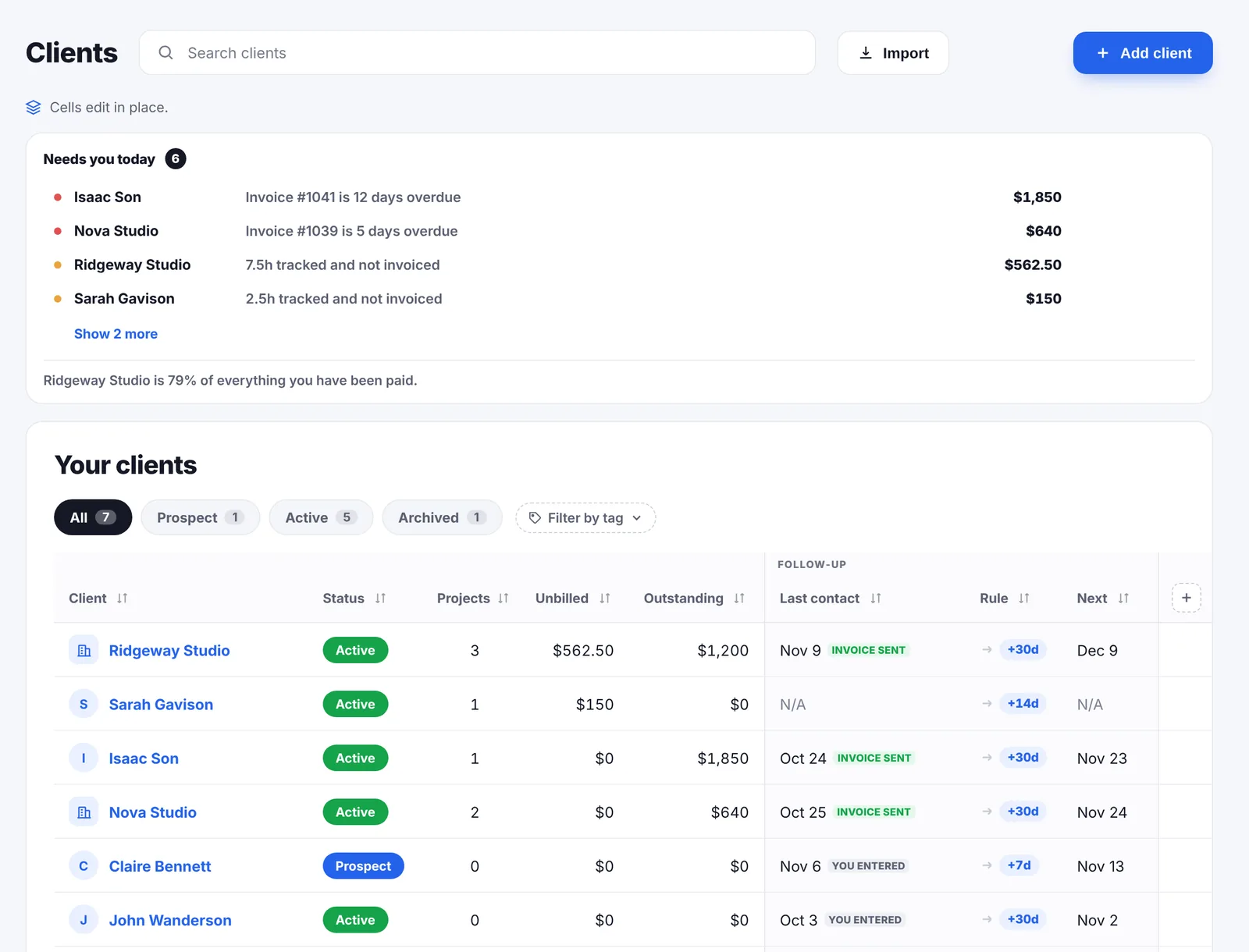
Each client gets a rhythm: every 7, 14, 30 or 90 days, or a date you pin. The Clients page opens on one line per client who needs you today, whether that is an overdue invoice, hours you have not billed or a conversation that has gone quiet.
Everything on this page is in the one plan at $14.99 a month, with no limit on clients.
Quick answer
Go Lancer keeps a client record with a status, contact details, tags, custom fields and three follow-up columns: when you last spoke, how often you want reminding, and the date that produces. The Clients page opens on a Needs you today list, one line per client, led by overdue invoices, then unbilled hours, then due follow-ups, then late projects. Once a client has paid something, Go Lancer shows how many days they take to pay, privately. Clients come in from CSV, Excel, Google Sheets, HubSpot or Notion.
Needs you today
The page opens on the work rather than on an address book. Go Lancer looks at every client and surfaces one line each, heaviest reason first:
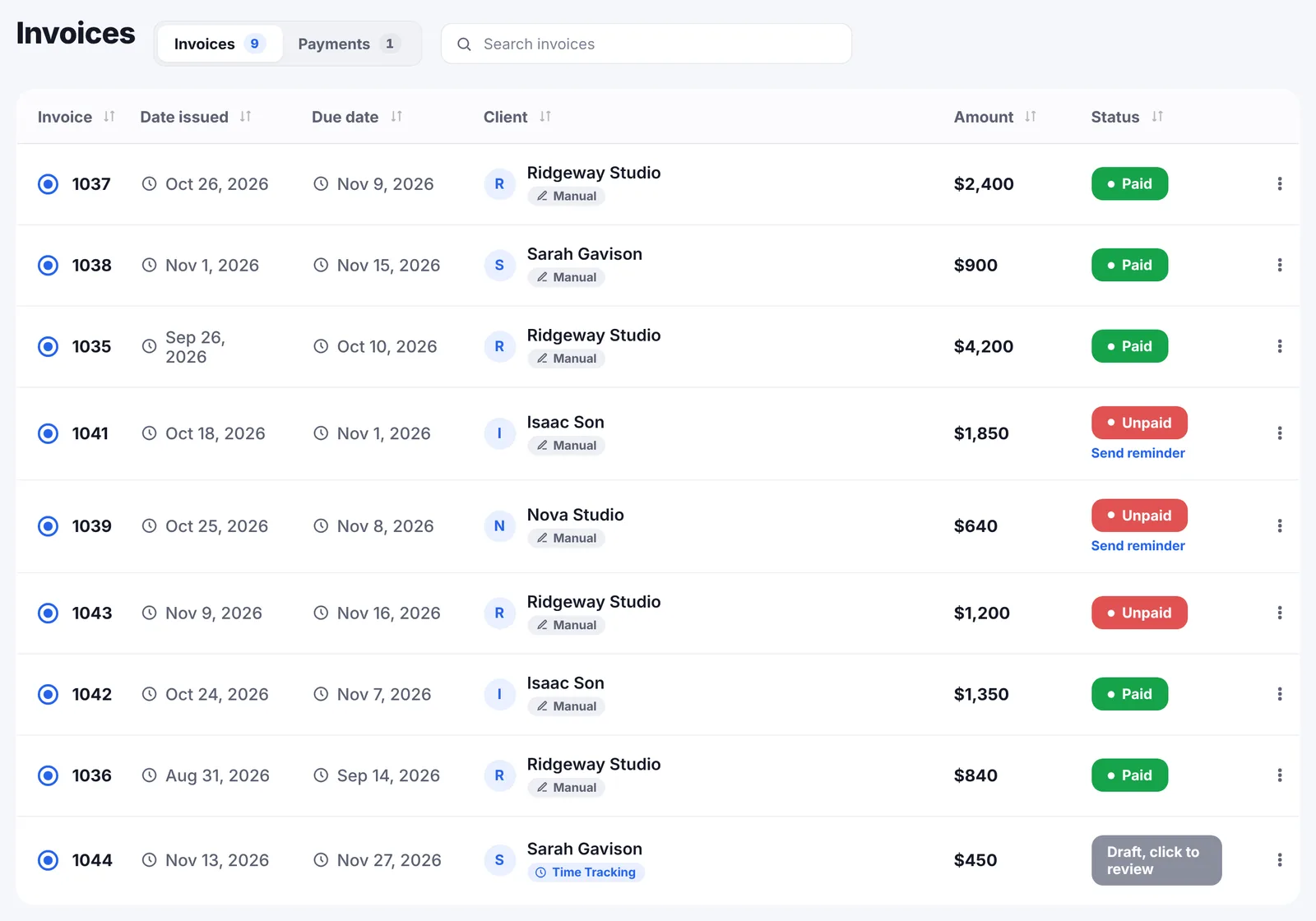
- An invoice is overdue, with how many days late and how much is still owed.
- Hours tracked and not invoiced, with the hours and what they are worth.
- A follow-up is due, today or some days ago.
- A project is past its due date.
Only the heaviest reason for each client appears. Five lines about the same person is a lecture, not a to-do list.
I keep everything in a Google Sheet, and I still lose track of clients in my own database. I’d just want nudge notifications.
A rhythm per client
Clients do not go cold because you decided to ignore them. They go cold because nothing reminded you. The follow-up block is three columns that always travel together:
- Last contact. The date you last spoke. Sending an invoice or a reminder counts.
- The rule. Every 7, 14, 30 or 90 days, your account default, or never.
- Next. The date the rule produces, which you can override by pinning a specific date instead.
Setting Last contact restarts the clock, so a client you called this morning drops away and comes back when the interval is up. There is a note field for what the next conversation is supposed to be about.
How this client actually pays
Once a client has paid something, Go Lancer averages the days they took across their paid invoices and shows it as Pays in N days. It adds a word for the pattern: a fast payer up to 14 days, on time up to 30, a slow payer up to 60, and slower than most beyond that. It also says what the figure rests on, whether that is one paid invoice or twenty.
Next to it is a private three-way mark for how the client is to work with: easy, fine or difficult. Both are yours alone. Neither is ever shown to a client or included in an export.
Between the two you know whether to ask for a deposit, how firm the reminders should be, and whether the next job wants a deposit on the invoice, and whether to take the next job at all.
When one client is most of your income
If one client is half or more of your paid revenue, and you have at least three clients, Go Lancer says so on the Clients page. It is the number freelancers usually discover in the month that client leaves.
The record itself
- Status. Prospect, active, past or archived.
- Money, worked out for you. Projects, unbilled work and outstanding balance sit on the row without you entering anything.
- Contact details and tags, plus a company and contact person for business clients.
- Billing details. Address, VAT number, default currency, default rate and payment instructions live on the client, so invoices for them start out filled in.
- Custom fields in text, number, date or currency, for the columns only your business needs.
- Columns you arrange. Add, remove, reorder and sort them; the arrangement survives a reload. The three follow-up columns move as one block.
Getting your clients in
Nobody starts with an empty list. Go Lancer imports from a CSV or Excel file, or a Google Sheets link, read in your browser, and from HubSpot and Notion through the server, because both need a secret token that should never sit in browser code.
Imported clients are tagged with where they came from, and a column Go Lancer does not recognise becomes a custom field rather than being dropped.
What the client side does not do
- No client portal. Clients get invoices, reminders and an hours report by email. There is nothing for them to log into.
- No shared access. One login, one freelancer: no seats and no roles.
- No sales pipeline or deal stages. The statuses are prospect, active, past and archived, not a CRM funnel.
- No email inbox. Go Lancer sends invoices and reminders; it is not a place to read client mail.
If a portal or a pipeline is what you came for, the comparisons say which tool has it and what it costs.
Questions people ask
What does a client record hold?
A name, a status of prospect, active, past or archived, an email, a company and contact person, tags, and the follow-up block. Alongside those, Go Lancer works out how many projects the client has, how much work is unbilled and how much is outstanding.
How does the follow-up rhythm work?
Pick how often you want reminding for that client: every 7, 14, 30 or 90 days, your account default, or never. Go Lancer works the next date out from when you last spoke. You can also pin a specific date instead, which replaces the rhythm.
What counts as contact?
The date in Last contact. Setting it restarts the rhythm, so a client you called today drops to the bottom of the list and comes back when the interval is up.
What is the Needs you today list?
One line per client, sorted by what matters most: an invoice that is overdue, hours tracked and not invoiced, a follow-up that is due, or a project past its due date. Only the heaviest reason per client is shown, so the list stays a to-do list rather than a lecture.
Does Go Lancer tell me how a client pays?
Yes, once they have paid something. It works out the average days to pay across their paid invoices and shows it as "Pays in N days", with a word for the pattern: a fast payer, on time, a slow payer, or slower than most. It is private to you.
Can I note what a client is like to work with?
Yes. A three-way picker marks a client as easy, fine or difficult to work with. It is private to the freelancer, never shown to clients and never exported.
Will it warn me if one client is most of my income?
If one client is half or more of your paid revenue and you have at least three clients, Go Lancer says so on the Clients page. Freelancers usually discover that number the month the client leaves.
Can I change the columns?
Yes. Add, remove, reorder and sort them, and the arrangement survives a reload. The three follow-up columns move as one block, because last contact, the rule and the next date only make sense together.
Can I add my own fields?
Yes. Custom fields in text, number, date or currency add your own columns, and a column an import does not recognise becomes one automatically.
How do I get my clients in?
From a CSV or Excel file, or a Google Sheets link, which are read in your browser. HubSpot and Notion go through the server because both need a secret token that must never sit in browser code. Imported clients are tagged with where they came from.
Can a client log in and see their projects?
No. Go Lancer has no client portal. Clients get invoices, reminders and an hours report by email; everything else stays on your side.
How often should a freelancer follow up with past clients?
Often enough that they have not forgotten you, which for most work is every 30 to 90 days. Clients rarely leave on purpose; they leave because nobody got in touch and someone else did.
What should a freelancer keep about each client?
How to reach them, what they owe, what is unbilled, when you last spoke, and how they pay. A long history of notes is nice to have, but the five facts above are what change a decision.
Do freelancers need a CRM?
Rarely in the sales sense. Deal stages and pipelines are built for a team working many leads at once. What a solo freelancer needs is a short list of people, what each one owes, and a reminder not to go quiet on them.
What is a CRM?
Software for keeping track of relationships with customers: who they are, what has been said, and what to do next. Most are built for sales teams working many leads, which is why they feel oversized to one person with a dozen clients.
What is revenue concentration?
The share of your income coming from one client. The higher it is, the more a single email ends your year, which is why it is worth knowing before that email arrives.
Keep going
Invoicing Projects and tasks Time tracking Pricing Compare with other apps Payment reminder emails Late fee calculator About Go LancerPut your clients in and see who needs you
Seven days, your own clients and invoices in it, and a founder who answers email. Then $14.99 a month, cancel any time.