Go Lancer vs Toggl Track
Toggl is the better time tracker and its own invoicing page says what it does next: it hands you the numbers an invoice needs. Somebody still has to write the invoice, send it and chase it.
Quick answer
Toggl Track is free for up to 5 users and tracks time better than Go Lancer does, with automated tracking, idle detection, desktop and mobile apps and browser extensions. What it does not do is invoice: its own page describes exporting a report and using it in your invoicing tool. Go Lancer costs $14.99 a month and closes that gap, putting billable hours on a draft invoice as you track them and chasing the client until it is paid. Toggl hours import with an API token, so you can keep tracking there if you prefer.
Pick Go Lancer if
- Your hours are tracked fine and the invoices still go out late
- You want hours to become an invoice without an export in between
- You want reminders chasing the client, not a report in your downloads folder
- You want clients, projects and what you are owed in the same place
Pick Toggl Track if
- Tracking is the whole job and you want to pay nothing
- You want automated tracking, idle detection and a Pomodoro timer
- You track from a desktop app, a phone or a browser extension
- You need reports on profitability, utilisation and workload
Price
| Go Lancer | Toggl Track | |
|---|---|---|
| Price and plans | ||
| Price | $14.99 a month, or $149 a year | Free; Starter $10, Premium $20 a user a month |
| Billed yearly | $149 a year | Starter $9, Premium $18 a user a month |
| Free plan | ✕ 7-day trial | ✓ up to 5 users, unlimited tracking |
| What the free plan holds back | No free plan | Billable rates, time estimates, saved reports; 6 months of data |
| Billed per person | ✕ one account, one price | ✓ per user |
| Free trial | 7 days | 30 days on paid plans |
For a freelancer the free plan is genuinely enough to track time. The moment you want Toggl to work out what those hours are worth, billable rates are on Starter at $10 a month, and you still have no invoice at the end of it.
Where Toggl is the better tool
This is not close. Toggl tracks time better than we do and most other things do.
- Automated tracking. It records the apps and sites you used on a timeline and you choose what becomes an entry.
- It notices you walked away. Idle detection prompts you when the timer runs and the machine does not.
- Focus and Pomodoro timers, and recurring time goals with alerts when you are under or over.
- Calendar events become entries, from Google or Outlook, automatically or on a click.
- It runs everywhere. Windows and macOS apps, iOS, iPad and Android, Firefox and Chrome extensions, a CLI and an MCP server.
- Reports on the work. Profitability by project, client, task, member and tag, utilisation, workload and forecasting, exported to PDF, CSV or XLSX.
- Teams. Timesheet approvals, access levels, guest access for clients, multiple workspaces, SSO and time off.
The sentence this whole page turns on
Toggl's own invoicing page is honest about where it stops. It describes Toggl as handing you every number the invoice needs. The workflow it then sets out is: track against a client, set billable rates, filter a report by client and date, export it as CSV or PDF, and use it in your invoicing tool or attach it to the invoice as proof of work.
That is four steps after the work is finished, every month, by you. And the page names no invoicing integration to shorten them.
Where Go Lancer is the better tool
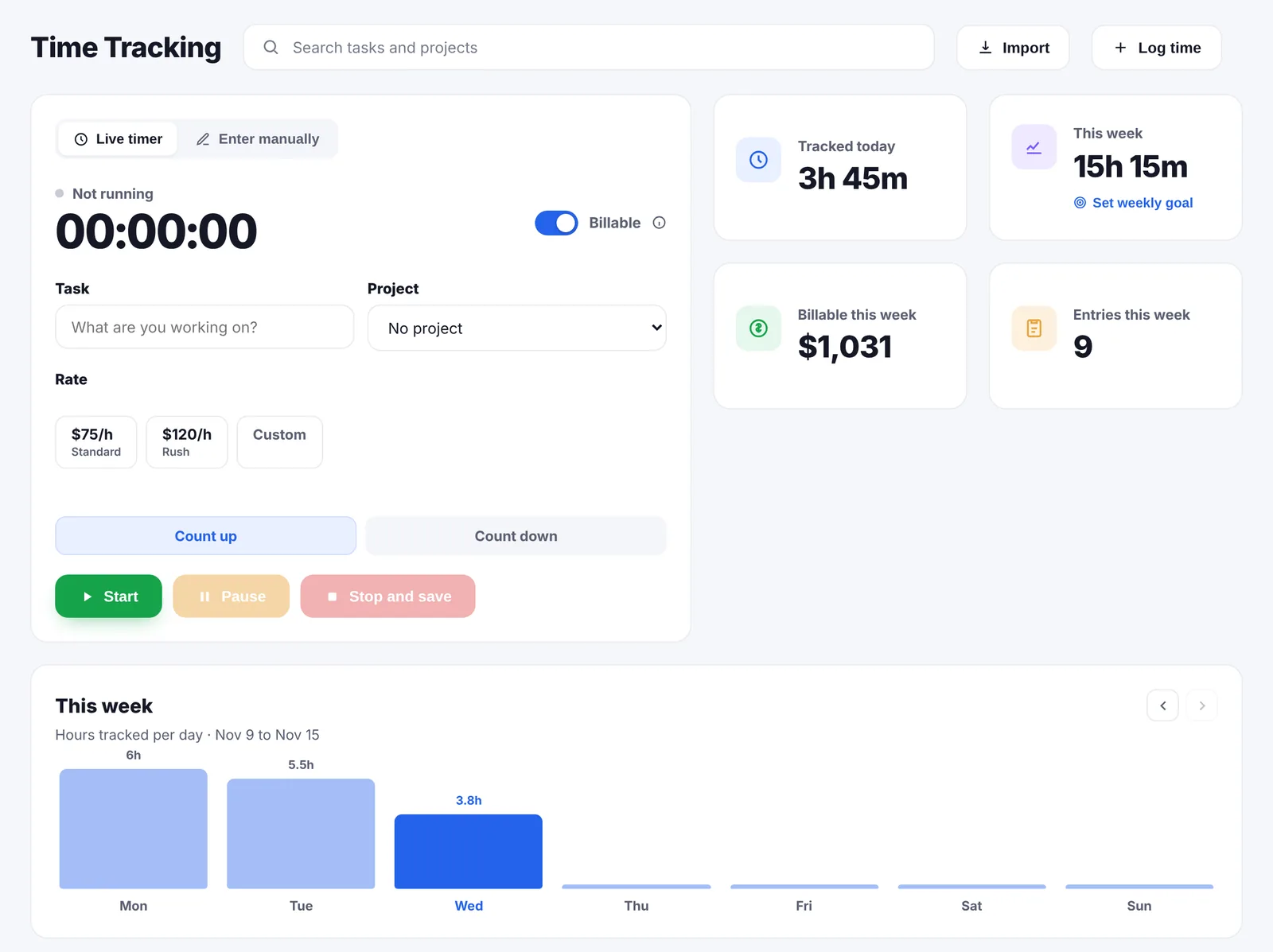
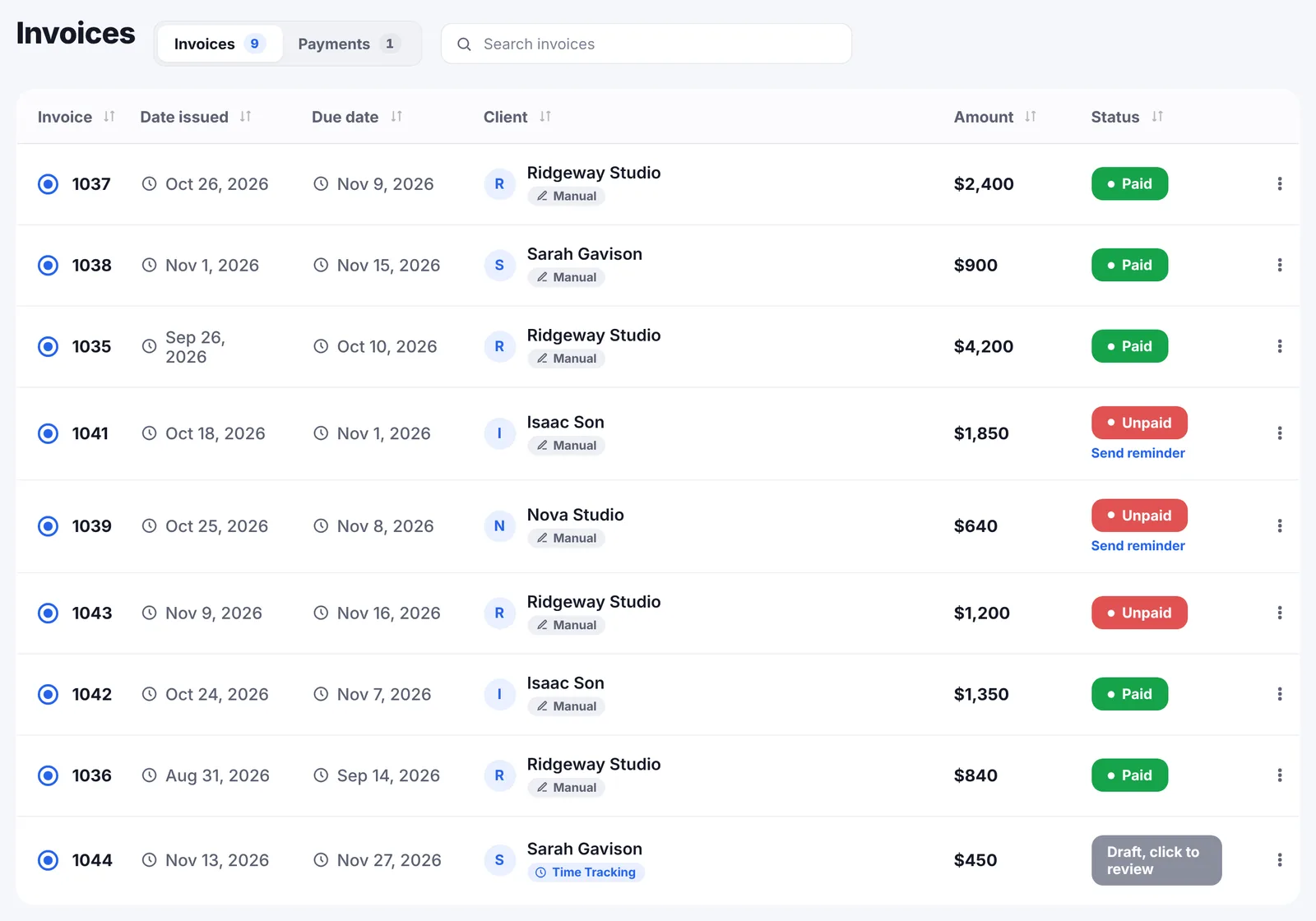
- The hours are already on an invoice. Billable time with a rate lands on a draft invoice for that project while you work, so there is no export, no filtering and no retyping.
- The invoice sends itself to the client, as a PDF from your own email address, in any of 43 currencies, with your numbering and nothing of ours on it.
- Reminders chase it a day before the due date, on the due date, then every 7 days until paid, in your wording, and they stop when it is paid.
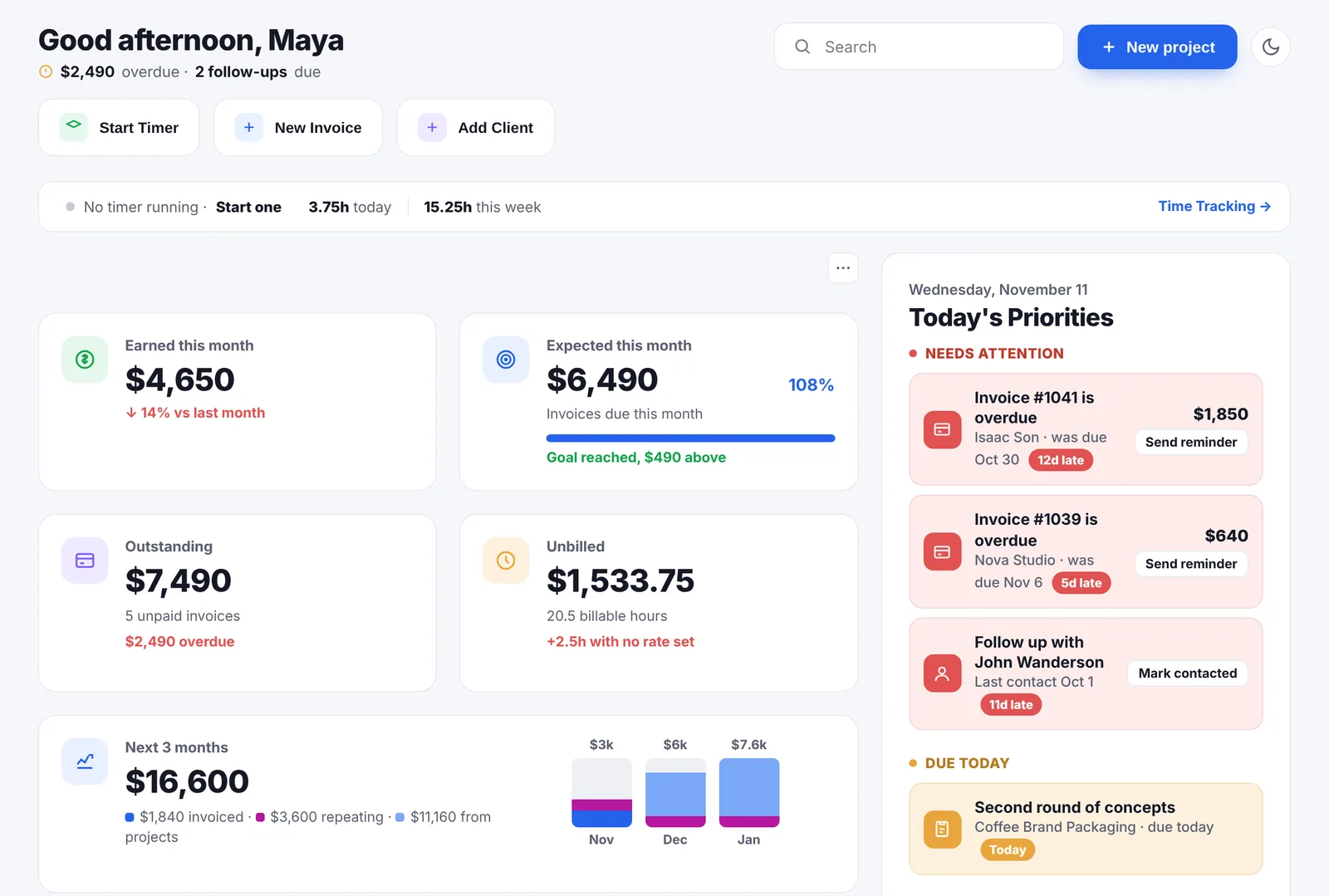
- You can see what you are owed without building a report: outstanding, overdue and unbilled are worked out for you.
- It tells you what is coming, over 6, 12 or 24 months, split into invoiced, repeating and not yet billed.
- Clients have a follow-up rhythm, so the quiet ones surface before they are gone.
- One price, not per seat. $14.99 a month whatever the year does.
A month with both
Say you are a freelance developer with four clients, billed by the hour, one of them in euros. Ten invoices a month.
In Toggl, tracking is a pleasure. The desktop app runs all day, the browser extension catches the Jira ticket, idle detection saves you from the hour you spent at lunch. On the 1st you open Reports, filter by client, pick the date range, export four CSVs, open your invoicing tool, create four invoices, type the numbers in, send them, and put a note in your calendar to check in two weeks. Billable rates meant Starter, so this costs $10 a month.
In Go Lancer, tracking is plainer: a timer on the task, counting up or down. But on the 1st the four invoices already exist as drafts with the hours on them. You open each, check it, send it. The euro one stays in euros. Nobody needs a note in the calendar, because the reminders go out on the 8th whether or not you remember.
If the first month sounds fine to you, Toggl is cheaper and better at its job. If you recognise the part where the export never happens and the invoice goes out on the 20th, that is what the $14.99 buys.
The two side by side
| Go Lancer | Toggl Track | |
|---|---|---|
| Price and plans | ||
| Built for | One freelancer, from hours to paid | Tracking time, solo or in a team |
| Price of the plan you would be on | $14.99 a month | Free, or $10 a user with billable rates |
| Time and the work | ||
| Timer | ✓ on the task, counts up or down | ✓ timer, focus and Pomodoro modes |
| Automated tracking of apps and sites | ✕ | ✓ |
| Idle detection | ✕ | ✓ |
| Calendar events into entries | ✕ two-way sync for tasks | ✓ Google and Outlook |
| Desktop apps, browser extensions | ✕ installs from the browser | ✓ Windows, macOS, Chrome, Firefox |
| Billable rates | ✓ on the client, project or entry | Starter and up |
| Projects and tasks | ✓ five views, templates | ✓ board, list, timeline, calendar |
| Invoicing and payments | ||
| Creates an invoice | ✓ five designs, your numbering | ✕ exports the numbers |
| Hours onto the invoice | ✓ automatically, as you track | Export a report, invoice elsewhere |
| Sends the invoice to the client | ✓ from your name or Gmail | ✕ |
| Automatic payment reminders | ✓ until paid | ✕ |
| Card payment on the invoice | ✓ your own Stripe | ✕ |
| Currencies | ✓ 43, daily ECB rates | Rates per workspace or project |
| Planning, clients and limits | ||
| Reports on hours | Weekly totals, a PDF hours report | ✓ profitability, utilisation, forecasting |
| Income forecast | ✓ 6, 12 or 24 months | Forecasting of hours, not income |
| Client follow-up rhythm | ✓ | ✕ |
| Wellbeing settings | ✓ away mode, quiet hours, hour cap | Time goals and reminders |
| Team features | ✕ | ✓ approvals, SSO, guest access |
| AI assistant | ✕ | ✓ MCP server and CLI |
So which one
If you track time for its own sake, to know where the week went or to bill through accounting software you already have, Toggl is better than us and free for one person. Take it.
Go Lancer is for the freelancer who has tracked hours sitting in a tool right now that nobody has invoiced. Not because the tracker is bad, but because tracking and billing are two different habits and the second one is the one that slips.
Bringing your Toggl hours over
- Paste a Toggl API token and Go Lancer imports your time entries. The token is not stored. A CSV export works just as well.
- Bring the clients from a CSV or Excel file or a Google Sheet; columns we do not recognise become custom fields.
- Set rates on the client or the project, so imported hours know what they are worth.
- Upload any open invoices as PDFs so everything sits in one list.
- Or keep tracking in Toggl and bring the hours over each month. The import is built for exactly that.
Other Toggl alternatives
Go Lancer is one Toggl alternative, for the billing half rather than the tracking half. These are the others we have compared side by side, each from the vendor's own pages:
- Clockify. The closest substitute: free for up to 5 users, with invoicing on its $5.49 Standard plan.
- Harvest. Time tracking with invoicing built in: free for 1 seat and 2 projects, then $11 a seat.
- FreshBooks. Accounting software that also tracks time, with expenses and bank reconciliation.
- Moxie. All-in-one for freelancers, with proposals and contracts, from $12 a month.
- Plutio. The widest of them, with a client portal and a team, capped at 9 clients on its cheapest plan.
- Notion. If your timesheet is a database you built yourself.
All of them are on the comparisons page.
Questions people ask
Can Toggl Track send an invoice?
No, and Toggl says so on its own invoicing page: it hands you every number the invoice needs. You filter a report by client and date, export it as CSV or PDF, and raise the invoice in another tool or attach the report to it as proof of work.
How much does Toggl Track cost?
Free for up to 5 users with unlimited tracking, 100+ integrations, exportable reports and 6 months of data storage. Starter is $10 per user a month, or $9 billed yearly. Premium is $20, or $18 yearly. Enterprise is custom. There is a 30-day trial on the paid plans.
What does a freelancer lose on Toggl's free plan?
Billable rates, time estimates, saved reports and unlimited data storage are on Starter. So a freelancer who wants Toggl to work out what the hours are worth is on $10 a month, not free, and the invoice still has to be made somewhere else.
Is Toggl better at tracking time than Go Lancer?
Yes, clearly, and we are not going to pretend otherwise. Automated tracking that records apps and sites on a timeline, idle detection, Pomodoro and focus modes, calendar events that become entries, desktop apps for Windows and macOS, iOS and Android, browser extensions, a CLI and an MCP server. Go Lancer has a timer on the task that counts up or down, and manual entries.
So why would a freelancer use Go Lancer instead?
Because the timer is not the problem. The problem is the gap between the hours and the money: the invoice that gets written late, sent manually and never chased. Go Lancer puts billable hours on a draft invoice as you track them, sends it from your own address and reminds the client until it is paid.
Can I bring my Toggl hours over?
Yes. Paste a Toggl API token and Go Lancer imports your time entries; the token is not stored. A CSV export works too.
Can I keep using Toggl and still use Go Lancer?
Plenty of people do, and the import is built for it. Track in Toggl because the apps are better, bring the hours over each month, invoice and chase from Go Lancer.
Which has better reports?
Toggl, for anything about the hours themselves: profitability by project, client, task, member and tag, utilisation, workload, forecasting, and exports to PDF, CSV and XLSX. Go Lancer reports on money instead, with an income forecast over 6, 12 or 24 months and a client's average days to pay.
Does Toggl do invoicing through an integration?
Its invoicing page names none. The integrations it lists, such as Jira, Asana, Slack and GitHub, are for tracking time, not for billing.
Which is better for a team, Go Lancer or Toggl Track?
Toggl. Timesheet approvals, access levels, guest access for clients, multiple workspaces, SSO and time-off management. Go Lancer is one login for one freelancer, with no seats and no roles.
Does Toggl have AI features?
Toggl publishes an AI page and runs an MCP server and a CLI, so an assistant can reach your tracked time. Go Lancer has no AI assistant.
What should I pick if I only track time?
Toggl, on the free plan, and do not spend $14.99 on us. This comparison is for the freelancer whose hours are tracked fine and whose invoices still go out late.
Sources
Everything about Toggl Track on this page was read from Toggl's own pages on 16 November 2026:
- Toggl features: tracking methods, reports, billable rates, projects, teams and the apps it runs on
- Time tracking and invoicing: the export-and-invoice-elsewhere workflow, in their own words
- Automated time tracker and work timer: automated tracking, idle detection and the focus modes
- Timesheets and time reporting: approvals, profitability, utilisation and exports
- Integrations and the MCP server: what Toggl connects to
- Plan names and prices as stated across Toggl's own pages: Free for up to 5 users, Starter $10 a user a month ($9 yearly), Premium $20 ($18 yearly), Enterprise custom, 30-day trial
Prices move, and the figures above are what Toggl’s own pages said on the date given, so check theirs before you pay for anything. We wrote this page, Toggl did not: there is no partnership between us, nobody asked us to write it, and the name Toggl belongs to them.
Keep going
All comparisons Time tracking Invoicing Payment reminders Billable hours calculator Hourly rate calculator PricingKeep tracking in Toggl. Let us do the invoice
Seven days, your own clients and invoices in it, and a founder who answers email. Then $14.99 a month, cancel any time.