Go Lancer vs Notion
Notion is free for one person and will hold anything you are willing to build. It will not send the invoice, chase it, or know when it was paid.
Quick answer
Notion's Free plan is $0 a month for one person and covers unlimited pages, databases and a calendar, so a freelancer can run clients and projects there for nothing. What it does not do is the money: an invoice in Notion is a page, and the sending, the chasing and the record of what is owed stay manual. Go Lancer costs $14.99 a month and does exactly those parts. Most people keep both, and Go Lancer imports clients straight from a Notion database.
Pick Go Lancer if
- Invoices go out late and nobody chases them
- You want hours to reach an invoice without being retyped
- You want to know what is owed and what is coming without building it
- You would rather use a tool than maintain one
Pick Notion if
- You want to pay nothing, and one person on the Free plan pays nothing
- Your business is mostly writing, notes and research
- You enjoy building your own system and want it to work your way
- You work with other people in shared pages
Price
| Go Lancer | Notion | |
|---|---|---|
| Price | $14.99 a month, or $149 a year | Free $0; Plus $10 a seat a month; Business $20 a seat a month |
| Free plan | ✕ 7-day trial | ✓ for individuals, unlimited pages |
| What the free plan limits | No free plan | File uploads up to 5MB each, less version history, fewer guests |
| What a paid plan adds | Everything is in the one plan | Plus: guests, history, larger uploads. Business: AI credits, deeper integrations |
| Billed per person | ✕ one account, one price | ✓ per seat |
For one freelancer, Notion's Free plan really is free, and we are not going to pretend otherwise. The question this page answers is not which costs less. It is which of them does the work.
Where Notion is the better tool
- It costs nothing for one person. Unlimited pages and databases on the Free plan.
- It bends to anything. A client tracker, a content calendar, a reading list and a CRM, all in the shape you decide.
- It is a better place to write and think. Docs, wikis and notes are what it was built for.
- It is built for working with other people. Shared pages, guests and permissions, which Go Lancer deliberately does not have.
- There are thousands of templates. Notion's own gallery lists 226 invoicing templates and nearly 13,000 freelance ones.
Where Go Lancer is the better tool
The difference is not features on a list. It is who does the work.
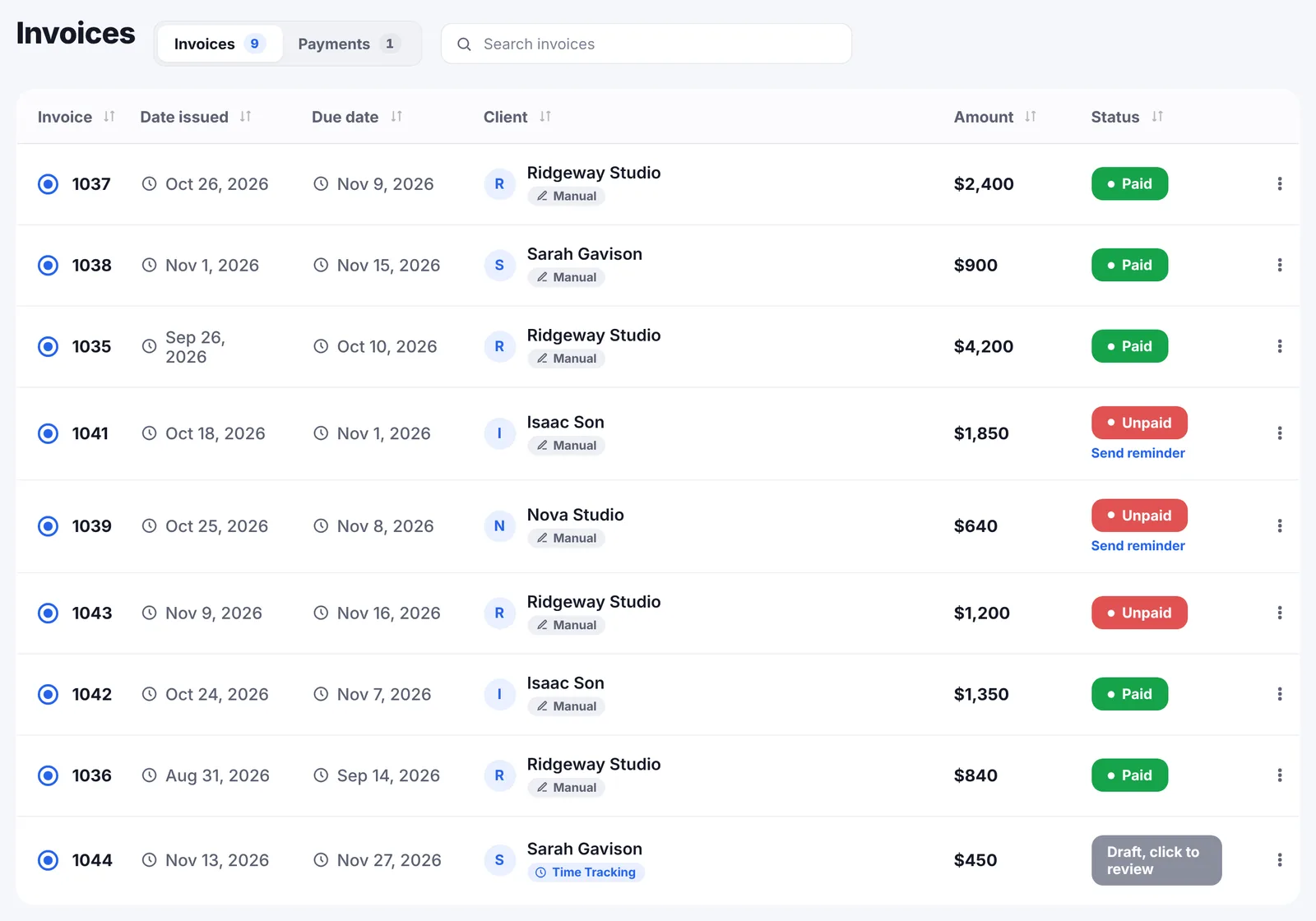
- The invoice sends itself to the client. A real PDF from your own address, with your numbering, in any of 43 currencies, not a page link.
- Reminders go out without you. A day before, on the due date, then every 7 days until it is paid, and they stop when it is paid.
- Hours become money. Billable time with a rate lands on a draft invoice while you work.
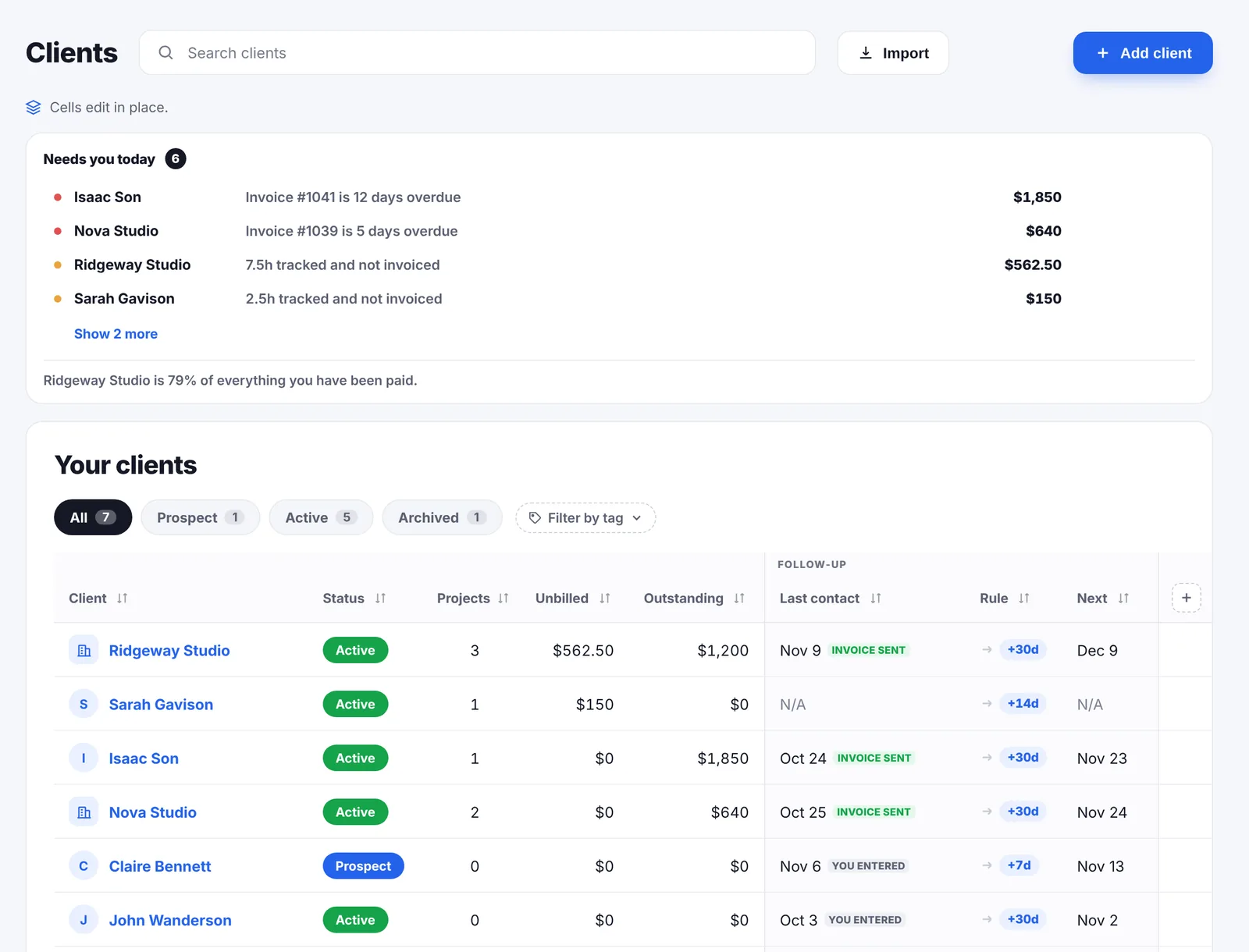
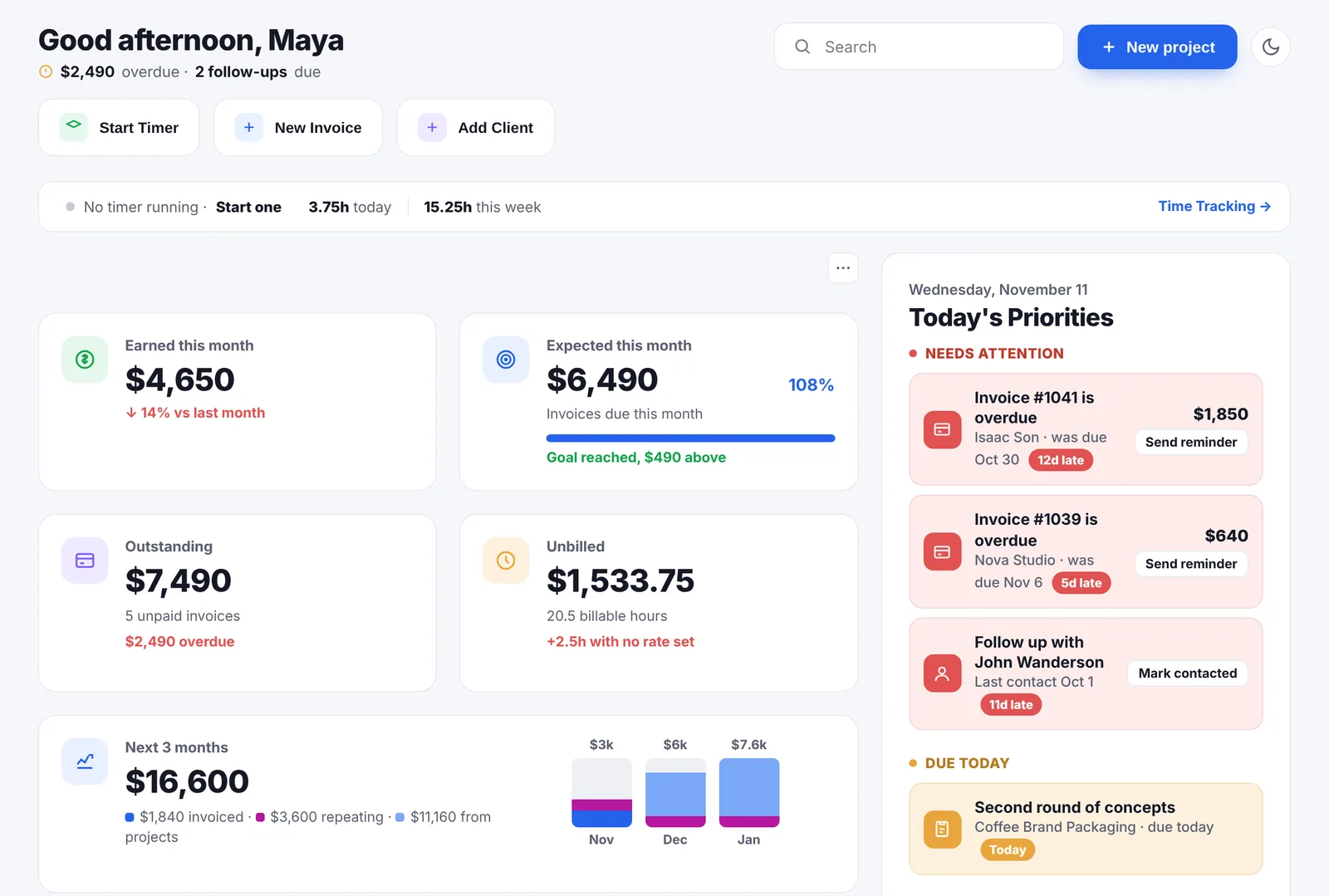
- It knows what you are owed. Outstanding, overdue and unbilled are worked out, not maintained by you in a formula.
- It tells you what is coming. A forecast over 6, 12 or 24 months, split into invoiced, repeating and not yet billed.
The template problem
Notion's gallery has an invoicing template for every taste, and that is genuinely useful. It is also where this comparison gets honest.
A template is someone else's logic running your billing. On Notion's own page for one invoice and timesheet template, a reviewer writes that it rounds billable time up and they could not find a way to change it, so they could not bill the actual hours. That is the failure mode: the template does almost what you need, and the last ten per cent is now your problem, in a system you did not design.
When a tool gets it wrong you report it. When your own Notion build gets it wrong, you rebuild it, usually in the week you were busiest.
A month with both
Say you are a freelance designer with five clients. Two pay a monthly retainer, three are project work, one invoices in euros. Eight invoices a month.
In Notion, it costs nothing. Your clients are a database, your projects are a database with a relation to it, and your invoices are a third one with a rollup that totals the line items. You duplicate the invoice template, fill it in, export the PDF, open your email client and attach it. On the 20th you check the Unpaid view, work out which of them are actually late, and write three emails. The euro invoice is a number you converted in your head, so the monthly total is approximate. The system took a weekend to build and it is exactly what you wanted.
In Go Lancer, it costs $14.99 a month. The eight invoices carry your numbering and go out from your own address. The euro one stays in euros and is converted at the day's rate for your totals. The two retainers are logged as repeating and appear by themselves. On the 20th you do nothing, because the reminders went out on the 14th without being written. The system took eleven minutes and it is not exactly what you wanted.
That is the trade. Notion gives you a system that fits you and asks you to run it. Go Lancer gives you a system that fits most freelancers and runs itself.
There is one more difference that only shows up later. A Notion build is yours, which means it ages with you: the formula you wrote in your first year is still rounding something oddly in your third. A tool is maintained by someone else, which is worse when you want a change and better every other day of the year.
The two side by side
| Go Lancer | Notion | |
|---|---|---|
| Price and plans | ||
| Built for | One freelancer, from hours to paid | A connected workspace for docs, wikis, projects and databases |
| Time and the work | ||
| Clients and projects | ✓ ready made | ✓ databases you build |
| Invoice as a document | ✓ five designs, your numbering | A page, or a community template |
| Invoice emailed to the client | ✓ PDF from your name or Gmail | ✕ you send it yourself |
| Automatic payment reminders | ✓ until paid | ✕ |
| Card payment on the invoice | ✓ your own Stripe | ✕ |
| Time tracking | ✓ timer on the task, rates | A database or a template |
| Hours onto the invoice | ✓ automatically | ✕ by hand |
| Planning, wellbeing and limits | ||
| What is outstanding and overdue | ✓ worked out | Formulas you maintain |
| Income forecast | ✓ 6, 12 or 24 months | ✕ |
| Follow-up rhythm per client | ✓ | A date property and your memory |
| Docs, wikis, notes | ✕ quick notes only | ✓ what it is for |
| Shared pages and guests | ✕ | ✓ |
| AI | ✕ | ✓ credits on Business |
| Setup | Add a client and send an invoice | Build it, or adopt someone else's build |
Using both
This is not a page about leaving Notion. Keep the notes, the briefs, the research and the second brain exactly where they are.
Go Lancer imports clients directly from a Notion database, through the server rather than the browser, because the integration token has to stay out of browser code. Imported clients are tagged with where they came from, and a column Go Lancer does not recognise becomes a custom field instead of being dropped.
So which one
If your freelance business is mostly writing and thinking, and the invoicing is two invoices a month to the same client, Notion on the Free plan is enough and $14.99 would be wasted.
If the admin is the part that goes wrong, if invoices sit unsent and nobody follows up, then the thing you need is not a better place to put the information. It is something that acts on it.
Moving the money part out of Notion
Nobody has to tear down a workspace to try this. The order that works:
- Bring the clients. Connect Notion with an integration token and pick the database. It runs through the server, because that token must never sit in browser code. Columns Go Lancer does not recognise become custom fields rather than being dropped, and every imported client is tagged with where it came from.
- Leave everything else. The briefs, the notes, the content calendar, the second brain: none of it moves.
- Send the next invoice from Go Lancer rather than duplicating the template, and set your numbering once.
- Turn reminders on and stop keeping the Unpaid view in your head.
- Keep the old invoice pages. They are a record. Nothing needs migrating backwards.
Within a month the only thing you will miss is the satisfaction of having built it yourself.
Other Notion alternatives for freelancers
Go Lancer is one Notion alternative, and a narrow one: it replaces the money part and nothing else. If what you want is a workspace, these are the other tools we have compared side by side, each from the vendor's own pages:
- Trello. Free, flexible boards you can share, closer to Notion's databases than to a freelance tool, with no invoicing of its own.
- Basecamp. Where a team and its clients talk about projects, from $29 a month, again with no invoices.
- Plutio. The wider product: proposals, scheduling, forms, a client portal and a team, with a 9-client limit on its cheapest plan.
- Bonsai. Grows into an agency suite with proposals, contracts and bookkeeping; invoices start on its $25 plan.
- Indy. Free for 3 invoices a month, with Gmail sending and payment reminders kept for its Pro plan.
- Clockify. Free time tracking for up to 5 users, if the hours are the part you are tracking in Notion today.
All of them are on the comparisons page.
Questions people ask
Is Notion free for a freelancer?
Notion's own pricing page lists a Free plan at $0 per member a month, described as for individuals organising personal projects and life, with unlimited pages, databases and Notion Calendar. For one person it is genuinely usable, and that is the honest starting point of this comparison.
What do the paid Notion plans cost?
Plus is $10 per seat a month and Business $20 per seat a month on their pricing page; their own FAQ says paid plans start at $10 per member a month billed annually. Plus mainly adds guests, version history and larger file uploads; Business adds Notion AI credits and deeper integrations.
Can Notion send an invoice?
Not by itself. Notion describes the product as a connected workspace for docs, wikis, projects and databases. An invoice built there is a page you share or export; the sending, the chasing and the record of payment are yours to handle.
Are there invoice templates for Notion?
Many. Notion's own template gallery lists 226 invoicing templates and nearly 13,000 freelance templates, made by other users rather than by Notion. Quality varies, and so does what happens when you need to change something.
Can Notion track my time?
Only as a database you build or a template someone else built. One of the invoice and timesheet templates in Notion's own gallery carries a review from a freelancer who could not stop it rounding billable time up, which is the usual shape of the problem: someone else's logic, in your billing.
Can Notion chase an unpaid invoice?
No reminder sequence ships with it. You can set a date reminder for yourself, but the email to the client is one you write and send.
So why would I pay for Go Lancer?
Because the parts that lose freelancers money are the parts a workspace cannot do for you: an invoice that goes out the day the work ends, a reminder that goes out whether or not you feel like sending it, and a figure that tells you what is still owed without you adding it up.
Can I keep using Notion as well?
Most people do, and Go Lancer is built for that. Clients import straight from a Notion database, and the writing, the notes and the wiki can stay exactly where they are.
Which is better for a team, Go Lancer or Notion?
Notion, clearly. It is built around shared pages, guests and permissions. Go Lancer is one login for one freelancer, with no seats and no roles.
What happens to my Notion setup if I switch?
Nothing. Nobody is asking you to leave. Import the client list, let Go Lancer handle the money, and keep Notion for what it is good at.
Can Notion take a card payment from a client?
Not on its own. An invoice page can hold a payment link you paste in from a processor, but Notion does not create the charge or record that it was paid. Go Lancer takes card payments through your own Stripe account and marks the invoice paid when it clears.
Is Go Lancer trying to replace Notion?
No. It replaces the spreadsheet-shaped part of a Notion workspace, the invoice tracker with the formulas. The writing, the wikis and the planning are things Notion does better and Go Lancer does not do at all.
Sources
Everything about Notion on this page was read from Notion's own pages on 16 November 2026:
- Notion pricing: the Free, Plus and Business plans, their per-seat prices and what each adds
- What is Notion: how Notion describes the product, and the free plan in their own FAQ
- Freelance templates and invoice templates: the number of templates and who makes them
- Invoices and Timesheets template: the review about billable time being rounded up
Prices move, and the figures above are what Notion’s own pages said on the date given, so check theirs before you pay for anything. We wrote this page, Notion did not: there is no partnership between us, nobody asked us to write it, and the name Notion belongs to them.
Keep going
All comparisons Invoicing Clients and follow-ups Income forecast Free invoice generator Payment reminder emails PricingKeep Notion. Hand over the money part
Seven days, your own clients and invoices in it, and a founder who answers email. Then $14.99 a month, cancel any time.