Incomee alternative for freelancers: Go Lancer vs Incomee
Incomee is one plan at €19 a month, or €15 billed yearly, covering proposals, invoices, a client portal and a dashboard. Go Lancer is $14.99 a month and starts after the proposal: a timer on the task, hours onto the invoice, and reminders that chase the client.
If you use Incomee, or are looking for an Incomee alternative, this is how Go Lancer compares. We make Go Lancer, so read this with that in mind. Everything about Incomee below comes from its own pricing and feature pages, and we say plainly where it is the better choice.
Quick answer
Incomee is the better choice if you win work with proposals: it writes them with AI, gets them signed, and turns an accepted one into an invoice, all in one plan at €19 a month, or €15 billed yearly. Go Lancer costs $14.99 a month and is the better Incomee alternative once the work is agreed: it has a timer on the task, puts billable hours on a draft invoice, and emails the client reminders until the invoice is paid. Neither has a free plan; both give you 7 days.
Pick Go Lancer if
- You bill by the hour and want a timer, not a timesheet you fill in
- Late invoices are the problem, and you want the app to chase them
- You want the invoice sent from your own Gmail
- You bill in several currencies, or want to see 24 months ahead
Pick Incomee if
- You win clients with proposals and want them signed in the app
- Your clients expect a portal to follow the project in
- You want expenses and income in the same dashboard
- You want PayPal, or to schedule when an invoice goes out
Price and what the price includes
| Go Lancer | Incomee | |
|---|---|---|
| Price | $14.99 a month, or $149 a year | €19 a month, or €15 a month billed yearly (€182 a year) |
| Currency charged in | US dollars | Euros |
| Free plan | ✕ | ✕ |
| Free trial | 7 days, card at sign-up | 7 days, no card |
| Lifetime | $299 once, limited number of accounts | Not offered |
| Clients and invoices | ✓ no limit | ✓ no limit |
| Plans to compare | One, everything in it | One, everything in it |
Incomee prices and features read from incomee.co/pricing and its feature pages on 15 November 2026. Incomee prices in euros and Go Lancer in US dollars, so which costs you less depends on the rate on the day and on what your card charges for a foreign currency. Check both before you decide, pricing moves.
Both sell one plan with everything in it, which makes this an unusually clean comparison: there is no cheaper tier hiding the feature you need. The question is only which set of features you want.
Where Incomee is the better tool
Incomee covers the part of freelancing that happens before the work starts, and Go Lancer does almost none of it.
- Proposals. A designed proposal with a cover image from Unsplash or your own, written faster with AI, translated into another language, and sent on a date you choose. Go Lancer has no proposals.
- E-signature and conversion. Clients sign or approve on any device, you are notified when a proposal is viewed and accepted, and one click turns it into an invoice.
- Proposal stats. An acceptance rate, which Incomee suggests using to adjust your pricing.
- A client portal. Incomee's projects keep the client updated without you doing it. Go Lancer has no client login.
- Expenses. A chart of revenues against expenses and a report of your top expense categories. Go Lancer does not track expenses.
- More ways to be paid. Stripe, PayPal or a bank account, with card, Google Pay and Apple Pay on the invoice. Go Lancer takes cards through your own Stripe account, or a bank transfer.
- Scheduled sending. Both invoices and proposals can be queued to go out on a chosen date.
Where Go Lancer is the better tool
Go Lancer was built from 100+ interviews with freelancers who already had a tool and still missed invoices. It does nothing before the client says yes, and more after.
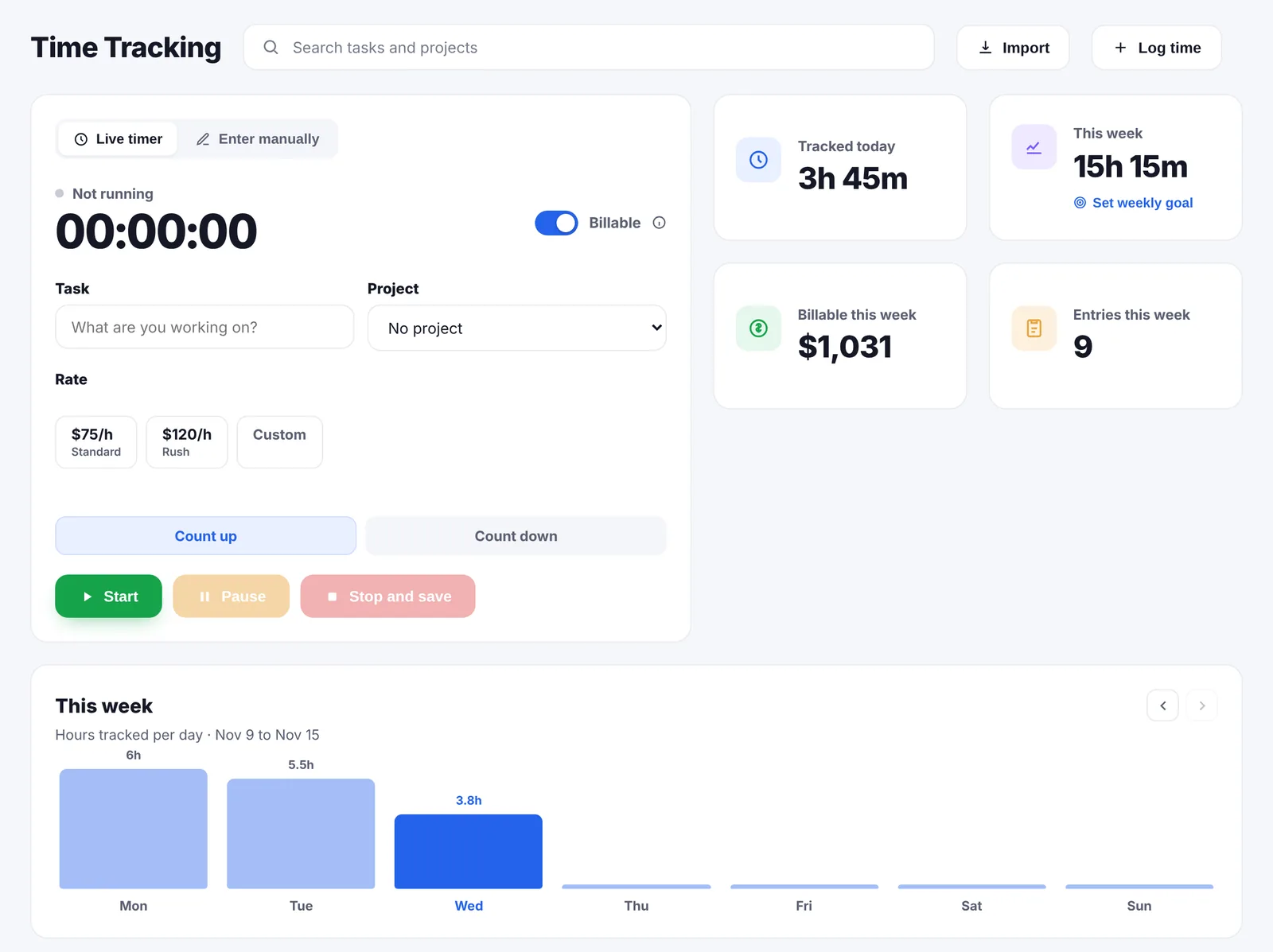
- A timer, not a timesheet. Start the timer from the task, counting up or down, or log time afterwards. Incomee's projects page describes logging time manually into project timesheets.
- Hours land on a draft by themselves. Every billable hour with a rate goes onto a draft invoice for that project as you track it, with saved rates such as Standard and Rush.
- The client gets reminded. A day before the due date, on it, then every 7 days up to 3 times, in your own words, never during your quiet hours or while you are away. Incomee shows you when an invoice was opened and paid; its pages describe no reminder sequence for a late one-off invoice.
- Clients you keep in touch with. A follow-up rule per client, a list of what needs you today, and a private label from pays on time to ghost.
- Your own Gmail. Invoices and reminders can go out from your own address, so replies come straight back to you.
- 43 currencies. With daily ECB rates. Incomee sets a currency per invoice or per customer.
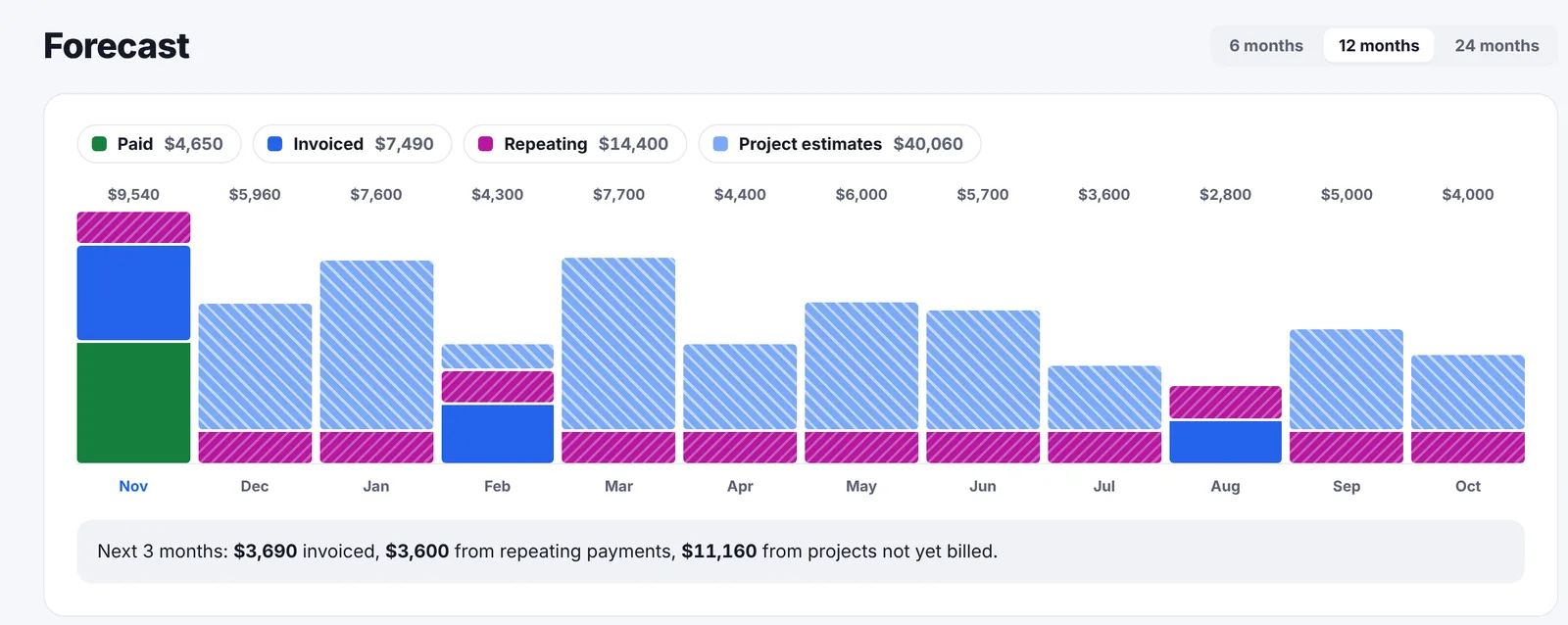
- A longer forecast. Go Lancer forecasts 6, 12 or 24 months from unpaid invoices, repeating payments and open projects. Incomee forecasts the current business year.
- Tasks you can see. List, board, calendar and Gantt views, with subtasks, priorities and estimated hours.
- A lifetime plan. $299 once, for a limited number of accounts.
Feature by feature
Invoices and getting paid
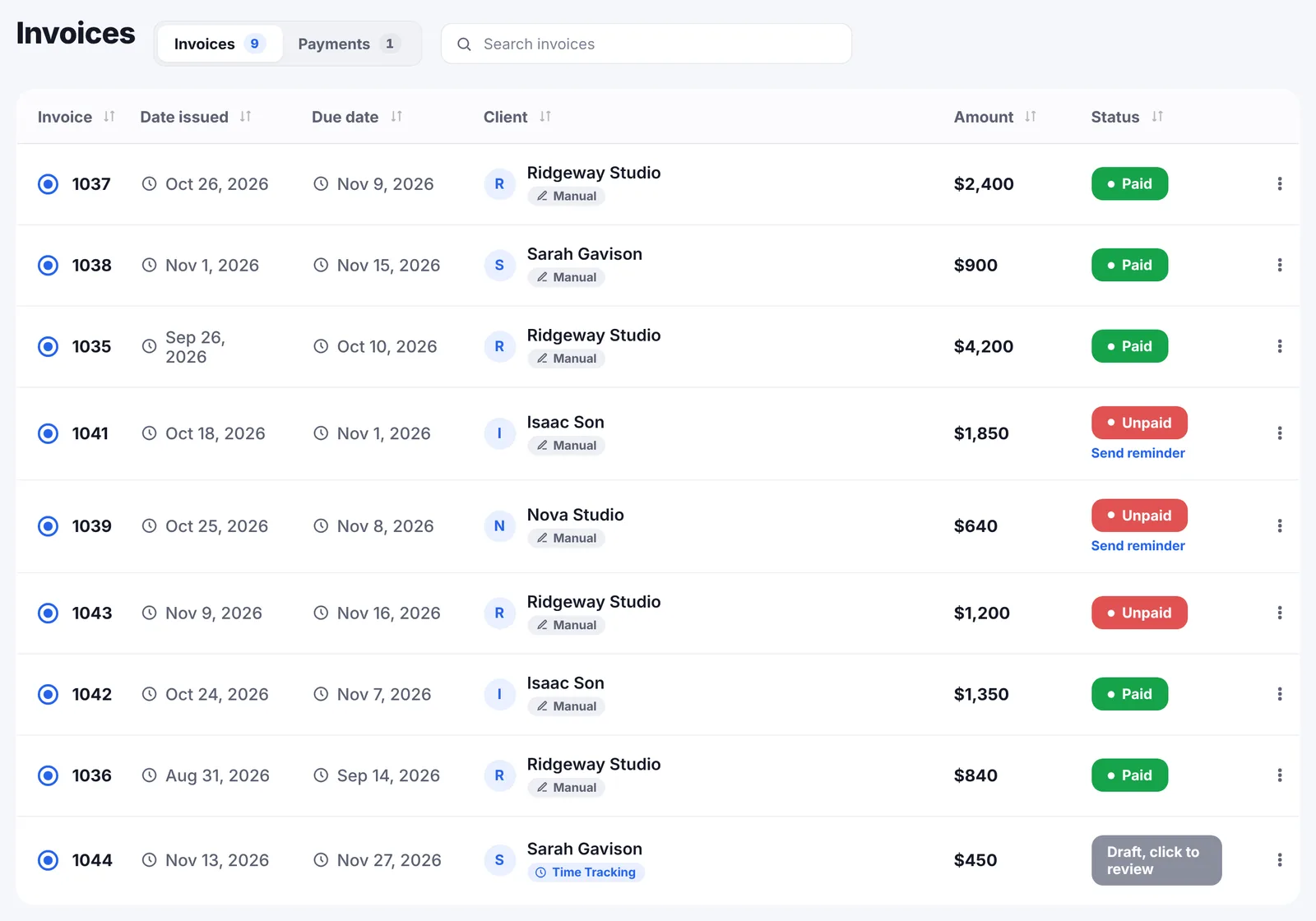
Incomee's invoice carries your brand colour, numbers itself, downloads as a PDF and can be set to a currency per invoice or per customer. It can repeat on a schedule, be queued for a date, and be marked paid or unpaid by hand, and it tells you when the client opened it. Payment runs through Stripe, PayPal or a bank account, with card, Google Pay and Apple Pay available.
Go Lancer sends the invoice as a PDF from your name, or from your own Gmail, with your payment details and an optional card link through your own Stripe account. It has five designs, recurring invoices from weekly to yearly, 43 currencies and its own numbering. Reminders go to the client a day before the due date, on it, then every 7 days up to 3 times, with the invoice attached, and stop the moment it is paid.
Tracking the work
Incomee's plan includes task and time tracking: each project holds its proposals, invoices and time entries, has a status and a stats view, and you add tasks to keep the work organised. Its page describes logging time into the project timesheet by hand.
In Go Lancer the timer sits on the task and counts up or down, each entry takes one of your saved rates and a billable switch, and billable hours appear on the project's draft invoice without a separate step. A time summary for the client exports with your own title and note.
Clients
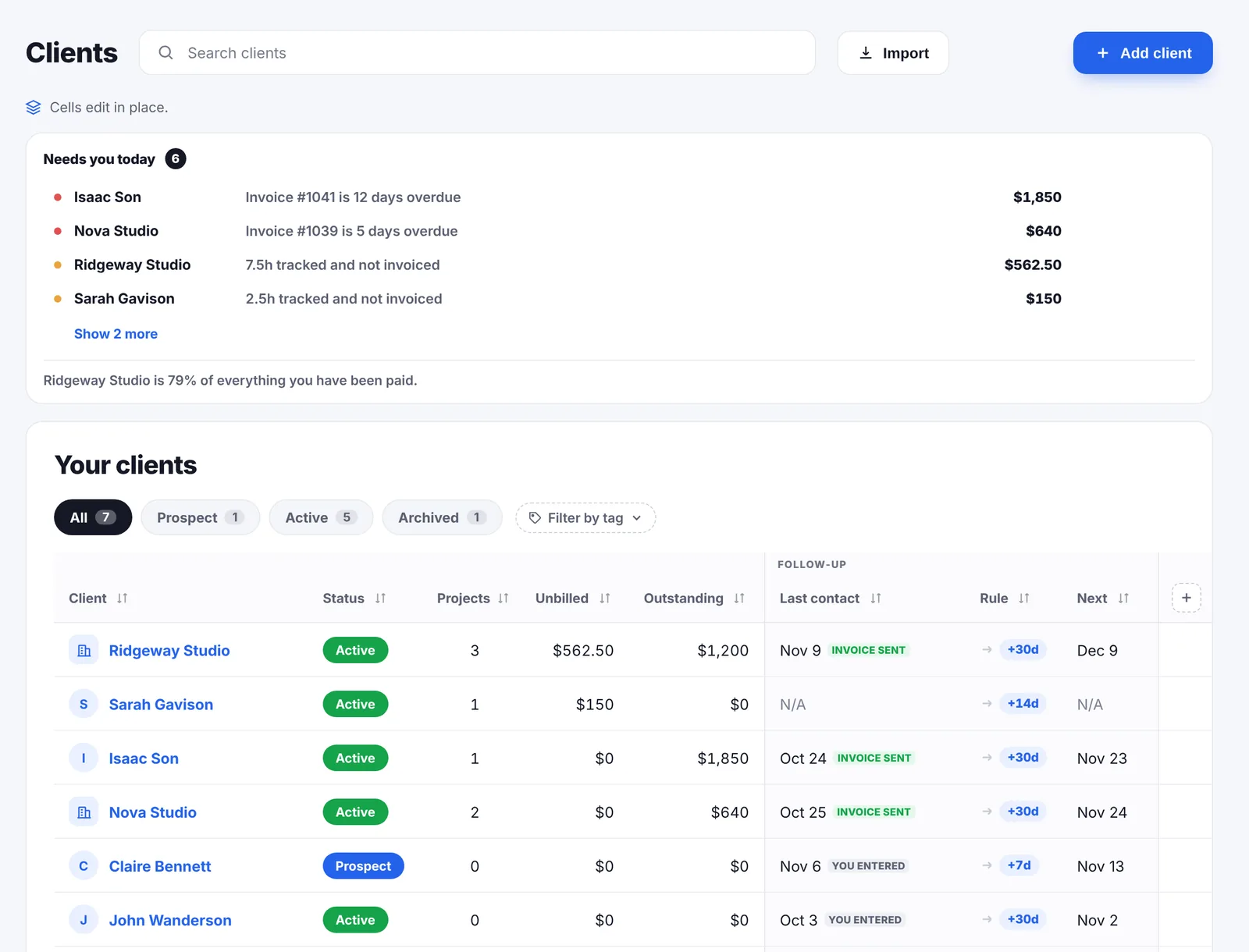
Incomee gives each client a profile with their invoices, proposals and projects, a summary of outstanding revenue and expenses, and a private notes space, plus a portal the client can follow the project in. Go Lancer's client side is about you staying on top of them: the Clients page opens on what needs you today, such as an overdue invoice or hours not billed yet, each client gets a follow-up rule every 7, 14, 30 or 90 days, and a private label based on how late they paid before.
The dashboard
Incomee's dashboard sets a revenue goal and tracks progress against it, charts monthly net income, charts revenues against expenses, reports your top expense categories, and forecasts revenue for the current business year. Go Lancer's dashboard shows earned, outstanding, overdue and unbilled hours per currency, and forecasts 6, 12 or 24 months ahead from unpaid invoices, repeating payments and open projects. It has no expense tracking.
A month with both
Say you are a freelance designer with five clients. Two are new each month and want a proposal first; three are ongoing and billed by the hour.
In Incomee, the two new clients get a designed proposal, written with the AI, signed in the app, and converted to an invoice when accepted. The three ongoing clients get their hours typed into each project's timesheet at the end of the month and invoiced from there. Expenses go in the same dashboard, so the year-end picture is in one place.
In Go Lancer, the proposals happen somewhere else. The three ongoing clients are the point: the timer runs on the task, the hours are already on each project's draft when the month ends, the invoices go out from your own Gmail, and the late one is reminded without you.
If two of five clients each month are new, Incomee earns its price on the proposal side alone. If your clients come back and the scope is agreed by email, most of that side goes unused.
The two side by side
| Go Lancer | Incomee | |
|---|---|---|
| Price and plans | ||
| Built for | One freelancer, after the client says yes | One freelancer, from proposal to payment |
| Price | $14.99 a month, $149 a year | €19 a month, €182 a year |
| Clients and documents | ||
| Proposals, e-signature | ✕ | ✓ with AI writing and translation |
| Client portal | ✕ | ✓ |
| Expenses | ✕ | ✓ with a report by category |
| Timer on the task | ✓ up or down, saved rates | Time logged into the timesheet |
| Hours onto the invoice | ✓ automatically | Time entries sit on the project |
| Reminders to the client | ✓ quiet hours, away mode, per-invoice override | Opened and paid tracking; recurring invoices send themselves |
| Recurring invoices | ✓ weekly to yearly | ✓ |
| Schedule an invoice for a date | ✕ | ✓ |
| Planning, wellbeing and limits | ||
| Send from your own Gmail | ✓ | Not described |
| Currencies | ✓ 43, daily ECB rates | ✓ per invoice or customer |
| Ways to get paid | Bank transfer, card via your Stripe | Stripe, PayPal, bank; card, Google Pay, Apple Pay |
| Task views | ✓ list, board, calendar, Gantt | Tasks on the project |
| Client follow-up rhythm | ✓ | Notes per client |
| Forecast | ✓ 6, 12 or 24 months | ✓ current business year |
| Revenue goal | ✓ | ✓ |
| Lifetime plan | $299 once | Not offered |
So which one
These two are closer than most pairs on this site: one plan each, no limits, a dashboard with a forecast, and a similar price. They split on where the work starts.
Incomee starts at the proposal and hands you a signed document that becomes an invoice. Go Lancer starts at the agreed job and spends its features on the hours and the chasing.
Before you decide, count how many of last month's clients needed a proposal, and how many of last month's invoices were paid late. Whichever number is bigger points at the tool.
Switching from Incomee
- Bring your clients. Import them from a CSV or Excel file, a Google Sheet, HubSpot or Notion. Columns Go Lancer does not know become custom fields.
- Bring your hours. Import old time entries from an Excel or CSV file, a Google Sheet, or from Toggl, Clockify or Harvest.
- Bring your invoices. Upload the invoices you still need as PDFs, so they sit in the same list.
- Connect Gmail and turn reminders on. Both are on the one plan.
Proposals, e-signatures, the client portal and expenses have no place in Go Lancer, so keep them in a tool built for them.
Other Incomee alternatives
Go Lancer is one Incomee alternative; it fits a freelancer who wants the hours, invoices and reminders in one place. If the proposals are what you came for, these are the other tools we have compared side by side, each from the vendor's own pages:
- Bonsai. Bonsai grows into an agency suite with proposals, contracts, bookkeeping and team seats; invoices start on its $25 plan.
- Indy. Indy is free for 3 invoices a month and keeps Gmail, white labelling and payment reminders for its Pro plan.
- Plutio. Plutio is the wider product: proposals, scheduling, forms, a client portal and a team, with a 9-client limit on its cheapest plan.
- Dubsado. Dubsado wins and onboards clients with proposals, contracts, workflows, a scheduler and a portal; time tracking is on Premier.
- HoneyBook. HoneyBook does proposals, contracts, automations and a client portal, for businesses in the US, Canada, the UK and Australia, from $36 a month.
- FreshBooks. FreshBooks is accounting software that also invoices, with expenses, bank reconciliation and proposals.
- Moxie. All-in-one for freelancers from $12 a month, with proposals and contracts on the cheapest plan and the client portal on Pro.
- Toggl Track. The best-known time tracker: free for up to 5 users, with billable rates on its $10 Starter plan and no invoicing of its own.
All of them are on the comparisons page.
Questions people ask
How much does Incomee cost?
Incomee has one plan: €19 a month billed monthly, or €15 a month billed yearly, which its pricing page shows as €182 billed yearly, a 20% discount. There is a 7-day free trial with no credit card. Go Lancer is $14.99 a month, $149 a year, or $299 once for lifetime access.
Does Incomee have a free plan?
No. Its pricing page shows one paid plan and a 7-day free trial with no credit card required. Go Lancer also has no free plan: 7 days free, then $14.99 a month.
Does Incomee limit clients or invoices?
No. Its FAQ says there is no limit on clients, invoices or proposals, and no extra fees. Go Lancer has no limits either.
Does Incomee track time?
Its plan includes task and time tracking, and its projects page describes logging time manually into project timesheets. It does not describe a start-stop timer. In Go Lancer you start a timer from the task, counting up or down, or log the time afterwards.
Does Incomee chase unpaid invoices?
Incomee shows when an invoice is opened and paid, and its recurring invoices send themselves on a schedule. Its pages describe no reminder sequence for a one-off invoice that is late. Go Lancer emails the client a day before the due date, on it, then every 7 days up to 3 times, and stops the moment the invoice is paid.
Can I take card payments in Incomee?
Yes. Incomee lists Stripe, PayPal and bank account as payment methods, and card, Google Pay and Apple Pay on invoices. Its FAQ says card payments run through Stripe once you link your account. Go Lancer takes cards through your own Stripe account, or a bank transfer.
What does Incomee do that Go Lancer does not?
Proposals with an AI writer, cover images, translation and e-signature, converting a proposal into an invoice, a client portal, expense tracking with a report by category, PayPal, and scheduling an invoice or proposal to send on a chosen date.
What does Go Lancer do that Incomee does not?
A timer on the task with saved rates, billable hours that land on a draft invoice by themselves, payment reminders with quiet hours and an away mode, a follow-up rhythm and a private payment label per client, invoices sent from your own Gmail, 43 currencies, board, calendar and Gantt views, a forecast up to 24 months, and a lifetime plan.
Is Incomee priced in euros?
Yes, its pricing page shows euros. Go Lancer is priced in US dollars, so the one you pay less for depends on the rate on the day and on what your card charges for a foreign currency.
Can I move from Incomee to Go Lancer?
Yes. Bring clients in from a CSV or Excel file, a Google Sheet, HubSpot or Notion, upload the invoices you still need as PDFs, and import old hours from a CSV or Excel file. Proposals and the client portal have no place in Go Lancer.
Sources
Everything about Incomee on this page was read from Incomee's own pages on 15 November 2026:
- Incomee pricing: the one plan at €19 a month or €15 billed yearly (€182), the 7-day trial with no card, no limit on clients or invoices, and Stripe for card payments
- All features: invoices, proposals, dashboard, projects and client management, point by point
- Invoicing: recurring invoices, online payments with card, Google Pay and Apple Pay, and scheduled sending
- Proposals: design, e-signature, conversion to an invoice and proposal stats
- Dashboard: revenue goal, income and expense charts and the revenue forecast for the current business year
Prices move, and the figures above are what Incomee’s own pages said on the date given, so check theirs before you pay for anything. We wrote this page, Incomee did not: there is no partnership between us, nobody asked us to write it, and the name Incomee belongs to them.
Keep going
Go Lancer vs Bonsai Go Lancer vs Indy Go Lancer vs Plutio Go Lancer vs Dubsado What Go Lancer does Pricing Payment reminder emails Free invoice generator Project quote calculatorSee it before you decide
Seven days, your own clients and invoices in it, and a founder who answers email. Then $14.99 a month, cancel any time.