Invoicing for freelancers
Five designs, 43 currencies and your own numbering. The invoice goes out as a PDF under your name, or from your own Gmail. Switch reminders on and Go Lancer chases it until it is paid, or leave them off and keep that part yourself.
Everything on this page is in the one plan at $14.99 a month. There is no higher tier, no per-invoice fee and no limit on how many you send.
Quick answer
Go Lancer invoices in 43 currencies with your logo, five designs and invoice numbers in a pattern you choose. The invoice is emailed to the client as a PDF attachment under your name, or from your own Gmail, with no link to a Go Lancer page. Clients can pay by card through your own Stripe account. If an invoice passes its due date, reminders go out by themselves until it is paid. Billable hours land on a draft invoice as you track them.
What the invoice looks like
The invoice carries your logo, your business details and one of five designs. Nothing on it says Go Lancer.
- 43 currencies. The currency belongs to the client, so each one is billed in theirs and the dashboard totals each currency separately.
- Line items by the hour or flat. Hours with a rate, or a fixed amount per item.
- Tax, discounts and notes. One tax percentage, which covers VAT, GST or sales tax, a discount, a due date and a notes field.
- Your payment instructions. Bank details, an IBAN, a PayPal address or anything else you type; they go on the invoice as written.
- Your numbering. Year and sequence, a prefix and sequence, year, month and sequence, or your own pattern, reset yearly or monthly. The number is assigned when you send, so drafts do not use one up.
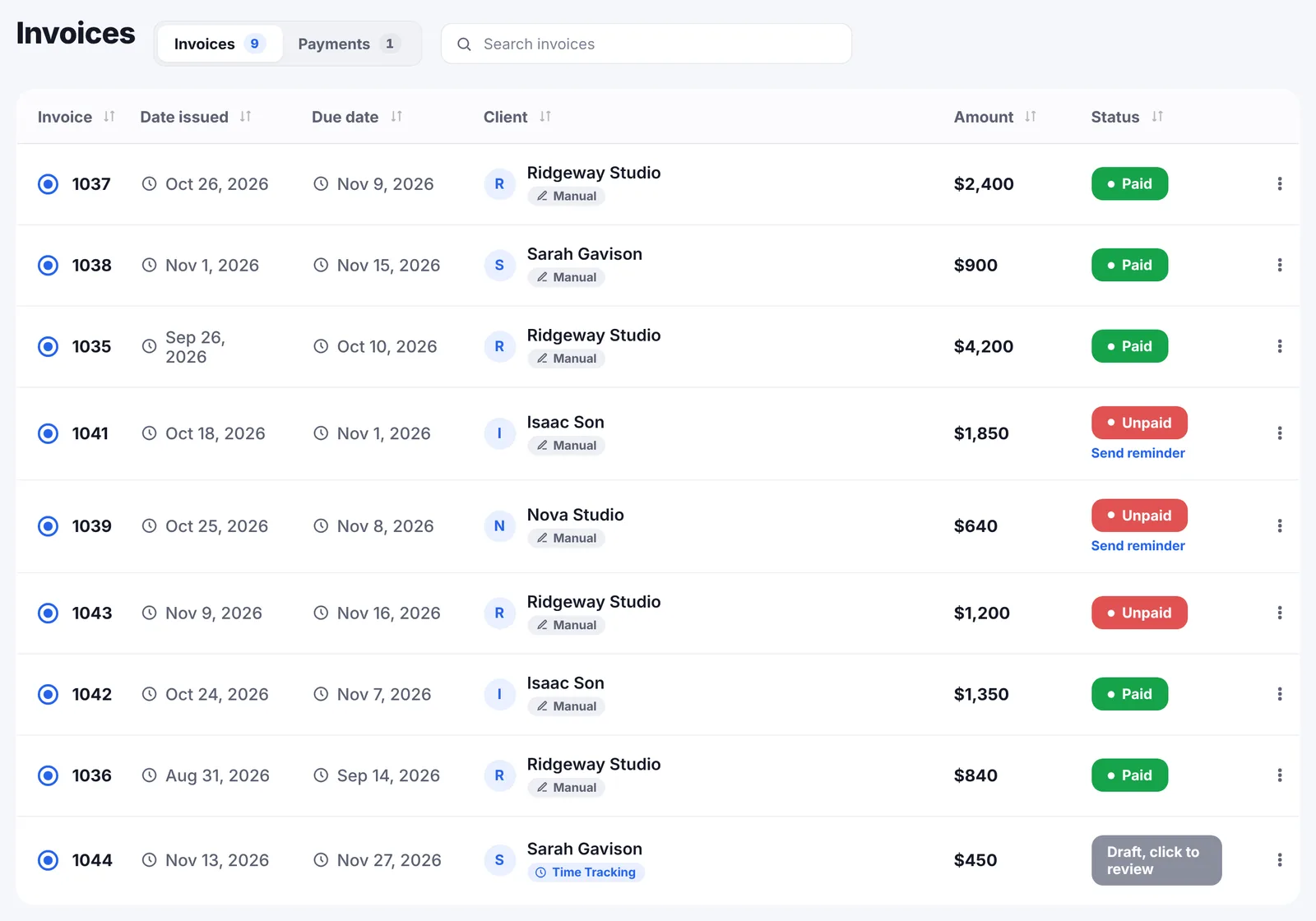
- Four statuses. Draft, sent, paid and overdue. A sent invoice past its due date turns overdue by itself overnight.
Admin is the biggest frustration. Starting new projects, onboarding, responding to emails, invoices, timesheets. Every day the same thing.
How it reaches the client
The PDF is built in your browser and sent to the client as an email attachment. The client opens an email and a PDF, the way they would from any other business. There is no Go Lancer page for them to visit and no account for them to make.
Whatever route it takes, the document itself carries your logo and your business details and nothing else. There is no Go Lancer name, mark or link anywhere on it, and no page of ours for the client to land on. The same holds for reminders and for the hours report.
By default the email leaves from Go Lancer's sending domain, set up with SPF and DKIM so it lands in the inbox, showing your name as the sender and your address as reply-to. Connect Gmail with send-only permission and invoices and reminders go out from your own Gmail address instead, and sit in your Sent folder.
Invoices you made somewhere else can be uploaded as a PDF or an image, so the whole history sits in one list.
Getting paid
- Card payments through your own Stripe account. The client gets a pay link in the email and on the PDF. When they pay, the invoice marks itself paid. Go Lancer takes no fee on top of Stripe's.
- Bank transfer. Your own instructions on the invoice, and you mark it paid when the money lands.
- Partial payments. Log what arrived; the invoice turns paid once it is covered.
- Payments without an invoice. Retainers, deposits and marketplace payouts from places like Upwork or Fiverr can be logged on their own, and marked as repeating, so the dashboard shows real money rather than only invoices.
The part that chases for you
This is the reason most people start paying for Go Lancer. Reminders are switched on for the account and can be overridden on a single invoice.
- The schedule. One day before the due date, on the due date, then every 7 days up to 3 times. The interval and the count are yours to change.
- Your words. The template is yours, in any language, with placeholders for the client's name, the invoice number, the amount, the due date, the days late and your business name.
- They stop when the invoice is paid. Nothing goes out to a client who has already paid.
- Quiet hours and away mode. Nothing leaves during the hours and days you choose, and one switch stops everything while you are away.
- By hand too. A reminder can be sent from the invoice at any time.
Reminders go out only for invoices that were sent through Go Lancer, so an uploaded PDF is a record, not something the app will chase.
Invoices that are half written already
Billable time with a rate on it lands on a draft invoice for that project as you track it. At the end of the month the draft is waiting with the hours on it, rather than a blank form and a timesheet to copy from.
Work that repeats gets a recurring invoice: weekly, every two weeks, monthly, quarterly or yearly. The next one is created on schedule, numbered and ready to send.
What is coming in
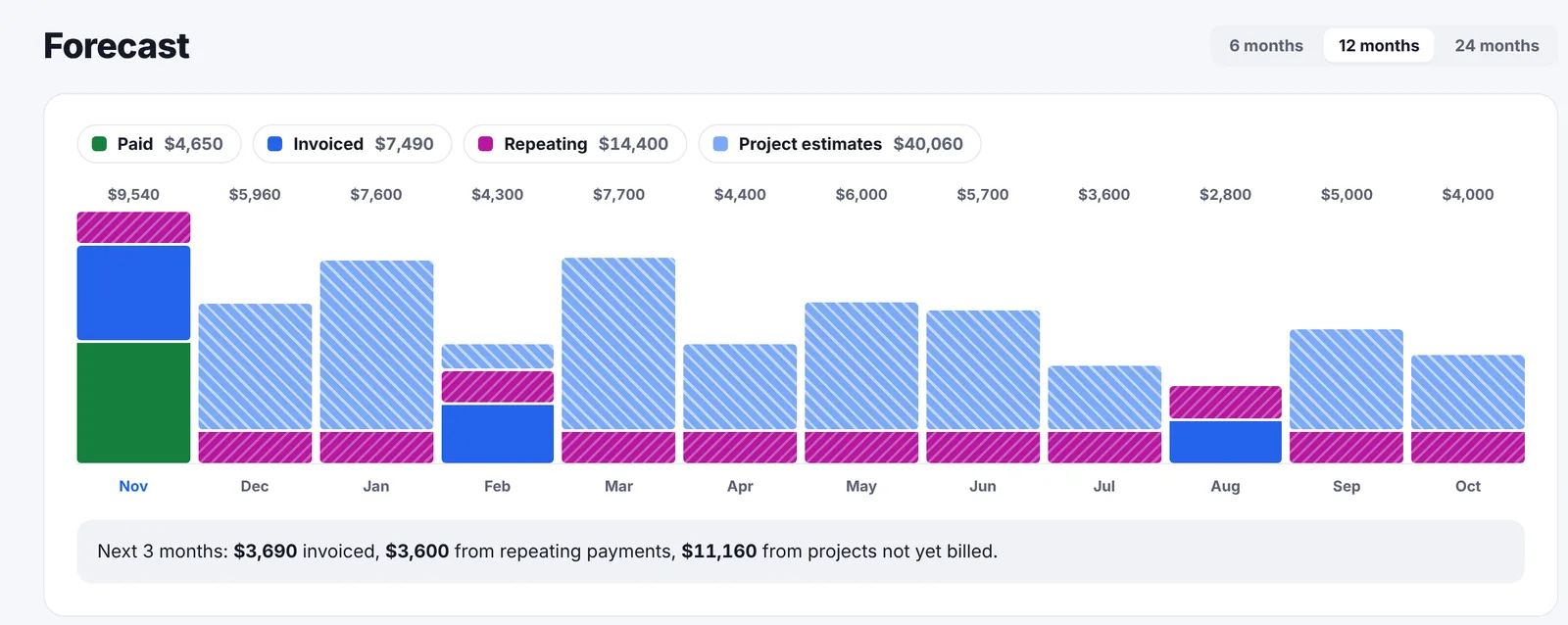
The Invoicing page carries a forecast for the next 6, 12 or 24 months, month by month, in four layers. What is already paid. What is invoiced and not yet paid, placed on its due date. Repeating payments such as retainers. The remaining value of open projects, placed on their end date. A line underneath sums up the next three months, and the dashboard has the same figure as a tile.
What invoicing does not do
Go Lancer is one app for one freelancer, and the list of what it leaves out is short and deliberate.
- No credit notes.
- No late fees added automatically. The free late fee calculator works one out and you add it as a line item.
- One tax percentage per invoice, not several tax lines.
- No expense tracking or receipt scanning, so it is not a replacement for bookkeeping software.
- No proposals, quotes or contracts in the app. Free generators for a contract, a scope of work and a project quote are on this site; they give you text to send, they are not stored in the app.
If you need those, the comparisons say which tool does them and what it costs.
Questions people ask
How do I send an invoice to a client?
Pick the client, add the line items by the hour or as a flat amount, set the due date and send. Go Lancer builds the PDF, attaches it to an email under your name and sends it. The client gets a normal email with a PDF, not a link to a Go Lancer page.
Can I send invoices from my own email address?
Yes. Connect Gmail with send-only permission and invoices and reminders go out from your own Gmail address. Without Gmail connected they go from Go Lancer's sending domain with your name as the sender and your address as reply-to, so replies still reach you.
How many currencies does Go Lancer invoice in?
43. The currency is set per client, so an invoice to a client in the UK can be in pounds and the next one in dollars, and the dashboard totals each currency separately.
Can I control my invoice numbers?
Yes. Choose year and sequence, a prefix and sequence, year, month and sequence, or your own pattern, and reset yearly or monthly. The number is assigned when the invoice is sent, so drafts never use one up.
Does Go Lancer send payment reminders automatically?
Yes. By default a reminder goes out one day before the due date, on the due date, then every 7 days up to 3 times. You can change the interval and the count, switch reminders off for a single invoice, and they stop the moment the invoice is paid.
What do the reminder emails say?
Whatever you write. The template is yours, in any language, with placeholders for the client's name, the invoice number, the amount, the due date, the days late and your business name. You can also send a reminder by hand from the invoice at any time.
Can clients pay by card?
Yes, through your own Stripe account. The client gets a payment link in the email and on the PDF, and when they pay, the invoice marks itself paid. Go Lancer adds no fee on top of Stripe's.
Can I set up recurring invoices?
Yes: weekly, every two weeks, monthly, quarterly or yearly. The next invoice is created on schedule, numbered and ready for you to send.
Do tracked hours turn into an invoice?
Yes. Billable time with a rate on it lands on a draft invoice for that project as you track it, so the invoice is mostly written by the time the work is finished.
Can I record a payment that did not come through an invoice?
Yes. Payments can be logged on their own, for retainers, deposits and marketplace payouts from places like Upwork or Fiverr, and marked as repeating. Partial payments against an invoice work too; the invoice turns paid once it is covered.
Does Go Lancer do credit notes or automatic late fees?
No. There are no credit notes, no late fees added automatically, and one tax percentage per invoice rather than several tax lines. The free late fee calculator works out a fee you can add as a line item yourself.
Can I keep invoices I made somewhere else?
Yes. Upload them as a PDF or an image and they sit in the same list as the rest, so your invoice history is in one place.
What should a freelance invoice include?
Your business name and address, the client's, an invoice number, the issue and due dates, a line per piece of work with its amount, the total, any tax, and how to pay. If you are registered for VAT or GST, the number and the rate belong on it too. Anything else is decoration.
When should a freelancer send the invoice?
The day the work is delivered, or on a fixed day of the month for ongoing work. Every day between finishing and invoicing is a day added to how long you wait for the money, and nobody chases you for it.
What payment terms work best for freelancers?
Net 14 is the usual compromise for solo work, net 7 is reasonable for small jobs, and net 30 is worth pushing back on unless the client is paying well. The terms matter less than the chasing: an invoice with net 7 and no follow-up is paid later than one with net 30 and a reminder.
What is an invoice?
A dated request for payment that records who is billing whom, for what work, how much, and by when. It is the document a client's accounts department needs before it can pay you, which is why a missing invoice number or due date holds up money.
Is an invoice the same as a receipt?
No, and they run in opposite directions. An invoice asks for money that is owed; a receipt confirms money that has arrived. The same job usually produces both, the invoice first and the receipt after payment.
What is an invoice number?
A unique reference for one invoice. It has to be unique and most tax authorities expect the sequence to have no gaps, which is why the numbering is a format you set once rather than a figure you type each time.
Is there any Go Lancer branding on the invoice?
No. The PDF carries your logo, or none if you have not set one, and your business details. Nothing on it says Go Lancer, and there is no link for the client to open. The same is true of the hours report and of every reminder.
Keep going
Pricing Compare with other apps Free invoice generator Payment reminder emails Late fee calculator Payment fee calculator How to invoice as a freelancer About Go LancerSend one and see
Seven days, your own clients and invoices in it, and a founder who answers email. Then $14.99 a month, cancel any time.